AppBrain
AppBrain
  • Apps
  • Apps being viewed right now Trending apps today Most popular apps All-time most installed apps Top rated apps iPhone and iPad apps
  • Intelligence ▾
    Intelligence overview → Track any Android app or your whole market
    Track & analyze
    Keyword Tracker & OptimizerTrack & improve Play rankings App Performance ReportOne-off PDF for any app StatisticsFree Android & Play market stats
    Promote your app
    Featured Apps App Links
  • Intelligence
  • Pricing
  • Dashboard
  • Sign up
  • Log in
App Store Apps > Utilities > Speck: Count Items from Photo
Speck: Count Items from Photo icon

Speck: Count Items from Photo

by Yi Chao Ding · Utilities · Free
On the App Store since September 2026 · Data updated 2026-10-07
App Store

Speck: Count Items from Photo is made and published by Yi Chao Ding. AppBrain is an independent app data site and isn't affiliated with Yi Chao Ding. The app name, icon, screenshots and description belong to Yi Chao Ding and are shown as published on the App Store.

AppBrain's verdict

Last updated
September 3, 2026

Rankings

App Store top charts

App Store Rankings for Speck: Count Items from Photo

This app is not ranked

Competitors

Similar apps and more from Yi Chao Ding

Alternatives to Speck: Count Items from Photo

Smart Visual Counter icon Smart Visual Counter
IceThunder Times
0.0
Free
Dot Counter: Count Anything icon Dot Counter: Count Anything
Victor Edu
5.0
Free
2 ratings
Zero-shot Counting icon Zero-shot Counting
行健 赵
0.0
Free
AI Photo Counter icon AI Photo Counter
玉鑫 张
1.0
Free
2 ratings
Object Counter: Photo Count AI icon Object Counter: Photo Count AI
Utku Gogen
0.0
Free
Wood Volume Calculator icon Wood Volume Calculator
Akila Mendis
0.0
Free
evDash OBD2 icon evDash OBD2
NEXT176
5.0
Free
2 ratings
SnapCount: AI Object Counter icon SnapCount: AI Object Counter
Yunus Emre Uslu
1.0
Free
1 ratings

More from Yi Chao Ding

Price Note - Grocery Tracker icon Price Note - Grocery Tracker
Yi Chao Ding
0.0
Free

Releases

Updates seen on the App Store
Version
1.0
Launched
September 2026

No changelog data

User feedback

Ratings and reviews on the App Store

Comments on Speck: Count Items from Photo for iOS

We don't have enough comments to show example comments. Please check back later.

Technology

Found in the app by AppBrain
Price
Free
App size
38.9 MB
Content rating
Everyone

Technologies used by Speck: Count Items from Photo

About the app and developer

About Speck: Count Items from Photo

Speck: Count Items from Photo is an utilities app developed by Yi Chao Ding.

User Ratings

The app has no ratings yet.

App Information

Speck: Count Items from Photo is freely available from the App Store. The app size is 38.87 MB. The latest version available is 1.0. The last update was on September 3, 2026.

Technical Requirements

The app has a content rating of Everyone. The app has been available on the App Store since September 2026.

Developer information for Yi Chao Ding

Yi Chao Ding

Address:

Share Speck: Count Items from Photo

Store listing

By Yi Chao Ding, from the App Store
Speck: Count Items from Photo Screenshot 1 of 5
Speck: Count Items from Photo Screenshot 2 of 5
Speck: Count Items from Photo Screenshot 3 of 5
Speck: Count Items from Photo Screenshot 4 of 5
Speck: Count Items from Photo Screenshot 5 of 5
Screenshots by Yi Chao Ding, from the the App Store listing
Description by Yi Chao Ding Written by the developer, not by AppBrain. Click to read.
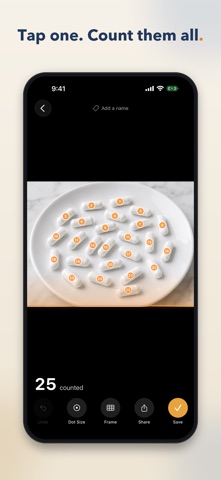
Stop counting one by one. Photograph the pile, tap a single object, and Speck marks every match it finds with a numbered dot — then you fix the stragglers with a tap.

HOW IT WORKS
1. Take a photo, or pick one from your library.
2. Tap one of the objects. That shows Speck what to count. Add a second or third example if they vary.
3. Tap Count. Every match gets a numbered dot, with a running total underneath.

Speck finds most of them on its own. Missed one? Tap it to add a dot. Marked something that isn't there? Tap the dot to remove it. The total updates as you go, so the number you save is one you have checked yourself — not one you have to take on trust.

WHAT PEOPLE COUNT WITH IT
• Pills and tablets in a tray
• Eggs, seeds, seedlings and produce
• Screws, bolts, nuts and fixings in a bin
• Rebar ends, pipe stacks, planks and log piles
• Coins, beads, buttons and craft supplies
• Bricks, blocks and tiles on a pallet
• Stock on a shelf, at stocktake time

MORE THAN A CLICKER
• Frame part of the photo to count only what is inside it.
• Split that frame down the middle or into a grid, and get a separate count for every cell.
• Shrink the dots when you want to see what is underneath them.
• Name a count — "Tray 3, blue caps" — and find it again in your history.
• Reopen a saved count later to move the frame or fix a dot.
• Share the marked-up photo, so the next person can see exactly what was counted.

PRIVATE BY DESIGN
Counting runs on your iPhone's Neural Engine. Your photos and your counts stay on the device and are never uploaded. Speck needs an internet connection once, on first launch, to finish setting itself up — after that it counts with no connection at all.

No account. No ads. No subscription.

WHAT IT IS GOOD AT — AND WHAT IT ISN'T
Speck works best on a group of objects of a similar size and shape, photographed straight on and close enough that each one is clearly visible. Dense, overlapping or wildly uneven piles are harder: it will miss a few, or dot the same thing twice. That is exactly what the tap-to-fix dots are for. Speck is not a replacement for your own eyes — it is a fast first pass that gets you most of the way in a second, so you only have to correct the rest.
Official page on the App Store
Popular Utilities Apps Apps other people are watching Today's trending apps Top new apps Price drops on Google Play
Smart Visual Counter icon Smart Visual Counter
Dot Counter: Count Anything icon Dot Counter: Count Anything
Zero-shot Counting icon Zero-shot Counting
AI Photo Counter icon AI Photo Counter
Object Counter: Photo Count AI icon Object Counter: Photo Count AI
Wood Volume Calculator icon Wood Volume Calculator
evDash OBD2 icon evDash OBD2
SnapCount: AI Object Counter icon SnapCount: AI Object Counter
Overview Alternatives Reviews Rankings Technology
AppBrain Intelligence premium content

Subscribe now to get full and unlimited access to AppBrain Intelligence. You'll have access to:

  • App Intelligence dashboard (performance timeline, competitor comparison, country rankings, insight cards)
  • Detailed ranking data per app
  • Full timeline per developer
  • Device market shares data per country
  • Unlimited keyword tracking
1 Month

$75/mo
(billed every month)

SAVE 0%
Subscribe
3 Months

$65/mo
($195 billed every 3 months)

SAVE 13%
Subscribe
1 Year

$57.50/mo
($690 billed every year)

SAVE 23%
Subscribe
Each subscription will automatically renew 3 days before the expiration date for the same time period. Subscriptions can be cancelled at any time before the renewal.

AppBrain is an app data site, we track rankings, ratings, installs for all apps and games on Google Play and the App Store. AppBrain doesn't host app files or APKs, all install links go directly to the official store. All trademarks are owned by their respective owners.

More apps

  • Top Android apps being viewed
  • Tribal Herbal Remedies
  • Emerald Chat - Meet People
  • The Last Shot: Roguelike Games

App statistics

  • Android statistics
  • Google Play Developer stats
  • Trending Android Apps
  • Trending iOS apps
  • Top popular Apps
  • Buy the best Android phone
  • Buy & sell app businesses

About AppBrain

  • Contact
  • Privacy
  • Documentation
  • DMCA takedowns
  • Articles
  • Blog
  • The AppBrain advertising system
© 2010-2026 - AppBrain