
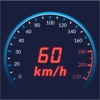
Speed Limit Alarm
Speed Limit Alarm is made and published by Cogniter Technologies Pvt Ltd. AppBrain is an independent app data site and isn't affiliated with Cogniter Technologies Pvt Ltd. The app name, icon, screenshots and description belong to Cogniter Technologies Pvt Ltd and are shown as published on the App Store.
AppBrain's verdict
- Rating on App Store
- 5.00
- 4 ratings
- Last updated
- November 11, 2024
It doesn't have enough ratings yet to judge what users think.
Rankings
App Store top chartsApp Store Rankings for Speed Limit Alarm
Competitors
Similar apps and more from Cogniter Technologies Pvt LtdAlternatives to Speed Limit Alarm






More from Cogniter Technologies Pvt Ltd



Releases
Updates seen on the App Store- Version
- 1.1
- Launched
- September 2022
No changelog data
User feedback
Ratings and reviews on the App StoreComments on Speed Limit Alarm for iOS
We don't have enough comments to show example comments. Please check back later.
Technology
Found in the app by AppBrain- Price
- Free
- App size
- 11.8 MB
- Content rating
- Everyone
Technologies used by Speed Limit Alarm
About the app and developer
About Speed Limit Alarm
Speed Limit Alarm is an utilities app developed by Cogniter Technologies Pvt Ltd.
What is the rating of Speed Limit Alarm?
Speed Limit Alarm is rated 5.00 out of 5 stars, based on 4 ratings.
Is Speed Limit Alarm free?
Speed Limit Alarm is free. The app size is 11.82 MB. The latest version available is 1.1. The last update was on November 11, 2024.
What are the requirements for Speed Limit Alarm?
The app has a content rating of Everyone. The app has been available on the App Store since September 2022.
Developer information for Cogniter Technologies Pvt Ltd
Address:
Frequently asked questions about Speed Limit Alarm
Is Speed Limit Alarm free?
Yes. Speed Limit Alarm is free on the App Store.
Is Speed Limit Alarm still available?
Yes. Speed Limit Alarm is on the App Store, and the last update we saw was on November 11, 2024.
How large is Speed Limit Alarm?
Speed Limit Alarm is 11.82 MB.
Is Speed Limit Alarm suitable for children?
App Store rates the content of Speed Limit Alarm as suitable for everyone.
How do people rate Speed Limit Alarm?
Speed Limit Alarm scores 5.00 out of 5 stars, from 4 ratings on the App Store.
Who made Speed Limit Alarm?
Speed Limit Alarm was developed by Cogniter Technologies Pvt Ltd. It is listed in the utilities category on the App Store.
What are the best alternatives to Speed Limit Alarm?
People looking at Speed Limit Alarm also look at these utilities apps: Speed Alarm - Drive Safe, Trip Tracker – GPS Speed Log, PickUpAlert, Cellular Info, VATRER.
Store listing
By Cogniter Technologies Pvt Ltd, from the App Store



Description by Cogniter Technologies Pvt Ltd Written by the developer, not by AppBrain. Click to read.
Some of the core features of this app include
- Display real time speed of the vehicle (Uses GPS)
- Audible alarms when speed is exceeded
- Show speed in Km/h or M/h
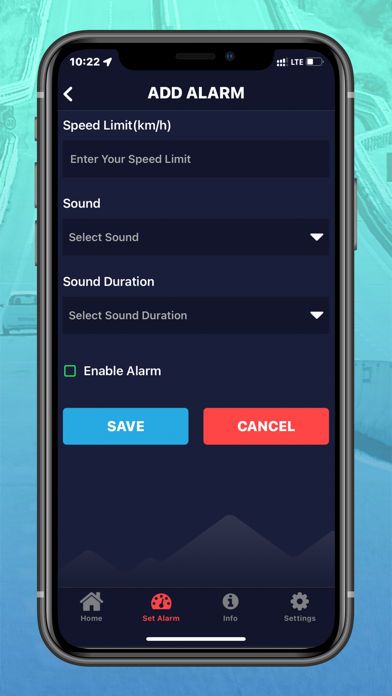
- Set unlimited alarms with unique sound for each
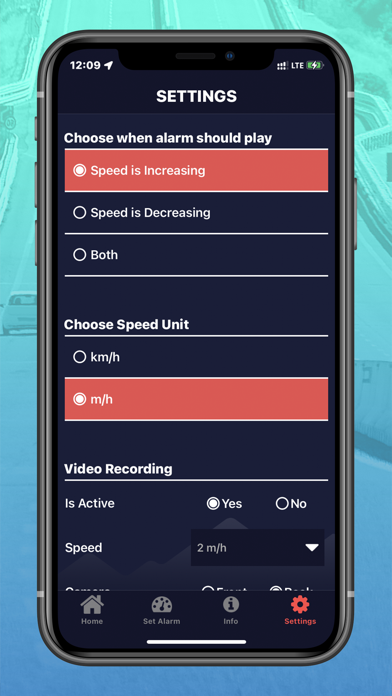
- Settings available to choose speed unit (km/h or m/h)
- Control the duration for how long the sound plays so you are able to hear its alert
- The application even tracks speed in background so even if your phone is in sleep mode or you are using your phone for some other activity it will play the alarm
- If Bluetooth sound is connected alarms are played through your car speakers
- Enable or disable alarms quickly and conveniently
- Get speed alarm notifications if the app is running in the background
- Settings available to control when alarm will play (speed is increased, decreased or both)
- View Logs of time and location when speed limit was crossed
- Settings available for video recording
- View video logs
- Portrait and Landscape display
Here are steps which describes how to use this app.
1. Install the app in your mobile device and grant required permissions to the app.
2. Now open the app, Home Screen will show.
3. Now tap “Set Alarm” icon and Set the Alarm for the Speed Limit as per requirement.
4. Once alarm is set, Go to Home Screen of the app.
Home Screen shows Speedometer of the app.
This Speedometer calculates speed of your vehicle based on GPS.
5. Now, start your vehicle and begin the journey.
Once your vehicle’s speed exceeds the speed limit defined in Alarm, sound of alarm will play.
This sound of alarm is indicator that speed limit has been crossed.
Limit your Speed and Increase your Safety with Speed Limit Alarm App.
A simple and fully-functional speed limit application that keeps you alert of over speeding and reminds you to slow down your vehicle. This safety application is featured with real-time speed calculation and plays an alarm as soon as your vehicle’s speed exceeds a specified speed.
The application built-in user-friendly interface where users can simply set speed limit, select audio sound and duration for the alert alarm. It offers customized functionality for adding multiple alarms and let users freely enable/disable alarms as and when needed.
We suggest that if your city’s has a speed limit like 60 Km/h set an alarm for 55 km/h so it plays before you exceed the speed limit. Also this app uses GPS signals for tracking, if for some reason that signal gets dropped the speed shown might not be accurate.
NOTE: Only enabled alarm will execute based on the measurement mode chosen i.e. Km/h or M/h
While setting alarms, there must be a minimum difference of 10 between two alarms.
Eg. If an alarm is set for 60km/hr, then other alarm can be set for either for 70km/hr or 50km/hr. This is to ensure there is little overlap of sound.