SpeedZip Pro: ZIP & 7Z is an utilities app developed by 耀 陈.
What is the rating of SpeedZip Pro: ZIP & 7Z?
SpeedZip Pro: ZIP & 7Z is rated 5.00 out of 5 stars, based on one rating ratings.
Is SpeedZip Pro: ZIP & 7Z free?
SpeedZip Pro: ZIP & 7Z costs $0.99 to download. The download size is 18.82 MB. The latest version available is 1.5.1. The last update was on September 13, 2026.
What are the requirements for SpeedZip Pro: ZIP & 7Z?
The app has a content rating of Everyone. The app has been available on App Store June 2026.
Description
Open, create and organize archives on iPhone and iPad. SpeedZip Pro combines compression, extraction, file previews and management, with archive processing on your device and no account required.
Share a supported archive from Files to browse its contents. Share other files, such as documents, photos or videos, to add them to a new archive. Mixed selections go to archive creation with all selected files included.
OPEN COMMON ARCHIVE FORMATS Read and extract ZIP, ZIPX, 7Z, RAR, TAR, TAR.GZ, TAR.BZ2, TAR.XZ, GZ, BZ2, XZ, LZMA and ZLIB. Open compatible password-protected archives and complete multipart sets.
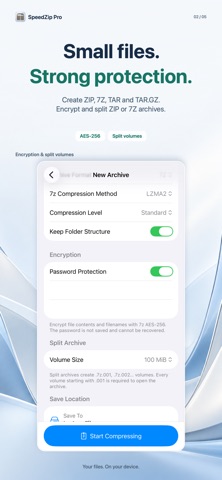
CREATE, ENCRYPT AND SPLIT Create ZIP, 7Z, TAR and TAR.GZ from files, folders, photos and videos. Choose compression settings and whether to preserve folder structure. ZIP and 7Z support AES-256 encryption and split volumes, including custom volume sizes. 7Z can also encrypt filenames and offers Copy, Deflate, BZip2, LZMA, LZMA2 and PPMd methods.
LOOK INSIDE BEFORE EXTRACTING Browse folders, search filenames and sort by name, size or date. Preview supported files, extract an entire archive or select just the items you need. Choose a destination and how to handle existing files.
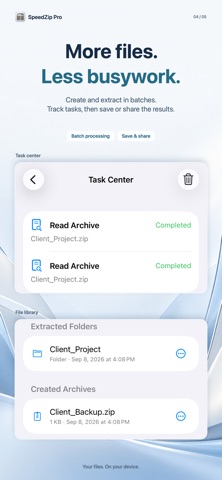
WORK IN BATCHES Extract multiple archives into separate folders, or create a separate archive for each selected item. Track progress and results in the task center, cancel running work and retry eligible failed or interrupted tasks. Live Activities show progress where supported and enabled.
IMPORT, ORGANIZE AND SHARE Import through Files or the Share sheet in compatible apps. Open an archive once or keep a copy in SpeedZip. Manage imported archives, extracted folders and created archives in one place. Preview, rename, delete, share and export supported items. Save supported extracted images and videos to Photos, or export results to a folder you choose.
CHECK ARCHIVES AND MANAGE STORAGE Inspect signatures, extensions, archive structure and path risks. Run full data tests for supported formats without publishing extracted files. View storage usage by category and remove expired caches, temporary sessions and abandoned Share drafts while keeping imported, extracted and created results.
USE SHORTCUTS Open archives, start a new archive, test archive data, extract in batches or create separate ZIP and 7Z archives through supported Shortcuts actions. Use the app for operations that require a password; passwords are not passed through Shortcuts.
PRIVATE BY DESIGN Archive processing does not upload file contents or passwords. No account is required, and archive passwords are not saved or recoverable.
Compatibility depends on the format, compression method and encryption used. RAR and ZIPX support browsing and extraction, not creation. Archive checks assess structure and data integrity; they are not antivirus scans.
Subscribe to see full ranking history in this country
AppBrain offers valuable information about your app and those of your competitors. Join AppBrain for free and claim this app to view more ranking data, view history etc.
Each subscription will automatically renew 3 days before the expiration date for
the same time period. Subscriptions can be cancelled at any time before the renewal.