

Spending Crisis
Spending Crisis is made and published by KUO-WEI CHEN. AppBrain is an independent app data site and isn't affiliated with KUO-WEI CHEN. The app name, icon, screenshots and description belong to KUO-WEI CHEN and are shown as published on the App Store.
AppBrain's verdict
- Last updated
- September 18, 2026
Rankings
App Store top chartsApp Store Rankings for Spending Crisis
Competitors
Similar apps and more from KUO-WEI CHENAlternatives to Spending Crisis


Releases
Updates seen on the App Store- Version
- 1.0
- Launched
- September 2026
No changelog data
User feedback
Ratings and reviews on the App StoreComments on Spending Crisis for iOS
We don't have enough comments to show example comments. Please check back later.
Technology
Found in the app by AppBrain- Price
- Free
- App size
- 8.22 MB
- Content rating
- Everyone
Technologies used by Spending Crisis
About the app and developer
About Spending Crisis
Spending Crisis is a productivity app developed by KUO-WEI CHEN.
User Ratings
The app has no ratings yet.
App Information
Spending Crisis is freely available from the App Store. The app size is 8.22 MB. The latest version available is 1.0. The last update was on September 18, 2026.
Technical Requirements
The app has a content rating of Everyone. The app has been available on the App Store since September 2026.
Developer information for KUO-WEI CHEN
Address:
Store listing
By KUO-WEI CHEN, from the App Store
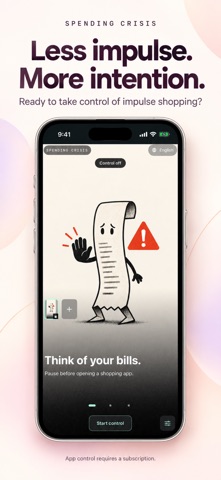


Description by KUO-WEI CHEN Written by the developer, not by AppBrain. Click to read.
An impulse purchase. Another scroll. A quick check that takes longer than you planned. Spending Crisis helps you interrupt the habit and remember what matters to you.
PUT YOUR PRIORITIES IN THE PICTURE
Choose a reminder about upcoming bills, your monthly budget, a personal goal, or something entirely your own. Use the built-in artwork or upload a photo that makes your reason to pause feel real.
PAUSE BEFORE SELECTED APPS
Choose apps with Apple’s Screen Time picker. When controls are active, a blocking screen gives you a moment to reconsider. Leave, or continue to your personal reminder before choosing temporary access.
TAKE A BREAK WITH A CLEAR END
Temporary access defaults to five minutes and can be adjusted from 1 to 180 minutes. Control stays enabled during the break, and the app requests that restrictions return when it ends. Timing depends on iOS scheduling.
SEE THE CHOICES YOU MAKE
Keep track of the times you choose to leave and the times you continue. Optional local summaries offer encouragement and a chance to reflect, without turning every choice into a judgment.
PERSONAL BY DESIGN
Customize your reminder, switch images from the home screen, and see your current control status at a glance. English is the default, with 15 interface languages available.
YOUR REMINDERS STAY WITH YOU
No Spending Crisis account is required. Your images, reminder text, and decision history are stored on your device.
SUBSCRIPTION
App control requires an auto-renewable monthly subscription and Screen Time permission. The price for your region is shown before purchase. Payment is charged to your Apple Account at confirmation. Your subscription renews automatically unless canceled at least 24 hours before the current period ends. Manage or cancel it in your Apple Account settings. Restore Purchases is available inside the app.
Spending Crisis restricts access to selected apps; it does not block Apple Pay or individual transactions. Returning to another app after temporary access is granted is manual.
Privacy Policy: https://spending-crisis-support.tender-cream-6874.chatgpt.site/privacy
Terms of Use: https://www.apple.com/legal/internet-services/itunes/dev/stdeula/