

SpendMon - Expense Tracker
SpendMon - Expense Tracker is made and published by MBG Studio. AppBrain is an independent app data site and isn't affiliated with MBG Studio. The app name, icon, screenshots and description belong to MBG Studio and are shown as published on the App Store.
AppBrain's verdict
EstablishedLoved by users- Rating on App Store
- 4.64
- 250 ratings
- Last updated
- October 11, 2026
Users love it: 4.6 stars from 250 ratings.
Rankings
App Store top chartsApp Store Rankings for SpendMon - Expense Tracker
Competitors
Similar apps and more from MBG StudioAlternatives to SpendMon - Expense Tracker



More from MBG Studio


Releases
Updates seen on the App Store- Version
- 4.6
- Launched
- July 2018
No changelog data
User feedback
Ratings and reviews on the App StoreComments on SpendMon - Expense Tracker for iOS
We don't have enough comments to show example comments. Please check back later.
Technology
Found in the app by AppBrain- Price
- Free
- App size
- 14.5 MB
- Content rating
- Everyone
Technologies used by SpendMon - Expense Tracker
About the app and developer
About SpendMon - Expense Tracker
SpendMon - Expense Tracker is a finance app developed by MBG Studio.
User Ratings
SpendMon - Expense Tracker is rated 4.64 out of 5 stars. The rating is based on 250 ratings.
App Information
SpendMon - Expense Tracker is freely available from the App Store. The app size is 14.49 MB. The latest version available is 4.6. The last update was on October 11, 2026.
Technical Requirements
The app has a content rating of Everyone. The app has been available on the App Store since July 2018.
Developer information for MBG Studio
Address:
Store listing
By MBG Studio, from the App Store



Description by MBG Studio Written by the developer, not by AppBrain. Click to read.
• Every feature, no payment
Statistics, themes and backups are all included — nothing is locked behind a payment.
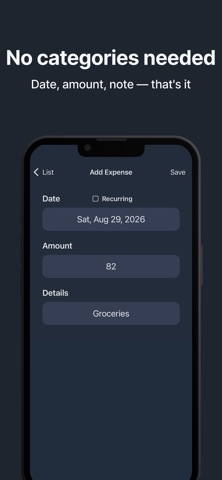
• Three-second entry, no categories
Just enter the date, the amount and a note. There are no categories to pick or sort through, so you can log a purchase the moment you make it. Save the bills you pay every month as recurring entries.
• Home screen widgets
See this month's spending, your daily average and the projected total for the month without opening the app.
• Pick your favorite theme
Make the tracker your own with four themes: mint, pink, brown, and navy.
• Yearly spending statistics
Compare every month on a chart and see at a glance how much the year has added up to.
• Backup without an account
Export a backup file and load it back later — no sign-up, no login. CSV export is supported too.
• Search and see totals
Type a word and the app finds every matching entry — with the total added up for you. Set a start and end date to see just that period.
• Easy to read at a glance
Sort by date or amount, browse month by month, see the day of the week, choose a currency, and lock the screen.