

Spider Solitaire` is made and published by Still57. AppBrain is an independent app data site and isn't affiliated with Still57. The app name, icon, screenshots and description belong to Still57 and are shown as published on the App Store.
AppBrain's verdict
- Rating on App Store
- 4.57
- 46 ratings
- Last updated
- February 20, 2025
- Size
- 164.2 MB
It doesn't have enough ratings yet to judge what users think.
User feedback
Ratings and reviews on the App StoreComments on Spider Solitaire` for iOS
We don't have enough comments to show example comments. Please check back later.
Store listing
By Still57, from the App Store




Description by Still57 Written by the developer, not by AppBrain. Click to read.
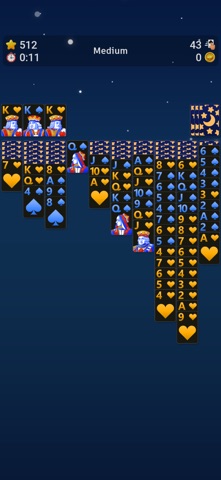
Play Spider Solitaire with its all classic graphics and gameplay! Customize your game with tons of settings and make the game your own. Earn coins and unlock gorgeous classic themes. Get lost in the world of classic Spider Solitaire!
Key Features:
• 3 Game Modes (Difficulty): Play the Easy (1 Suit), Medium (2 Suits) and Hard (4 Suits) classic Spider Solitaire game modes
• Solvable Deals: Choose to play solvable deals with our solvable deal algorithm
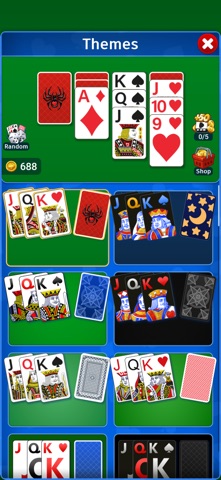
• 50+ gorgeous classic themes: Unlock these themes with coins. Complete deals to earn coins
• Win Animations: See the classic card waterfall animations when you complete a game!
• No More Moves: The game will tell you if there are no more moves to play
• Card Speed: Choose from 5 different card animation speeds from slow to fast
• 3D Animations: Card pick up and placement animations along with haptic feedback provide a great gameplay feel
• Landscape mode: Landscape lovers for the win! You can play in landscape mode on any device but nothing beats playing Spider Solitaire in landscape mode on a tablet, while watching your favorite show picture-in-picture
• Auto Hints: You can choose the game to show hints automatically after a period of inactivity
• How To Play: Learn how to play Spider Solitaire with visual tutorials
• Tons of Settings: Customize your game with different settings such as enabling/disabling Card Shadows, Auto Hints, Vibration and much more
• Lefty Support: Are you a lefty? You can choose to change the board layout for left handed play
• Swipe Gestures: Swipe left to undo, swipe right to redo and swipe down to show a hint
• Undo Forever: Press & hold Undo to perform a series of undos
• Save/Load: The game will automatically continue where you left off from when you launch the app
• Stats: Keep track of your high scores, best times, win percentage and other stats for each game mode
• Leaderboards: Compete with players from around the world with global leaderboards
Functions:
• Solvable Deals: Select the solvable deal option from the New Game window to play solvable deals. An algorithm will work for you to find a solvable game of your specified game type so an online connection is not needed for this feature to work
• Card Animations: You can choose different card animations from the Settings window. This includes stars, points and card placement animations
• Swipe Gestures: Swipe on an empty area to perform an action. Press and hold on an empty area to see the allowed swipe gesture area and the actions you can perform. Check out the How To Play window for a visual tutorial
• Controls Bar (Bottom Bar): Tap on an empty area or hold the bottom bar and swipe it down to hide the bottom controls bar. Swipe up or tap on empty area to show the bottom bar again
• Themes: You can select the deck, card back and background of a theme separately so you can mix and match elements of different themes. Unlock themes with the coins you earn by playing deals in Solitaire
Save & Restore your themes with Game Center:
• Save your themes by logging into Game Center so you can restore them if you happen to switch to a different device
• Make sure your themes are saved by checking your achievements. If an achievement is unlocked for a particular theme then that theme is saved
Make sure you are logged into Game Center (if you are not automatically logged in):
• Click on the leaderboards button located in the Settings window
• If the game doesn't log you in or prompt a login window after a few seconds close the app
• Go to your device's settings and login to Game Center from there
• Open Spider Solitaire and click on the leaderboards button again and it should log you in
Enjoy!
Safety and technology
Found in the app by AppBrain- Price
- Free
- App size
- 164.2 MB
- Content rating
- Everyone
Technologies used by Spider Solitaire`
Releases
Updates seen on the App Store- Version
- 1.0.1
- Launched
- February 2025
No changelog data
Alternatives
Similar apps and more from Still57






Rankings
App Store top chartsApp Store Rankings for Spider Solitaire`
About the app and developer
About Spider Solitaire`
Spider Solitaire` is a games app developed by Still57.
User Ratings
Spider Solitaire` is rated 4.57 out of 5 stars. The rating is based on 46 ratings.
App Information
Spider Solitaire` is freely available from the App Store. The app size is 164.18 MB. The latest version available is 1.0.1. The last update was on February 20, 2025.
Technical Requirements
The app has a content rating of Everyone. The app has been available on the App Store since February 2025.
Developer information for Still57
Address: