

SplitCam: Dual Recorder
SplitCam: Dual Recorder is made and published by 慧慧 高. AppBrain is an independent app data site and isn't affiliated with 慧慧 高. The app name, icon, screenshots and description belong to 慧慧 高 and are shown as published on the App Store.
AppBrain's verdict
- Rating on App Store
- 4.33
- 3 ratings
- Last updated
- September 13, 2026
- Size
- 33.6 MB
It doesn't have enough ratings yet to judge what users think.
User feedback
Ratings and reviews on the App StoreComments on SplitCam: Dual Recorder for iOS
We don't have enough comments to show example comments. Please check back later.
Store listing
By 慧慧 高, from the App Store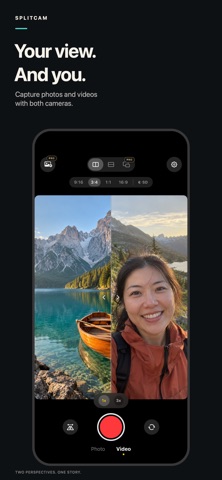
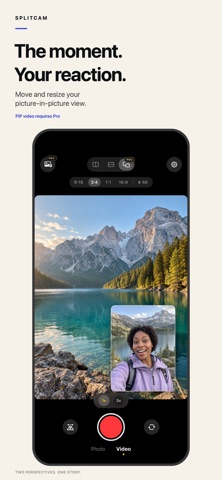

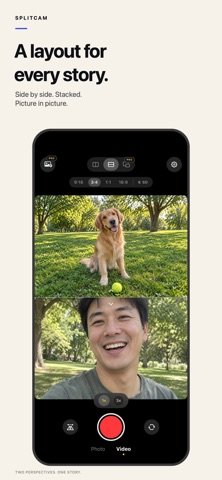

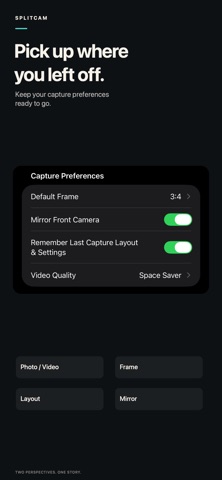


Description by 慧慧 高 Written by the developer, not by AppBrain. Click to read.
TWO VIEWS, YOUR COMPOSITION
Choose side-by-side, stacked, or picture-in-picture layouts. Adjust the split, move and resize the PiP window, and swap the camera views to tell your story your way.
CREATE ALONGSIDE YOUR MEDIA
Import a photo or video from your library and add your own perspective in Duet mode. Make a reaction, a comparison, or a new take on a favorite moment.
SMALLER FILES WHEN YOU WANT THEM
Choose Space Saver, Standard, or HD video quality. Space Saver uses a smaller video canvas and lower bitrate for lighter files. Settings shows estimated file sizes; actual sizes vary with the scene and recording length. Photo resolution is unaffected.
READY FOR YOUR NEXT SHOT
Choose 9:16, 3:4, 1:1, or 16:9. In 9:16, collapse the frame and quality controls for a clearer preview. Remember your last capture mode, layout, frame, camera swap, and mirror settings, so you can pick up where you left off.
MAKE IT YOURS
Choose from a collection of app icons, including Chrome, Terrazzo, Blueprint, and Bloom for Pro.
FREE AND PRO
Photo capture, including PiP photos, is free. Side-by-side and stacked video recording, plus all three video quality options, are also free. Pro unlocks PiP video recording, Duet video recording, and selected app icons.
Monthly and yearly auto-renewing subscriptions and a one-time lifetime purchase are available. Prices and any eligible trial are shown in the app before purchase. Subscriptions renew unless canceled; manage or cancel them in your Apple account’s Subscriptions settings. Restore Purchases is available at the bottom of the Pro page.
Requires iOS 16 or later and an iPhone that supports simultaneous front and back camera capture. Available camera options depend on your device.
Questions or ideas? captainlongevity@gmail.com
Privacy Policy: https://splitcam-legal.vercel.app/privacy-policy.html
Terms of Use: https://splitcam-legal.vercel.app/terms-of-use.html
Safety and technology
Found in the app by AppBrain- Price
- Free
- App size
- 33.6 MB
- Content rating
- Everyone
Technologies used by SplitCam: Dual Recorder
Releases
Updates seen on the App Store- Version
- 1.8
- Launched
- March 2026
No changelog data
Alternatives
Similar apps and more from 慧慧 高Alternatives to SplitCam: Dual Recorder


More from 慧慧 高


Rankings
App Store top chartsApp Store Rankings for SplitCam: Dual Recorder
About the app and developer
About SplitCam: Dual Recorder
SplitCam: Dual Recorder is a photo & video app developed by 慧慧 高.
What is the rating of SplitCam: Dual Recorder?
SplitCam: Dual Recorder is rated 4.33 out of 5 stars, based on 3 ratings.
Is SplitCam: Dual Recorder free?
SplitCam: Dual Recorder is free. The app size is 33.61 MB. The latest version available is 1.8. The last update was on September 13, 2026.
What are the requirements for SplitCam: Dual Recorder?
The app has a content rating of Everyone. The app has been available on the App Store since March 2026.
Developer information for 慧慧 高
Address:
Frequently asked questions about SplitCam: Dual Recorder
Is SplitCam: Dual Recorder free?
Yes. SplitCam: Dual Recorder is free on the App Store.
Is SplitCam: Dual Recorder still available?
Yes. SplitCam: Dual Recorder is on the App Store, and the last update we saw was on September 13, 2026.
How large is SplitCam: Dual Recorder?
SplitCam: Dual Recorder is 33.61 MB.
Is SplitCam: Dual Recorder suitable for children?
App Store rates the content of SplitCam: Dual Recorder as suitable for everyone.
How do people rate SplitCam: Dual Recorder?
SplitCam: Dual Recorder scores 4.33 out of 5 stars, from 3 ratings on the App Store.
Who made SplitCam: Dual Recorder?
SplitCam: Dual Recorder was developed by 慧慧 高. It is listed in the photo & video category on the App Store.
What are the best alternatives to SplitCam: Dual Recorder?
People looking at SplitCam: Dual Recorder also look at these photo & video apps: SplitCam Remote, YesCam, MirraMoments, 极简双摄相机, Loppo: Dual Camera Recorder.