



AppBrain's verdict
- Last updated
- November 2, 2026
- Size
- 1.53 MB
User feedback
Ratings and reviews on the App StoreComments on SplitCam Remote for iOS
We don't have enough comments to show example comments. Please check back later.
Store listing
By SplitCam Labs, from the App StoreDescription by SplitCam Labs Written by the developer, not by AppBrain. Click to read.
Your stream. Your network. Your control.
SplitCam Remote is a companion app for SplitCam on Windows, turning your iPhone into a dedicated control surface for your desktop setup. With SplitCam running on your computer, you can connect over your local Wi-Fi and manage your stream instantly — no cloud services, no accounts, just fast and reliable control.
Key Features:
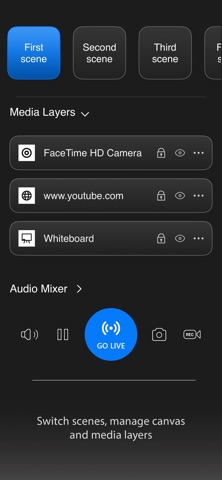
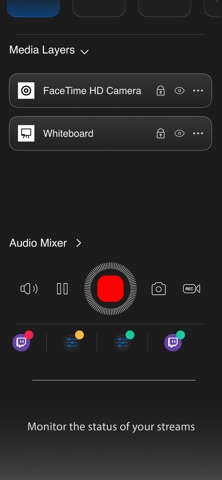
- Instant stream control Start and stop streaming without returning to your PC
- Seamless scene switching Switch scenes in real time without interruption
- Layer control Enable or disable elements inside your scenes on the fly
- Audio management Adjust inputs and keep your sound balanced
- Responsive performance Direct local connection for smooth, low-latency control
Perfect for:
- Streamers who move around during broadcasts
- Creators managing dynamic, multi-layer scenes
- Solo operators without a dedicated control setup
Requirements:
- SplitCam desktop application installed and running on your Windows PC
- iPhone and computer connected to the same Wi-Fi network
Stay focused on your content.
SplitCam Remote keeps your controls within reach — simple, fast, and always ready when you are.
Safety and technology
Found in the app by AppBrain- Price
- Free
- App size
- 1.53 MB
- Content rating
- Everyone
Technologies used by SplitCam Remote
Releases
Updates seen on the App Store- Version
- 1.6
- Launched
- April 2026
No changelog data
Alternatives
Similar apps and more from SplitCam LabsAlternatives to SplitCam Remote


More from SplitCam Labs

Rankings
App Store top chartsApp Store Rankings for SplitCam Remote
About the app and developer
About SplitCam Remote
SplitCam Remote is a photo & video app developed by SplitCam Labs.
User Ratings
The app has no ratings yet.
App Information
SplitCam Remote is freely available from the App Store. The app size is 1.53 MB. The latest version available is 1.6. The last update was on November 2, 2026.
Technical Requirements
The app has a content rating of Everyone. The app has been available on the App Store since April 2026.
SplitCam Remote is made and published by SplitCam Labs. AppBrain is an independent app data site and isn't affiliated with SplitCam Labs. The app name, icon, screenshots and description belong to SplitCam Labs and are shown as published on the App Store.
Developer information for SplitCam Labs
Address:
Frequently asked questions about SplitCam Remote
Is SplitCam Remote free?
Yes. SplitCam Remote is free on the App Store.
Is SplitCam Remote still available?
Yes. SplitCam Remote is on the App Store, and the last update we saw was on November 2, 2026.
How large is SplitCam Remote?
SplitCam Remote is 1.53 MB.
Is SplitCam Remote suitable for children?
App Store rates the content of SplitCam Remote as suitable for everyone.
Who made SplitCam Remote?
SplitCam Remote was developed by SplitCam Labs. It is listed in the photo & video category on the App Store.
What are the best alternatives to SplitCam Remote?
People looking at SplitCam Remote also look at these photo & video apps: SplitCam: Dual Recorder, TwinCam: Dual Video Recorder, Microscope Camera Remote, NDI Switcher - Focus, SplitCam Dual Camera Recorder.