

Spreadsheet data entry
Spreadsheet data entry is made and published by Ruslan Musagitov. AppBrain is an independent app data site and isn't affiliated with Ruslan Musagitov. The app name, icon, screenshots and description belong to Ruslan Musagitov and are shown as published on the App Store.
AppBrain's verdict
Established- Rating on App Store
- 5.00
- 5 ratings
- Last updated
- October 7, 2026
- Size
- 22.7 MB
It doesn't have enough ratings yet to judge what users think.
User feedback
Ratings and reviews on the App StoreComments on Spreadsheet data entry for iOS
We don't have enough comments to show example comments. Please check back later.
Store listing
By Ruslan Musagitov, from the App Store




Description by Ruslan Musagitov Written by the developer, not by AppBrain. Click to read.
This powerful tool is your ultimate companion for accounting, expense tracking as a smart spending tracker, warehouse inventory, and much more. Streamline your workflow by capturing information instantly—whether it's scanning a barcode, saving a location, or creating a new entry in your list maker.
Capture & Save Various Data Types:
- Scan it: QR and Barcode data directly to your spreadsheet.
- Geolocation: Save your current coordinates or pick a point on the map.
- Text and Numbers for detailed notes.
- Dates & Timestamps: Automatic or custom entries.
- Predefined Lists: Select values from a custom list.
- Yes/No selectors for quick checks.
Seamless Integration with Google Suite
The app works flawlessly with Google Sheets, can replace Google Forms, allowing you to convert csv to Excel spreadsheet compatible files with ease. The revolutionary Scan to Sheets technology means data from codes appears in your rows and columns instantly, eliminating manual transcription.
How It Works:
- Select a form.
- Input data (scan, type, or select).
- Tap "Send".
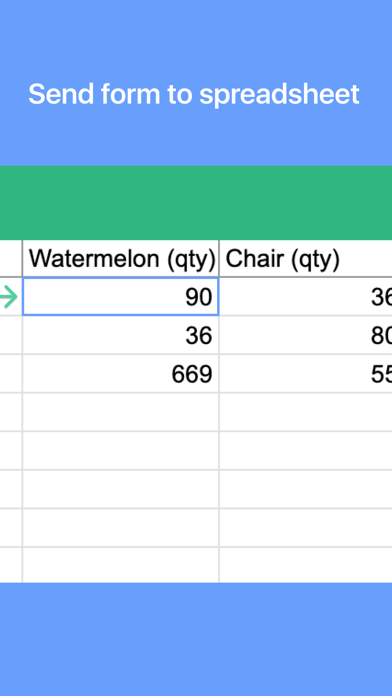
- Watch as the information appears live in your spreadsheet on Google Drive.
Connect Your Google Sheet in Minutes:
- Authorize your Google account.
- Configure your target spreadsheet URL.
What is a Form?
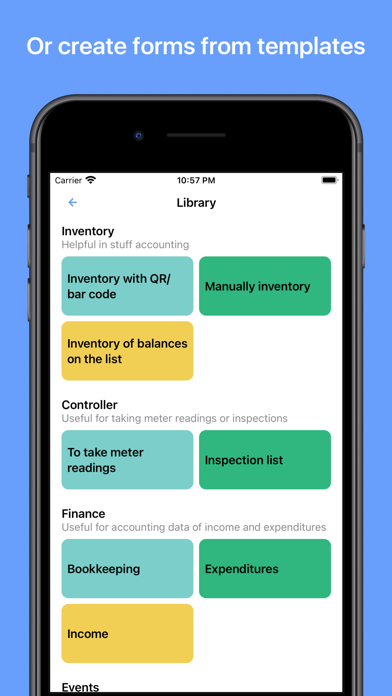
A Form defines the structure of your data entry, linking input fields to specific columns in your target spreadsheet. Create them manually for full control or choose a ready-made template from our library.
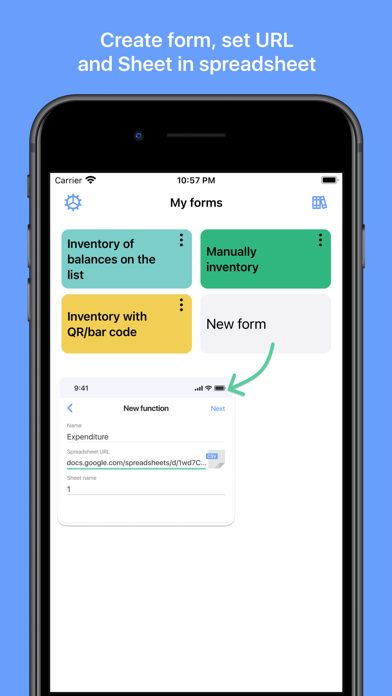
Create a Form Manually:
- Create a spreadsheet in your Google Drive.
- In the app, create a new form:
- Paste the spreadsheet URL and sheet name.
- Configure each field: name, data type, and target column.
- Save.
Use a Predefined Template:
- Browse the form library.
- Tap "Add to my forms" – a copy of the spreadsheet template is saved to your Drive.
Automate your data logging, enhance productivity, and ensure accurate data saving for any project. Download now to transform your phone into a powerful data hub.
Terms of Service and Privacy Policy:
https://bytepace.com/spreadsheet-data-entry/tos-and-privacy-policy
Safety and technology
Found in the app by AppBrain- Price
- Free
- App size
- 22.7 MB
- Content rating
- Everyone
Technologies used by Spreadsheet data entry
Releases
Updates seen on the App Store- Version
- 4.0
- Launched
- June 2020
No changelog data
Alternatives
Similar apps and more from Ruslan MusagitovAlternatives to Spreadsheet data entry








More from Ruslan Musagitov



Rankings
App Store top chartsApp Store Rankings for Spreadsheet data entry
About the app and developer
About Spreadsheet data entry
Spreadsheet data entry is an utilities app developed by Ruslan Musagitov.
User Ratings
Spreadsheet data entry is rated 5.00 out of 5 stars. The rating is based on 5 ratings.
App Information
Spreadsheet data entry is freely available from the App Store. The app size is 22.66 MB. The latest version available is 4.0. The last update was on October 7, 2026.
Technical Requirements
The app has a content rating of Everyone. The app has been available on the App Store since June 2020.
Developer information for Ruslan Musagitov
Address:
Frequently asked questions about Spreadsheet data entry
Is Spreadsheet data entry free?
Yes. Spreadsheet data entry is free on the App Store.
Is Spreadsheet data entry still available?
Yes. Spreadsheet data entry is on the App Store, and the last update we saw was on October 7, 2026.
How large is Spreadsheet data entry?
Spreadsheet data entry is 22.66 MB.
Is Spreadsheet data entry suitable for children?
App Store rates the content of Spreadsheet data entry as suitable for everyone.
How do people rate Spreadsheet data entry?
Spreadsheet data entry scores 5.00 out of 5 stars, from 5 ratings on the App Store.
Who made Spreadsheet data entry?
Spreadsheet data entry was developed by Ruslan Musagitov. It is listed in the utilities category on the App Store.
What are the best alternatives to Spreadsheet data entry?
People looking at Spreadsheet data entry also look at these utilities apps: # Simple Table - Note as table, GEAR NBS 2.0 Scanner, Inventory & Storage Manager, Daily Data Tracker, Gear Inventory.