AppBrain
AppBrain
  • Apps
  • Apps being viewed right now Trending apps today Most popular apps All-time most installed apps Top rated apps iPhone and iPad apps
  • Intelligence ▾
    Intelligence overview → Track any Android app or your whole market
    Track & analyze
    Keyword Tracker & OptimizerTrack & improve Play rankings App Performance ReportOne-off PDF for any app StatisticsFree Android & Play market stats
    Promote your app
    Featured Apps App Links
  • Intelligence
  • Pricing
  • Dashboard
  • Sign up
  • Log in
App Store Apps > Productivity > sqncr Build/Record Multitimers
sqncr Build/Record Multitimers icon

sqncr Build/Record Multitimers

by David Marcus · Productivity · Free
On the App Store since September 2026 · Data updated 2026-11-03

sqncr Build/Record Multitimers is made and published by David Marcus. AppBrain is an independent app data site and isn't affiliated with David Marcus. The app name, icon, screenshots and description belong to David Marcus and are shown as published on the App Store.

AppBrain's verdict

New
Rating on App Store
5.00
1 ratings
Last updated
September 4, 2026
Size
3.96 MB

sqncr Build/Record Multitimers came out 63 days ago. It doesn't have enough ratings yet to judge what users think.

Official page on the App Store

User feedback

Ratings and reviews on the App Store

Comments on sqncr Build/Record Multitimers for iOS

We don't have enough comments to show example comments. Please check back later.

Store listing

By David Marcus, from the App Store
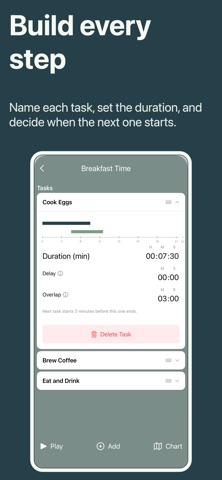
sqncr Build/Record Multitimers Screenshot 1 of 6
sqncr Build/Record Multitimers Screenshot 2 of 6
sqncr Build/Record Multitimers Screenshot 3 of 6
sqncr Build/Record Multitimers Screenshot 4 of 6
sqncr Build/Record Multitimers Screenshot 5 of 6
sqncr Build/Record Multitimers Screenshot 6 of 6
Screenshots by David Marcus, from the the App Store listing
Description by David Marcus Written by the developer, not by AppBrain. Click to read.
sqncr is a powerful yet simple productivity app that lets you build and follow a sequence of timers to stay focused, structured, and in flow—whether you’re working, studying, training, cooking, or managing a daily routine.

Designed for anyone who works best with structure, sqncr is perfect for:
• Students using time blocks or Pomodoro-style study
• Professionals organizing deep work, meetings, or focus sprints
• Athletes and coaches planning interval training
• Creators building repeatable workflows
• Anyone building better habits through routine

Create your own sequence of timers in advance, or hit “Record” and build a routine as you go. sqncr adapts to your real-life workflow and then makes it repeatable with a single tap.

Key features:
• Build custom timer sequences step-by-step
• Set specific durations for each stage (work, break, warm-up, rest, etc.)
• Incorporate overlap (start next early) and delay (wait to start next)
• Name and label each timer for clarity
• Reorder steps instantly with drag-and-drop
• Save unlimited routines for different activities
• Record a session in real-time and convert it into a reusable sequence
• Clean, distraction-free interface for focus
• Visual and audio alerts for transitions
• Background and Lock Screen support
• Dark mode for night sessions

Free version:
• Create and run basic timer sequences (up to 4 tasks)
• Save a limited number (3) of routines
• Access essential tracking and alerts
• Perfect for trying out structured time blocks

Premium version:
• Unlimited sequences and steps
• Advanced customization
• Detailed history and performance insights
• Cloud sync across devices
• Priority updates and new features
• Ad-free experience

Whether you’re building a morning routine, managing a focused work sprint, or structuring an entire training session, sqncr keeps you moving forward—one perfectly-timed step at a time.

Download today and turn your time into a repeatable advantage.

Contact us:
Site: sqncr.app
License Terms of Use (EULA): https://www.apple.com/legal/internet-services/itunes/dev/stdeula/
Privacy Policy: https://sqncr.app/privacy.html
App Terms and Conditions: https://sqncr.app/terms.html
Email: info@sqncr.app
Official page on the App Store

Safety and technology

Found in the app by AppBrain
Price
Free
App size
3.96 MB
Content rating
Everyone

Technologies used by sqncr Build/Record Multitimers

Releases

Updates seen on the App Store
Version
1.0.1
Launched
September 2026

No changelog data

Alternatives

Similar apps and more from David Marcus

Alternatives to sqncr Build/Record Multitimers

Flow Timer: Tasks & Lofi icon Flow Timer: Tasks & Lofi
Ardis Zhong
0.0
Free
Prio: Daily Planner & To-Do icon Prio: Daily Planner & To-Do
Haileslassie Lilay Desalegn
5.0
Free
1 ratings
Pangu AI icon Pangu AI
Haiva Inc
3.0
Free
2 ratings
Signal List icon Signal List
Amged Edwards
0.0
Free
CalendarNotes: Cute Reminder icon CalendarNotes: Cute Reminder
智强 郭
0.0
Free
MyListen: Create Audio Offline icon MyListen: Create Audio Offline
铁果 朱
5.0
Free
1 ratings
DayFlow Planner icon DayFlow Planner
Carlos Ayala
0.0
Free
Turnos Shift Rotation Calendar icon Turnos Shift Rotation Calendar
luis reynaldo cedeno manzanilla
5.0
$3.99
2 ratings

Rankings

App Store top charts

App Store Rankings for sqncr Build/Record Multitimers

This app is not ranked

About the app and developer

About sqncr Build/Record Multitimers

sqncr Build/Record Multitimers is a productivity app developed by David Marcus.

What is the rating of sqncr Build/Record Multitimers?

sqncr Build/Record Multitimers is rated 5.00 out of 5 stars, based on one rating ratings.

Is sqncr Build/Record Multitimers free?

sqncr Build/Record Multitimers is free. The app size is 3.96 MB. The latest version available is 1.0.1. The last update was on September 4, 2026.

What are the requirements for sqncr Build/Record Multitimers?

The app has a content rating of Everyone. The app has been available on the App Store since September 2026.

Developer information for David Marcus

David Marcus

Address:

Share sqncr Build/Record Multitimers

Price drops on Google Play Today's trending apps Apps other people are watching Top new apps Popular Productivity Apps
Flow Timer: Tasks & Lofi icon Flow Timer: Tasks & Lofi
Prio: Daily Planner & To-Do icon Prio: Daily Planner & To-Do
Pangu AI icon Pangu AI
Signal List icon Signal List
CalendarNotes: Cute Reminder icon CalendarNotes: Cute Reminder
MyListen: Create Audio Offline icon MyListen: Create Audio Offline
DayFlow Planner icon DayFlow Planner
Turnos Shift Rotation Calendar icon Turnos Shift Rotation Calendar
Overview Alternatives Reviews Rankings Technology
AppBrain Intelligence premium content

Subscribe now to get full and unlimited access to AppBrain Intelligence. You'll have access to:

  • App Intelligence dashboard (performance timeline, competitor comparison, country rankings, insight cards)
  • Detailed ranking data per app
  • Full timeline per developer
  • Device market shares data per country
  • Unlimited keyword tracking
1 Month

$75/mo
(billed every month)

SAVE 0%
Subscribe
3 Months

$65/mo
($195 billed every 3 months)

SAVE 13%
Subscribe
1 Year

$57.50/mo
($690 billed every year)

SAVE 23%
Subscribe
Each subscription will automatically renew 3 days before the expiration date for the same time period. Subscriptions can be cancelled at any time before the renewal.

AppBrain is an app data site, we track rankings, ratings, installs for all apps and games on Google Play and the App Store. AppBrain doesn't host app files or APKs, all install links go directly to the official store. All trademarks are owned by their respective owners.

More apps

  • Top Android apps being viewed
  • Move Animals Android App
  • Senior Color by Number Paint
  • Tic Tac Toe - Classic XO Game

App statistics

  • Android statistics
  • Google Play Developer stats
  • Trending Android Apps
  • Trending iOS apps
  • Top popular Apps
  • Buy the best Android phone
  • Buy & sell app businesses

About AppBrain

  • Contact
  • Privacy
  • Documentation
  • DMCA takedowns
  • Blog
  • Tips to improve your Android promotional campaign
© 2010-2026 - AppBrain