AppBrain
AppBrain
  • Apps
  • Apps being viewed right now Trending apps today Most popular apps All-time most installed apps Top rated apps iPhone and iPad apps
  • Intelligence ▾
    Intelligence overview → Track any Android app or your whole market
    Track & analyze
    Keyword Tracker & OptimizerTrack & improve Play rankings App Performance ReportOne-off PDF for any app StatisticsFree Android & Play market stats
    Promote your app
    Featured Apps App Links
  • Intelligence
  • Pricing
  • Dashboard
  • Sign up
  • Log in
App Store Apps > Education > Squiggle Zoo: Learn Origami
Squiggle Zoo: Learn Origami icon

Squiggle Zoo: Learn Origami

1.0.0
Atsushi Igarashi
0.00
0 reviews
Free

Squiggle Zoo: Learn Origami Screenshot 1 of 7
Squiggle Zoo: Learn Origami Screenshot 2 of 7
Squiggle Zoo: Learn Origami Screenshot 3 of 7
Squiggle Zoo: Learn Origami Screenshot 4 of 7
Squiggle Zoo: Learn Origami Screenshot 5 of 7
Squiggle Zoo: Learn Origami Screenshot 6 of 7
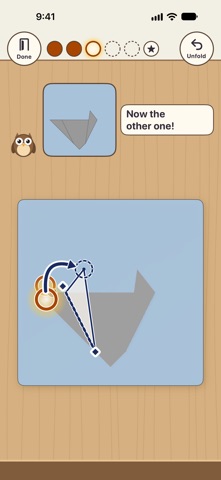
Squiggle Zoo: Learn Origami Screenshot 7 of 7
Screenshots by Atsushi Igarashi, from the the App Store listing
View on the App Store

AppBrain's verdict

Last updated
November 16, 2026
Size
4.40 MB
Official page on the App Store

User feedback

Ratings and reviews on the App Store

Comments on Squiggle Zoo: Learn Origami for iOS

We don't have enough comments to show example comments. Please check back later.

Store listing

By Atsushi Igarashi, from the App Store
Description by Atsushi Igarashi Written by the developer, not by AppBrain. Click to read.
A first origami app where your child folds paper with one finger, copying a friendly owl teacher one fold at a time.
Each finished animal opens its eyes, makes its sound and joins a little zoo on your child's desk.
For ages 3 to 6. No ads. No data collection. The first 3 animals are free; the rest are a one-time purchase, not a subscription.

FOLD ALONG WITH THE TEACHER
- Hoot the owl folds first on her own small sheet. Your child copies the fold on the big sheet, so children who can't read yet can follow along
- The corner to fold glows and an arrow shows where it goes. Drag the corner, or tap the corner and then the spot it goes to
- If your child gets stuck, Hoot shows the fold again or offers to fold together. When you fold together, the last little push is your child's
- No red crosses, no "wrong" sounds. Tap "Unfold" to go back one fold and try again
- Hoot teaches by showing, not telling. Her few words appear as short captions on screen (there is no spoken narration), so play stays quiet
- The teacher never gives scores. When an animal is finished, she names one good thing about it
- Before the first fold, pick the animal's usual color or one of 8 paper colors

FOLDED ANIMALS MOVE
When the last fold is done, the animal opens its eyes, makes its sound and gives a little hop. For animals that are just a face, Hoot folds a body and your child places the face on it. Swipe to turn the animal and look at it from the front, the side and the back.

A ZOO ON THE DESK
Finished animals take their own seats on the desk. Tap one and it hops, makes its sound or tilts its head. Fold any animal again, in a new color, as many times as you like.

ANIMALS
12 in all. Dog, Cat and Rabbit are free, start to finish.
The other 9 (Fox, Fish, Butterfly, Cicada, Pig, Bear, Whale, Panda and Penguin) come with "All Animals", a one-time In-App Purchase that supports Family Sharing. Until then, they wait on the desk as white paper in a wrapper.

A GENTLE END TO PLAY
When the bedtime timer runs out (off, or 10 to 30 minutes; 15 minutes by default), the desk lamp dims and Hoot says goodnight. It never turns off in the middle of a fold. It's a gentle cue, not a lock. You can change the time on the parents' page.

FOR PARENTS
- No ads. Your child's work and play are never collected or sent to the developer. No account needed
- Play works offline. Only buying, showing the price and restoring the purchase on the parents' page connect to the App Store
- No camera, no microphone, no photo library
- The purchase and our other apps are only on the parents' page, which opens after a grown-ups' check
- Sound effects and animal sounds follow Silent Mode and never stop music from other apps
- Settings for feedback (how strong sounds and vibrations are), handedness (which side the teacher sits), how a body is added, letting the teacher fold each step for your child, and more
- For a firm limit on play time, use Screen Time in your device's Settings to set a limit for this app alone
- Japanese and English

ACCESSIBILITY
- VoiceOver (it reads which step you're on and which corner to fold where; double-tap to fold) and full keyboard access (press Space to fold on Mac)
- Larger Text, Dark Mode, Increase Contrast and Reduce Motion
- Paper colors differ from the desk in brightness, not just in hue

DEVICES
iPhone and iPad in any orientation, including Split View and Stage Manager, and Mac with Apple silicon.

Safety and technology

Found in the app by AppBrain
Price
Free
App size
4.40 MB
Content rating
Everyone

Technologies used by Squiggle Zoo: Learn Origami

Releases

Updates seen on the App Store
Version
1.0.0
Launched
November 2026

No changelog data

Rankings

App Store top charts

App Store Rankings for Squiggle Zoo: Learn Origami

This app is not ranked

About the app and developer

About Squiggle Zoo: Learn Origami

Squiggle Zoo: Learn Origami is an education app developed by Atsushi Igarashi.

User Ratings

The app has no ratings yet.

App Information

Squiggle Zoo: Learn Origami is freely available from the App Store. The app size is 4.40 MB. The latest version available is 1.0.0. The last update was on November 16, 2026.

Technical Requirements

The app has a content rating of Everyone. The app has been available on the App Store since November 2026.

Squiggle Zoo: Learn Origami is made and published by Atsushi Igarashi. AppBrain is an independent app data site and isn't affiliated with Atsushi Igarashi. The app name, icon, screenshots and description belong to Atsushi Igarashi and are shown as published on the App Store.

Developer information for Atsushi Igarashi

Atsushi Igarashi

Address:

Share Squiggle Zoo: Learn Origami

Popular Education Apps Top new apps Today's trending apps Price drops on Google Play Apps other people are watching
More hot apps 🔥
Overview Reviews Rankings Technology
AppBrain Intelligence premium content

Subscribe now to get full and unlimited access to AppBrain Intelligence. You'll have access to:

  • App Intelligence dashboard (performance timeline, competitor comparison, country rankings, insight cards)
  • Detailed ranking data per app
  • Full timeline per developer
  • Device market shares data per country
  • Unlimited keyword tracking
1 Month

$75/mo
(billed every month)

SAVE 0%
Subscribe
3 Months

$65/mo
($195 billed every 3 months)

SAVE 13%
Subscribe
1 Year

$57.50/mo
($690 billed every year)

SAVE 23%
Subscribe
Each subscription will automatically renew 3 days before the expiration date for the same time period. Subscriptions can be cancelled at any time before the renewal.

AppBrain is an app data site, we track rankings, ratings, installs for all apps and games on Google Play and the App Store. AppBrain doesn't host app files or APKs, all install links go directly to the official store. All trademarks are owned by their respective owners.

More apps

  • Top Android apps being viewed
  • YouVersion Bible App + Audio
  • Elseway: Into the Story
  • Royal Smash Fest for Android

App statistics

  • Android statistics
  • Google Play Developer stats
  • Trending Android Apps
  • Trending iOS apps
  • Top popular Apps
  • Buy the best Android phone
  • Buy & sell app businesses

About AppBrain

  • Contact
  • Privacy
  • Documentation
  • DMCA takedowns
  • Blog
  • The best curated Android app categories
© 2010-2026 - AppBrain