

Stack: Daily Planner & Routine
Stack: Daily Planner & Routine is made and published by MAPPVATE YAZILIM LIMITED SIRKETI. AppBrain is an independent app data site and isn't affiliated with MAPPVATE YAZILIM LIMITED SIRKETI. The app name, icon, screenshots and description belong to MAPPVATE YAZILIM LIMITED SIRKETI and are shown as published on the App Store.
AppBrain's verdict
- Last updated
- October 23, 2026
Rankings
App Store top chartsApp Store Rankings for Stack: Daily Planner & Routine
Competitors
Similar apps and more from MAPPVATE YAZILIM LIMITED SIRKETIAlternatives to Stack: Daily Planner & Routine








More from MAPPVATE YAZILIM LIMITED SIRKETI


Releases
Updates seen on the App Store- Version
- 3.3.2
- Launched
- June 2023
No changelog data
User feedback
Ratings and reviews on the App StoreComments on Stack: Daily Planner & Routine for iOS
We don't have enough comments to show example comments. Please check back later.
Technology
Found in the app by AppBrain- Price
- Free
- App size
- 72.7 MB
- Content rating
- Everyone
Technologies used by Stack: Daily Planner & Routine
About the app and developer
About Stack: Daily Planner & Routine
Stack: Daily Planner & Routine is a productivity app developed by MAPPVATE YAZILIM LIMITED SIRKETI.
User Ratings
The app has no ratings yet.
App Information
Stack: Daily Planner & Routine is freely available from the App Store. The app size is 72.68 MB. The latest version available is 3.3.2. The last update was on October 23, 2026.
Technical Requirements
The app has a content rating of Everyone. The app has been available on the App Store since June 2023.
Developer information for MAPPVATE YAZILIM LIMITED SIRKETI
MAPPVATE YAZILIM LIMITED SIRKETI
Address:
Store listing
By MAPPVATE YAZILIM LIMITED SIRKETI, from the App Store



Description by MAPPVATE YAZILIM LIMITED SIRKETI Written by the developer, not by AppBrain. Click to read.
Turn your to-do list into a plan for the day. Give each task a time, see what fits, and focus on one thing at a time.
PLAN YOUR DAY
See your tasks on a timeline, with clear start and end times. Drag to reschedule and spot the free time between tasks.
KEEP YOUR PLANS IN VIEW
Check your day from your Home Screen with widgets. Follow your current focus session with Live Activities, without returning to the app.
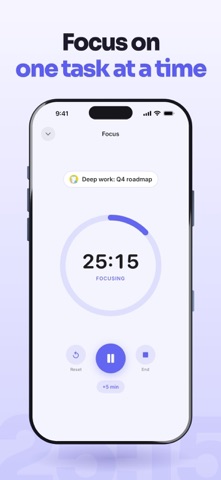
FOCUS ON ONE TASK
Start a focus timer for the task in front of you. Pause when you need to, adjust the time, and mark it done when you finish.
ADD TASKS IN SECONDS
Choose a time and duration, add a note, and set a reminder. See your other tasks as you plan, so you can avoid overlapping schedules.
PLAN ONCE, REPEAT AS NEEDED
Set recurring tasks for your regular commitments. Change one day or update future repeats without rebuilding your schedule.
From your first task to your last, know what’s planned, what’s done, and what comes next.
A paid subscription is required to access all features. Subscriptions renew automatically at the end of the selected subscription period unless canceled. You can manage or cancel your subscription in your Apple Account settings.