



AppBrain's verdict
- Last updated
- September 16, 2026
- Size
- 4.34 MB
User feedback
Ratings and reviews on the App StoreComments on Stair Calculator: Both Ways for iOS
We don't have enough comments to show example comments. Please check back later.
Store listing
By Jinwan Kim, from the App StoreDescription by Jinwan Kim Written by the developer, not by AppBrain. Click to read.
Most stair apps take a height and hand back a length. Remodels do not work like that — the stair has to land between a loft that is already there and a floor that is already poured. Give this one the rise alone, the rise with the run you have, or the rise with the tread you want, and the same search runs behind all three.
Tape measure entry.
Type 9' 3 1/2 the way you read it off the tape. Feet, inches, sixteenths, plain decimals or millimetres all go in the same field, and a value it cannot read is refused instead of quietly becoming zero.
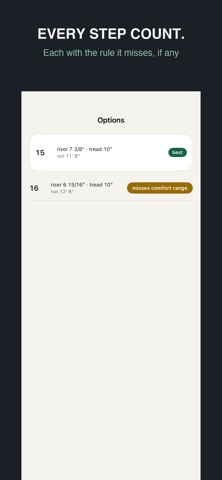
Every step count, not just one.
Thirteen step counts might fit a nine foot rise. You get all of them, each with its riser, tread, run and the rule it misses if it misses one. Nothing is filtered out on your behalf.
Limits you can edit.
Max riser, min tread, the comfort range and the rise allowed per flight are working numbers, and every one of them is yours to change.
Ten presets cover residential through to a ship's ladder.
The remainder is told, not rounded.
A rise almost never divides evenly. Instead of rounding the total away, the app says how many risers come out a fraction taller, which is the number that actually matters when you mark the stringer.
A cut sheet you can send.
Stringer length along the slope, the framing square setting, the count of risers and treads, how far to drop the bottom step for your tread material, and the checks. It goes out as plain text, so it survives being pasted into a message.
Your layouts stay.
Saved on this device, opened again next week. Nothing expires, nothing locks, nothing has to be re-entered.
Limits, not approval. Your local authority decides what is legal; this app reviews nothing.
Languages: English, 한국어, 日本語, 繁體中文, Deutsch, Français, Español
Safety and technology
Found in the app by AppBrain- Price
- Free
- App size
- 4.34 MB
- Content rating
- Everyone
Technologies used by Stair Calculator: Both Ways
Releases
Updates seen on the App Store- Version
- 1.0
- Launched
- September 2026
No changelog data
Alternatives
Similar apps and more from Jinwan KimAlternatives to Stair Calculator: Both Ways


More from Jinwan Kim


Rankings
App Store top chartsApp Store Rankings for Stair Calculator: Both Ways
About the app and developer
About Stair Calculator: Both Ways
Stair Calculator: Both Ways is an utilities app developed by Jinwan Kim.
User Ratings
The app has no ratings yet.
App Information
Stair Calculator: Both Ways is freely available from the App Store. The app size is 4.34 MB. The latest version available is 1.0. The last update was on September 16, 2026.
Technical Requirements
The app has a content rating of Everyone. The app has been available on the App Store since September 2026.
Stair Calculator: Both Ways is made and published by Jinwan Kim. AppBrain is an independent app data site and isn't affiliated with Jinwan Kim. The app name, icon, screenshots and description belong to Jinwan Kim and are shown as published on the App Store.
Developer information for Jinwan Kim
Address: