

Steps Widget & Smart Nudges
Steps Widget & Smart Nudges is made and published by CrazyLazy OU. AppBrain is an independent app data site and isn't affiliated with CrazyLazy OU. The app name, icon, screenshots and description belong to CrazyLazy OU and are shown as published on the App Store.
AppBrain's verdict
- Rating on App Store
- 3.94
- 17 ratings
- Last updated
- October 16, 2026
It doesn't have enough ratings yet to judge what users think.
Rankings
App Store top chartsApp Store Rankings for Steps Widget & Smart Nudges
Competitors
Similar apps and more from CrazyLazy OUAlternatives to Steps Widget & Smart Nudges


More from CrazyLazy OU



Releases
Updates seen on the App Store- Version
- 4.8
- Launched
- January 2026
No changelog data
User feedback
Ratings and reviews on the App StoreComments on Steps Widget & Smart Nudges for iOS
We don't have enough comments to show example comments. Please check back later.
Technology
Found in the app by AppBrain- Price
- Free
- App size
- 87.1 MB
- Content rating
- Everyone
Technologies used by Steps Widget & Smart Nudges
About the app and developer
About Steps Widget & Smart Nudges
Steps Widget & Smart Nudges is a health & fitness app developed by CrazyLazy OU.
User Ratings
Steps Widget & Smart Nudges is rated 3.94 out of 5 stars. The rating is based on 17 ratings.
App Information
Steps Widget & Smart Nudges is freely available from the App Store. The app size is 87.07 MB. The latest version available is 4.8. The last update was on October 16, 2026.
Technical Requirements
The app has a content rating of Everyone. The app has been available on the App Store since January 2026.
Developer information for CrazyLazy OU
Address:
Frequently asked questions about Steps Widget & Smart Nudges
Is Steps Widget & Smart Nudges free?
Yes. Steps Widget & Smart Nudges is free on the App Store.
Is Steps Widget & Smart Nudges still available?
Yes. Steps Widget & Smart Nudges is on the App Store, and the last update we saw was on October 16, 2026.
How large is Steps Widget & Smart Nudges?
Steps Widget & Smart Nudges is 87.07 MB.
Is Steps Widget & Smart Nudges suitable for children?
App Store rates the content of Steps Widget & Smart Nudges as suitable for everyone.
How do people rate Steps Widget & Smart Nudges?
Steps Widget & Smart Nudges scores 3.94 out of 5 stars, from 17 ratings on the App Store.
Who made Steps Widget & Smart Nudges?
Steps Widget & Smart Nudges was developed by CrazyLazy OU. It is listed in the health & fitness category on the App Store.
What are the best alternatives to Steps Widget & Smart Nudges?
People looking at Steps Widget & Smart Nudges also look at these health & fitness apps: step widget minimalist, Steps Widgets (Pedometer), StepWise - Step Counter, EpiTracker: Epilepsy Diary, Step Counter Widget -MyCount-.
Store listing
By CrazyLazy OU, from the App Store




Description by CrazyLazy OU Written by the developer, not by AppBrain. Click to read.
Steps Widget asks for much less. It puts your step count where your eyes already go, on your Home Screen, Lock Screen, and StandBy, and gives you a gentle nudge only when you’ve been sitting a little too long. Not every hour. Not on a fixed schedule.
A few hundred extra steps here and there soon become part of your day, and those small moments add up. You don’t need to become a different person. Just move a little more today than yesterday. That’s how habits begin.
DESIGN IT YOUR WAY
A step counter you find ugly ends up on page three, and a buried reminder is no reminder. The style editor lets you pick colors, gradients, and layouts, give light and dark mode their own look, and save your favorite styles to reuse on any widget. Or pick a photo you love: Steps Widget can pull a matching palette from it, or place the photo right behind your step count.
THE SMART NUDGE
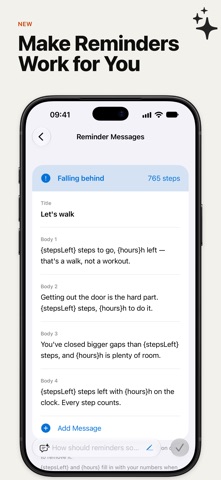
When glancing isn’t enough, Nudge steps in. It learns your routine right on your device and shows up once, only when you’ve actually gone still. One nudge, when it’s earned, and nothing otherwise. Don’t like how a reminder reads? Rewrite it yourself, or let Apple Intelligence reword it on your device.
WHEN YOU WANT THE LATEST NUMBER
iOS decides when widgets refresh, so your widget catches up through the day rather than the second you walk. When you want to watch the number climb, open the app for a count straight from your iPhone's motion sensor, or use the Apple Watch app to follow your steps as you go.
NEW: SHARE YOUR STEPS AND YOUR STYLE
Send today’s steps, your widget, or a style you made into any conversation, with a note of your own. In Messages, a step ranking shows who has walked the most today.
KEY FEATURES
• Beautiful Widgets: Home Screen, Lock Screen, and StandBy, with ring, chart, gauge, and compact layouts.
• Style Editor: Colors, gradients, and light and dark looks, saved as your own styles.
• Photo Styles: Turn any photo into a palette or a widget background.
• Smart Nudges: Learns your routine, alerts you only when you’re inactive, in wording you can edit.
• Motion Sensor Count: The app reads your iPhone's sensor for a fresher number.
• Standalone Apple Watch App: Runs on its own, with complications and move reminders on your wrist.
• Insights: Your week, your past year, your best day, and where today will land.
• Siri and Shortcuts: Ask whether you’re on track, or drop your steps into a shortcut.
• Guilt-Free Tracking: No streaks to lose, no maps, no noise. Just a clean step counter.
NO GPS. BARELY ANY BATTERY.
Your iPhone already counts steps with its built-in motion sensors through Apple Health. Steps Widget simply shows that data—no background GPS tracking, no constant polling, no battery drain.
PRIVATE BY DESIGN
Your health data stays on your device. The app collects no personal identity information.
FREE TO START
Default widget styles and goal reminders are free. A subscription is only needed to change your style with the style editor or photo styles, and the style you built stays on your widgets when a subscription ends.
See your steps, get a gentle nudge. Move a little more every day.
FREQUENTLY ASKED QUESTIONS
Can I set my own daily walking goal?
Yes. Pick the number of steps a day that suits you, and the progress ring fills as you walk toward it.
Why doesn’t my widget update the moment I walk?
iOS schedules widget refreshes, so the number catches up through the day. For an up-to-the-minute count, open the app or use the Apple Watch app.
Do I need an Apple Watch?
No. Steps Widget works on iPhone alone using Apple Health step data. With an Apple Watch you also get complications and move reminders on your wrist.
Terms of Use: https://www.apple.com/legal/internet-services/itunes/dev/stdeula/