AppBrain's verdict on StitchHub: Cross Stitch
- Rating on App Store
- 3.50
- 2 ratings
- Last updated
- November 15, 2026
- Size
- 78.9 MB
It doesn't have enough ratings yet to judge what users think.
About StitchHub: Cross Stitch
StitchHub: Cross Stitch is a graphics & design app developed by Diana Białogrzywa.
What is the rating of StitchHub: Cross Stitch?
StitchHub: Cross Stitch is rated 3.50 out of 5 stars, based on 2 ratings.
Is StitchHub: Cross Stitch free?
StitchHub: Cross Stitch is free. The app size is 78.93 MB. The latest version available is 3.9. The last update was on November 15, 2026.
What are the requirements for StitchHub: Cross Stitch?
The app has a content rating of Everyone. The app has been available on the App Store since May 2026.
StitchHub: Cross Stitch is made and published by Diana Białogrzywa. AppBrain is an independent app data site and isn't affiliated with Diana Białogrzywa. The app name, icon, screenshots and description belong to Diana Białogrzywa and are shown as published on the App Store.
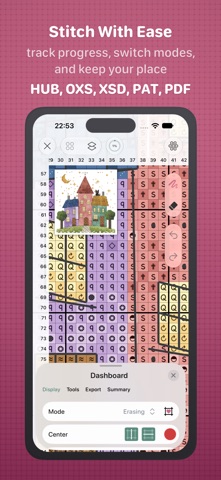
StitchHub brings everything together for stitchers and pattern designers: importing existing patterns, tracking stitching progress, creating new designs, converting images into patterns, managing materials, and preparing clear exports.
Work with detailed patterns that include a wide range of stitch types and decorative elements, from full cross stitches, half stitches and fractional stitches to backstitch, knots, beads and buttons.
Preview your design in a realistic embroidery-style view to see how the finished piece will look.
STITCHING
• Import supported pattern files, including HUB, OXS, XSD, PAT and PDF
• Open large patterns up to 1000 × 1000 stitches
• Use all essential navigation aids: grid, rulers, guidelines, center marks and stitch counters
• Switch between several working modes, including marking, coloring, erasing and stitching
• Mark and unmark completed stitches
• Track your progress as you work
• Share current stitching progress with a visual preview and details
• Navigate patterns easily with the minimap
• Use advanced stitching tools such as boundary areas and parking marks
• Calculate materials with adjustable parameters and export results as TXT or PDF
• Export legends, organizers and materials
JOURNAL & BACKUPS
• Look back on your days in the Stitching Journal and Designing Journal
• Set a Month's goal and keep an eye on it with Home Screen widgets
• Mark stitches and draw precisely with Apple Pencil on iPad
• Keep your patterns, progress and journals safe with iCloud backups
DESIGNING
• Create new designs from scratch, convert images into patterns, or open editable HUB and OXS designs
• Create larger designs up to 1000 × 1000 stitches
• Work in the display mode that fits your workflow: colors, symbols, colors with symbols, colored symbols or realistic preview
• Work with threads, beads, fabrics and custom palettes
• Choose materials, symbols and colors for your design
• Use a variety of brushes for comfortable drawing and erasing
• Apply quick actions for common operations, such as drawing shapes, filling empty areas and editing larger regions
• Manage layers: create, delete, merge, duplicate, and add another pattern as a layer
• Use an underlayer as a visual reference when redrawing or recreating a pattern
• Export everything you need: editable designs, pattern files, PDF charts, cover pages, organizers, legends and materials
SUPPORTED FORMATS
StitchHub supports multiple formats for working with patterns, editable designs and stitching progress, as well as transferring data between devices.
Import of popular third-party formats is also supported:
• XSD — Hobbyware Pattern Maker
• OXS — Open Cross Stitch
• PAT — PC Stitch
You can also import PDF charts. StitchHub helps you calibrate them — stitching multi-page charts into one large sheet, detecting the grid, and setting up the color palette — so you can track your stitching progress right on the chart, use many of the features of digital patterns, and keep all your charts together in one convenient format.
Some features, limits and export options vary by subscription.
PC Stitch, Pattern Maker and the thread brands named in the app are trademarks of their respective owners. StitchHub is not affiliated with them.
Terms of Use (EULA): https://www.apple.com/legal/internet-services/itunes/dev/stdeula/
More data about StitchHub: Cross Stitch
| Price | Free |
| Rating | 3.50 based on 2 ratings |
| Ranking | Not ranked |
| Version | 3.9 |
| App size | 78.9 MB |
| Suitable for | Everyone |
Share StitchHub: Cross Stitch
Comments on StitchHub: Cross Stitch for iOS
We don't have enough comments to show example comments. Please check back later.
- Price
- Free
- App size
- 78.9 MB
- Content rating
- Everyone
Technologies used by StitchHub: Cross Stitch
Changelog of StitchHub: Cross Stitch
Updates seen on the App Store- Version
- 3.9
- Launched
- May 2026
No changelog data
Alternatives to StitchHub: Cross Stitch
More from Diana Białogrzywa
App Store Rankings for StitchHub: Cross Stitch
Developer information for Diana Białogrzywa
Address:
Frequently asked questions about StitchHub: Cross Stitch
Is StitchHub: Cross Stitch free?
Yes. StitchHub: Cross Stitch is free on the App Store.
Is StitchHub: Cross Stitch still available?
Yes. StitchHub: Cross Stitch is on the App Store, and the last update we saw was on November 15, 2026.
How large is StitchHub: Cross Stitch?
StitchHub: Cross Stitch is 78.93 MB.
Is StitchHub: Cross Stitch suitable for children?
App Store rates the content of StitchHub: Cross Stitch as suitable for everyone.
How do people rate StitchHub: Cross Stitch?
StitchHub: Cross Stitch scores 3.50 out of 5 stars, from 2 ratings on the App Store.
Who made StitchHub: Cross Stitch?
StitchHub: Cross Stitch was developed by Diana Białogrzywa. It is listed in the graphics & design category on the App Store.
What are the best alternatives to StitchHub: Cross Stitch?
People looking at StitchHub: Cross Stitch also look at these graphics & design apps: StitchItOn, Cross Stitch Pattern Maker PDF, StitchALot Studio, Cross Stitch Pattern Creator, Blackwork Pattern Creator.
Subscribe now to get full and unlimited access to AppBrain Intelligence. You'll have access to:
- App Intelligence dashboard (performance timeline, competitor comparison, country rankings, insight cards)
- Detailed ranking data per app
- Full timeline per developer
- Device market shares data per country
- Unlimited keyword tracking
- AI assistant access via MCP (Claude, Cursor or any MCP client)
AppBrain is an app data site, we track rankings, ratings, installs for all apps and games on Google Play and the App Store. AppBrain doesn't host app files or APKs, all install links go directly to the official store. All trademarks are owned by their respective owners.
More apps
App statistics