

STL Viewer - 3D Mesh
STL Viewer - 3D Mesh is made and published by Y Mobile Solution Co. , Ltd. AppBrain is an independent app data site and isn't affiliated with Y Mobile Solution Co. , Ltd. The app name, icon, screenshots and description belong to Y Mobile Solution Co. , Ltd. and are shown as published on the App Store.
AppBrain's verdict
- Last updated
- September 28, 2026
Rankings
App Store top chartsApp Store Rankings for STL Viewer - 3D Mesh
Competitors
Similar apps and more from Y Mobile Solution Co. , Ltd.Alternatives to STL Viewer - 3D Mesh



More from Y Mobile Solution Co. , Ltd.







Also available on Google Play

Releases
Updates seen on the App Store- Version
- 1.0.1
- Launched
- July 2026
No changelog data
User feedback
Ratings and reviews on the App StoreComments on STL Viewer - 3D Mesh for iOS
We don't have enough comments to show example comments. Please check back later.
Technology
Found in the app by AppBrain- Price
- Free
- App size
- 45.8 MB
- Content rating
- Everyone
Technologies used by STL Viewer - 3D Mesh
About the app and developer
About STL Viewer - 3D Mesh
STL Viewer - 3D Mesh is a graphics & design app developed by Y Mobile Solution Co. , Ltd.
User Ratings
The app has no ratings yet.
App Information
STL Viewer - 3D Mesh is freely available from the App Store. The app size is 45.79 MB. The latest version available is 1.0.1. The last update was on September 28, 2026.
Technical Requirements
The app has a content rating of Everyone. The app has been available on the App Store since July 2026.
Developer information for Y Mobile Solution Co. , Ltd.
Address:
Frequently asked questions about STL Viewer - 3D Mesh
Is STL Viewer - 3D Mesh free?
Yes. STL Viewer - 3D Mesh is free on the App Store.
Is STL Viewer - 3D Mesh still available?
Yes. STL Viewer - 3D Mesh is on the App Store, and the last update we saw was on September 28, 2026.
How large is STL Viewer - 3D Mesh?
STL Viewer - 3D Mesh is 45.79 MB.
Is STL Viewer - 3D Mesh suitable for children?
App Store rates the content of STL Viewer - 3D Mesh as suitable for everyone.
Who made STL Viewer - 3D Mesh?
STL Viewer - 3D Mesh was developed by Y Mobile Solution Co. , Ltd. It is listed in the graphics & design category on the App Store.
What are the best alternatives to STL Viewer - 3D Mesh?
People looking at STL Viewer - 3D Mesh also look at these graphics & design apps: Open3D: STL & 3D Model Viewer, 3D Model Print Simple Edit, Color Palette Designer, CDR Viewer Plus, SurfaBeam - Projection Mapping.
Store listing
By Y Mobile Solution Co. , Ltd., from the App Store



Description by Y Mobile Solution Co. , Ltd. Written by the developer, not by AppBrain. Click to read.
OPEN BINARY AND ASCII STL FILES
Import STL models from your file manager, email attachments or cloud drive. Keep copies in a local library for convenient access. Model inspection runs on your device without an account or uploading STL files to our servers.
EXPLORE YOUR 3D MODEL
Rotate, zoom, pan and fit the model to the screen. Switch between shaded, wireframe and point views, use standard viewing directions, and show bounding boxes and dimensions.
MEASURE AND INSPECT
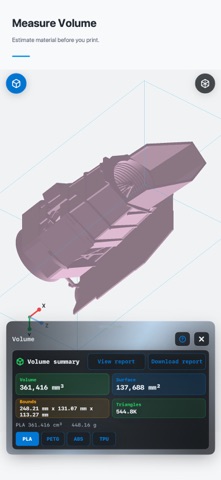
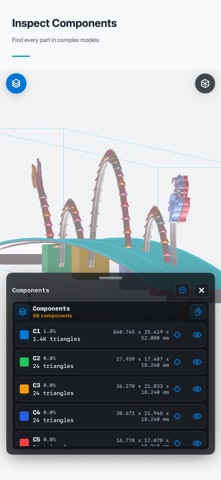
Measure distances, angles and X/Y/Z dimensions. Examine cross sections, volume and surface area. Use wall-thickness views, normal visualization, component coloring and printability checks to investigate mesh issues.
ORGANIZE AND SHARE
Find models in your STL library and share model images or inspection results. Premium options are available through in-app purchases. STL Viewer helps you inspect geometry; print settings and material choice still need to be checked for your printer.
Privacy Policy: https://docs.google.com/document/d/1fPpYIUs9nyiLBl27gIhtaJYv-lsw6kDTgKDAcx1PT-s/preview
Terms of Use (EULA): https://www.apple.com/legal/internet-services/itunes/dev/stdeula/
Subscription Terms: https://www.apple.com/legal/internet-services/itunes/dev/stdeula/