StoryGrid is a photo & video app developed by PETR URBANEK.
User Ratings
StoryGrid is rated 5.00 out of 5 stars. The rating is based on one rating ratings.
App Information
StoryGrid is freely available from the App Store. The app size is 2.40 MB. The latest version available is 2.1.0. The last update was on October 17, 2026.
Technical Requirements
The app has a content rating of Everyone. The app has been available on the App Store since June 2026.
Description by PETR URBANEK(from the App Store)
CUT PHOTOS AND VIDEOS INTO A STORY
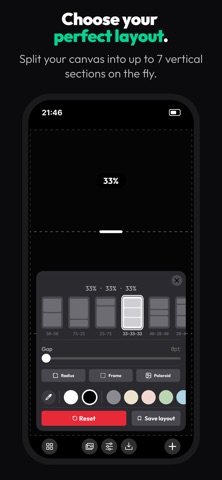
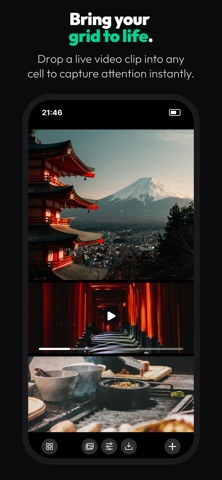
Every other grid app cuts your post into equal squares. StoryGrid puts the divider where the picture actually wants it — drag it, and the percentages follow, live. Split one photo across the sections so it reads as one continuous shot, or drop a different photo or clip into each block — up to three clips in one story, all playing in sync.
SERIES • Cut a whole run of up to 20 stories or posts from one pick. • Pick the format, add your photos and clips, set how many — it tells you how many your picks fill. • Every post on one board: tap a photo, then tap a block. Or let the wand mix them by colour. • One design for the whole series — blocks, gap, frame, corners, colour — or a saved grid. • Step through it post by post in the full editor, and swipe through it in the story preview. • Save every filled post to Photos in one go.
CUT • 1 to 6 vertical sections — thirds are a default, not a rule. • Drag any divider to any proportion, with live percentages. • 12 grids to start from, or drag your own. • Undo and redo every change, up to 30 steps.
FINISH • Gap width and corner radius, from an invisible split to a bold edge. • Any background colour behind the grid, or a diagonal gradient — or pick a colour straight off your photo with the eyedropper. • Four one-tap looks set the background, gap, frame and corners at once. • Pan, zoom and free-rotate a photo or a clip inside its block. The magnet levels it for you. • The hidden part of the picture shows while you move it, so you never place a photo or a clip blind. • Zoom a photo out past the frame so it spans the full width.
SHIP • Stories 1080 × 1920, portrait 1080 × 1350, square 1080 × 1080 — exported at 2× for sharper detail. No re-cropping. • Story preview: see the grid inside a mock story, chrome and all, before you post. • Save a layout and reload it in one tap. • Full-resolution export, as a photo or a video. No account, no ads, no watermark.
NOTHING LEAVES YOUR PHONE No account, no upload, no tracking. Every export is rendered on your device.
STORYGRID PRO Everything above stays free. PRO adds: • Up to three video clips in one grid — pan, zoom and rotate each. • Clips in a series, too. • Pick the clip that sets the length and the one whose sound plays. • Shorter clips start over or play back, your choice per clip. • Every clip plays in sync while you edit and preview. • Export the whole grid as video, at full resolution. • Polaroid and Leica edges, plus the taller top margin.
SUBSCRIPTION • Yearly $19.99 — save over 40%, with a 7-day free trial for new users. • Monthly $2.99. • Payment will be charged to your Apple ID account at confirmation of purchase. • Subscription automatically renews unless canceled at least 24 hours before the end of the current period. • Account will be charged for renewal within 24 hours prior to the end of the current period. • Manage or cancel your subscription anytime in your App Store Account Settings after purchase.
Made in Prague. Follow @_story_grid_ on Instagram for layouts and new grids.
Terms of Use: https://story-grid.app/terms Privacy Policy: https://story-grid.app/privacy
Each subscription will automatically renew 3 days before the expiration date for
the same time period. Subscriptions can be cancelled at any time before the renewal.