

StudioDB is made and published by Dipen Patel. AppBrain is an independent app data site and isn't affiliated with Dipen Patel. The app name, icon, screenshots and description belong to Dipen Patel and are shown as published on the App Store.
AppBrain's verdict
- Rating on App Store
- 4.00
- 1 ratings
- Last updated
- June 5, 2026
It doesn't have enough ratings yet to judge what users think.
Rankings
App Store top chartsApp Store Rankings for StudioDB
Competitors
Similar apps and more from Dipen PatelMore from Dipen Patel


Releases
Updates seen on the App Store- Version
- 2.0.1
- Launched
- December 2023
No changelog data
User feedback
Ratings and reviews on the App StoreComments on StudioDB for iOS
We don't have enough comments to show example comments. Please check back later.
Technology
Found in the app by AppBrain- Price
- Free
- App size
- 24.5 MB
- Content rating
- Everyone
Technologies used by StudioDB
About the app and developer
About StudioDB
StudioDB is a productivity app developed by Dipen Patel.
User Ratings
StudioDB is rated 4.00 out of 5 stars. The rating is based on one rating ratings.
App Information
StudioDB is freely available from the App Store. The app size is 24.51 MB. The latest version available is 2.0.1. The last update was on June 5, 2026.
Technical Requirements
The app has a content rating of Everyone. The app has been available on the App Store since December 2023.
Developer information for Dipen Patel
Address:
Frequently asked questions about StudioDB
Is StudioDB free?
Yes. StudioDB is free on the App Store.
Is StudioDB still available?
Yes. StudioDB is on the App Store, and the last update we saw was on June 5, 2026.
How large is StudioDB?
StudioDB is 24.51 MB.
Is StudioDB suitable for children?
App Store rates the content of StudioDB as suitable for everyone.
How do people rate StudioDB?
StudioDB has one rating of 4.00 stars on the App Store.
Who made StudioDB?
StudioDB was developed by Dipen Patel. It is listed in the productivity category on the App Store.
Store listing
By Dipen Patel, from the App Store




Description by Dipen Patel Written by the developer, not by AppBrain. Click to read.
Will allow you to cast your Characters , define Locations for your Scenes - give you a unique point of view of your characters – where you will be able to read/control/edit Scenes for Scripts where an individual Character can exist from the Project and Scripts Character Options.
It has an Object Oriented concept in writing Scripts that gives you a new and fresh interface in writing Scripts. Every aspect of writing a Script is considered an Object from the highest level (Projects) to the lowest level (Elements - Action, Dialogue, etc..)
Objects that can be analyzed, copied, moved, imported, exported, etc…
Example:
Project Object – contains Scripts, Characters, Locations, Artists, etc… Objects
Script Object – contains Scenes, Elements (Action-Dialogue-Shot-Transition-Note), Characters, XScript, etc… Objects
This concept in writing Scripts – creates a unique interface in bringing your imagination/Story to your Scripts. StudioDB will let you cast your Characters– and as you read and write your story – the image of your Actor will be connected to your Characters.
You will be able to select an Image that identifies your Object (Project, Script or Artist)
Features:
* Projects/Scripts are stored in Apps Core Database - where all aspect of writing Scripts exist as an Object
* StudioDB Artist Data is fully user controlled on the content - which allows you to control what Artist (Actors) are available for your Projects which can be used to cast your Character
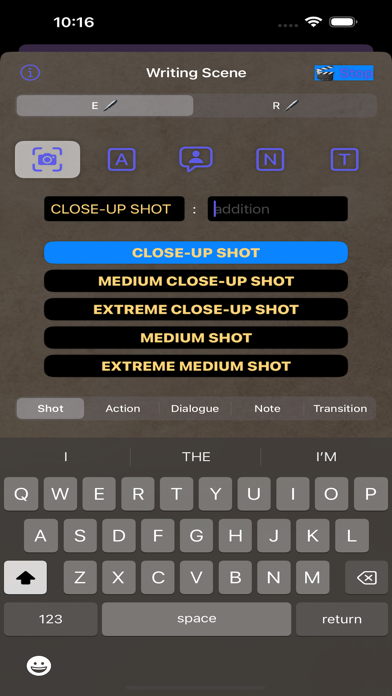
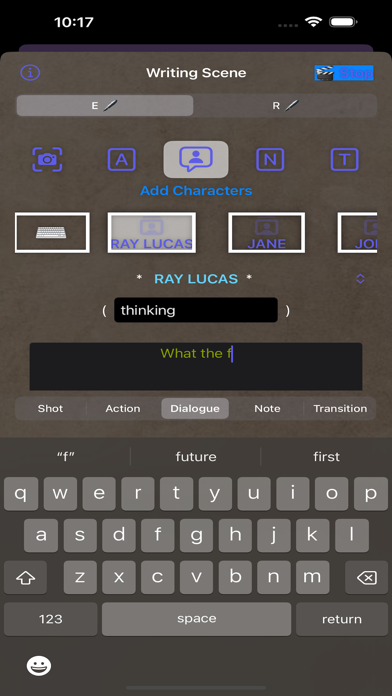
* Intelligent Element Options - When writing the Scenes
- Character Button to pick the Characters in the Dialogue & Scenes
- Auto check - typed Character name to see if they exist in Script Characters list - and linking it to the Scene and Dialogue
- Shot Button - to Select predefined/user customizable Shot options
- Transition Button - to Select predefined/user customizable Transition Options
* Character Segment in Project Detail - allow you to view & edit all the Scripts the Character is associated within that Project
* Copy/Cut/Paste functionality on you Script Writing Objects (Characters, Scenes & Elements)
* Internal Clipboard for Characters, Locations, Scenes, Elements and saved XScripts - User Controlled and Maintained
* Import/Export your Projects, Scripts, Characters, Locations, Artists, etc.. by creating the Objects JSON file.
* Options to Generate Report, Color rtf PDF, B&W rtf PDF and JSON Files depending on the Object (Project, Script, Scene, Character, Location, etc..)
* Studio, Project, Script, Character, Location, Artist, Site Report File and Option to Share once File is generated.
* Create Read Only files to send to other App Users to import in their Read tab as Read Only Script
Version 2.0.0+. App will be Free to use. Full Access to all Functionality.
Privacy policy: https://www.x23apps.com/studiodb-privacypolicy
Terms of Use: https://www.apple.com/legal/internet-services/itunes/dev/stdeula/