Sunny - Music Player is made and published by
Ramachandra Mallappa.
AppBrain is an independent app data site and isn't affiliated with Ramachandra Mallappa.
The app name, icon, screenshots and description belong to Ramachandra Mallappa and are shown as
published on the App Store.
About Sunny - Music Player
Sunny - Music Player is an entertainment app developed by Ramachandra Mallappa.
User Ratings
The app has no ratings yet.
App Information
Sunny - Music Player is freely available from the App Store. The app size is 4.69 MB. The latest version available is 3.1. The last update was on October 10, 2026.
Technical Requirements
The app has a content rating of Everyone. The app has been available on the App Store since July 2026.
Description by Ramachandra Mallappa(from the App Store)
Sunny is a clean, focused music player for two very different use cases: playing files stored right on your iPhone, and controlling an MPD (Music Player Daemon) server such as Volumio or Moode on your home network. No ads, no account, no subscriptions — just your music.
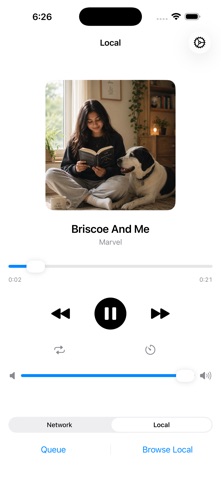
LOCAL PLAYBACK Copy your own audio files onto your iPhone using the Files app, and Sunny plays them straight from your device — no internet connection or server required.
• Supports MP3, M4A, AAC, WAV, AIFF, FLAC, CAF, Opus, and ALAC • Built-in file browser for your on-device music library • Full queue management — add, reorder, and remove tracks • Your queue is remembered across launches, so you can pick up right where you left off • Lock screen and Control Center playback controls, with artwork and metadata • Repeat modes: off, repeat one, repeat all • Sleep timer — fall asleep to your music with an auto-stop timer (5 to 60 minutes)
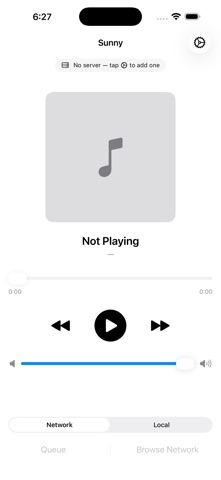
NETWORK / MPD REMOTE Already run an MPD server at home? Sunny doubles as a lightweight remote control.
• Add servers manually by host and port — no complicated setup • Browse your server's full music library • Manage the playback queue remotely • Real-time updates as tracks change, play, or pause • Works entirely over your local network — nothing leaves your home
WHY SUNNY Built to do one thing well: play your music, your way, without the clutter. No tracking, no third-party analytics, and no dependencies beyond what iOS gives you.
Getting started with local files is simple: open the Files app, go to On My iPhone → Sunny → Music, and copy your tracks in. They'll show up in Sunny right away.
Each subscription will automatically renew 3 days before the expiration date for
the same time period. Subscriptions can be cancelled at any time before the renewal.