

SupaWOL is made and published by SUPARAIN,Inc. AppBrain is an independent app data site and isn't affiliated with SUPARAIN,Inc. The app name, icon, screenshots and description belong to SUPARAIN,Inc. and are shown as published on the App Store.
AppBrain's verdict
- Last updated
- June 5, 2026
Rankings
App Store top chartsApp Store Rankings for SupaWOL
Competitors
Similar apps and more from SUPARAIN,Inc.Alternatives to SupaWOL






More from SUPARAIN,Inc.


Releases
Updates seen on the App Store- Version
- 1.6.1
- Launched
- June 2026
No changelog data
User feedback
Ratings and reviews on the App StoreComments on SupaWOL for iOS
We don't have enough comments to show example comments. Please check back later.
Technology
Found in the app by AppBrain- Price
- Free
- App size
- 22.0 MB
- Content rating
- Everyone
Technologies used by SupaWOL
About the app and developer
About SupaWOL
SupaWOL is a productivity app developed by SUPARAIN,Inc.
User Ratings
The app has no ratings yet.
App Information
SupaWOL is freely available from the App Store. The app size is 22.04 MB. The latest version available is 1.6.1. The last update was on June 5, 2026.
Technical Requirements
The app has a content rating of Everyone. The app has been available on the App Store since June 2026.
Developer information for SUPARAIN,Inc.
Address:
Frequently asked questions about SupaWOL
Is SupaWOL free?
Yes. SupaWOL is free on the App Store.
Is SupaWOL still available?
Yes. SupaWOL is on the App Store, and the last update we saw was on June 5, 2026.
How large is SupaWOL?
SupaWOL is 22.04 MB.
Is SupaWOL suitable for children?
App Store rates the content of SupaWOL as suitable for everyone.
Who made SupaWOL?
SupaWOL was developed by SUPARAIN,Inc. It is listed in the productivity category on the App Store.
What are the best alternatives to SupaWOL?
People looking at SupaWOL also look at these productivity apps: DeskBridge, What? - AI Rewriter, 예천버스정보, Hold'em GTO, 안동버스정보.
Store listing
By SUPARAIN,Inc., from the App Store




Description by SUPARAIN,Inc. Written by the developer, not by AppBrain. Click to read.
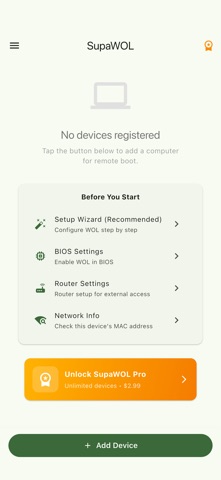
Sending a WOL packet is easy. The hard part is preparing the PC: disabling ErP/EuP in the BIOS, turning off Fast Startup in Windows, reserving the IP on your router, and configuring port forwarding for WAN access. SupaWOL guides you through all of it.
■ Core Features
• Wake PCs over LAN and WAN (external networks)
• One-tap magic packet send
• BIOS setup guides for 7 brands (ASUS, Gigabyte, MSI, ASRock, Dell, HP, Lenovo)
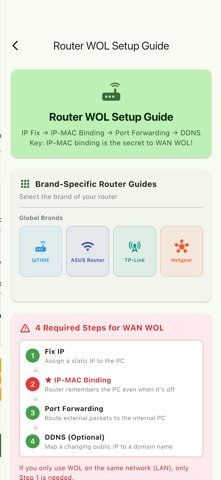
• Router setup guides for 7 brands (ipTIME, ASUS, TP-Link, Netgear, plus Korea ISP routers)
• 7-step setup wizard that walks first-time users to a successful wake
• OS-specific instructions for Windows, macOS, and Linux
• Diagrams, menu-path chips, and FAQ for visual learning
• No ads, no tracking, no backend
■ Wake from Anywhere (WAN)
• Send magic packets directly to a DDNS hostname or public IP
• Router configuration walkthrough in 4 stages
(Static IP → IP-MAC binding → Port forwarding → DDNS)
• Automatic detection and recovery for iOS link-local situations
■ Free vs Pro
Free — 1 device registration, full access to all guides, no ads
Pro ($2.99, one-time) — Unlimited device registrations
■ Privacy First
SupaWOL transmits zero user data. No ad identifiers, no location coordinates, no analytics tools whatsoever. All device registration info is stored only on your device.
■ Supported Languages
English · 한국어 · 日本語 · 中文 · Deutsch · Français · Español · Italiano · Português · Русский