

SuperCam Studio
SuperCam Studio is made and published by BinaryBrew. AppBrain is an independent app data site and isn't affiliated with BinaryBrew. The app name, icon, screenshots and description belong to BinaryBrew and are shown as published on the App Store.
AppBrain's verdict
- Last updated
- September 14, 2026
Rankings
App Store top chartsApp Store Rankings for SuperCam Studio
Competitors
Similar apps and more from BinaryBrewAlternatives to SuperCam Studio


Releases
Updates seen on the App Store- Version
- 1.0.6
- Launched
- July 2026
No changelog data
User feedback
Ratings and reviews on the App StoreComments on SuperCam Studio for iOS
We don't have enough comments to show example comments. Please check back later.
Technology
Found in the app by AppBrain- Price
- Free
- App size
- 19.7 MB
- Content rating
- Everyone
Technologies used by SuperCam Studio
About the app and developer
About SuperCam Studio
SuperCam Studio is a photo & video app developed by BinaryBrew.
What is the rating of SuperCam Studio?
SuperCam Studio has no ratings yet.
Is SuperCam Studio free?
SuperCam Studio is free. The app size is 19.75 MB. The latest version available is 1.0.6. The last update was on September 14, 2026.
What are the requirements for SuperCam Studio?
The app has a content rating of Everyone. The app has been available on the App Store since July 2026.
Developer information for BinaryBrew
Address:
Frequently asked questions about SuperCam Studio
Is SuperCam Studio free?
Yes. SuperCam Studio is free on the App Store.
Is SuperCam Studio still available?
Yes. SuperCam Studio is on the App Store, and the last update we saw was on September 14, 2026.
How large is SuperCam Studio?
SuperCam Studio is 19.75 MB.
Is SuperCam Studio suitable for children?
App Store rates the content of SuperCam Studio as suitable for everyone.
Who made SuperCam Studio?
SuperCam Studio was developed by BinaryBrew. It is listed in the photo & video category on the App Store.
What are the best alternatives to SuperCam Studio?
People looking at SuperCam Studio also look at these photo & video apps: FilmDev: Darkroom Timer, HDMI Cam - OBS Camera, CamDuo: Dual Camera Recorder, VigilCam, ClipDuet: Reaction Video Maker.
Store listing
By BinaryBrew, from the App Store


Description by BinaryBrew Written by the developer, not by AppBrain. Click to read.
SuperCam Studio turns your iPhone into a professional-quality webcam, streaming your camera feed to your computer over Wi-Fi or USB. Whether you're podcasting, live streaming, teaching online, or just want a sharper picture on your next video call, your iPhone's camera can now do the job your laptop's built-in camera never could.
Connecting is simple. The Companion app finds your iPhone automatically over your local network, or you can connect manually by IP address if you'd rather. USB is supported too, for a stable, wire-free-interference connection when you need it. Once connected,you can switch between your front and back cameras, move between lenses if your iPhone has more than one, and pinch to zoom or use the on-screen zoom controls to frame your shot exactly how you want it.
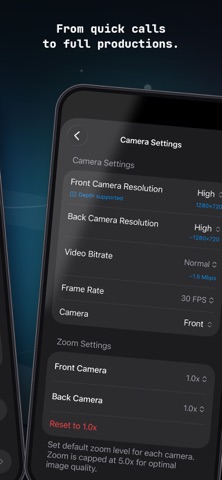
You're in full control of stream quality. Choose Hardware Encoding for smooth, efficient video up to 4K, or Software Encoding when you need broader compatibility. Resolution options range from 720p up to 4K, frame rates go up to 60 fps, and you can adjust bitrate to match your network and the quality you're after. 720p HD streaming is free, forever — no trial, no account required to get started.
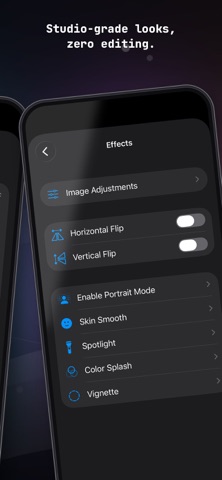
To help your stream look its best, SuperCam Studio includes a set of built-in video effects:
- Background Blur to keep the focus on you
- Skin Smooth for a natural beauty pass
- Vignette for a cinematic edge
- Spotlight and Color Splash for more creative looks.
SuperCam Studio also offers Image Adjustments, so you can tweak brightness, contrast, saturation, and color temperature right on your stream. Handy when your room lighting isn't cooperating, or your light just has a yellow or blue tint you want to correct.
The Companion app for your computer acts as a virtual camera, so you can use your iPhone directly in Zoom, Google Meet, Microsoft Teams, FaceTime, and most other video apps without installing anything extra. It also works alongside OBS, as a Media Source for hardware-encoded H.264 streams or a Browser Source for MJPEG, for anyone who wants more control over their setup. Your stream stays on your local network too — video never routes through external servers.
For anyone who wants an extra layer of privacy, the Companion app can also pair with your iPhone with just a quick QR code scan, so only devices you've approved can join your stream. This is available as part of our secure streaming option.
SuperCam Studio is available in English and Japanese at launch, with more languages planned for future updates.
Terms of Use (EULA): https://supercam.studio/terms/
Privacy Policy: https://supercam.studio/privacy/
Thank you for choosing SuperCam Studio. We built this app to help creators, streamers, and everyday users get more out of the camera they already carry with them. If you run into any issues or have ideas for what we should build next, we'd love to hear from you.