

SuperVision mini
SuperVision mini is made and published by Miguel Angel Lozano Ortega. AppBrain is an independent app data site and isn't affiliated with Miguel Angel Lozano Ortega. The app name, icon, screenshots and description belong to Miguel Angel Lozano Ortega and are shown as published on the App Store.
AppBrain's verdict
Established- Rating on App Store
- 3.67
- 3 ratings
- Last updated
- January 4, 2024
It doesn't have enough ratings yet to judge what users think.
Rankings
App Store top chartsApp Store Rankings for SuperVision mini
Competitors
Similar apps and more from Miguel Angel Lozano OrtegaAlternatives to SuperVision mini




More from Miguel Angel Lozano Ortega

Releases
Updates seen on the App Store- Version
- 1.1.0
- Launched
- August 2015
No changelog data
User feedback
Ratings and reviews on the App StoreComments on SuperVision mini for iOS
We don't have enough comments to show example comments. Please check back later.
Technology
Found in the app by AppBrain- Price
- Free
- App size
- 21.6 MB
- Content rating
- Everyone
Technologies used by SuperVision mini
About the app and developer
About SuperVision mini
SuperVision mini is a health & fitness app developed by Miguel Angel Lozano Ortega.
User Ratings
SuperVision mini is rated 3.67 out of 5 stars. The rating is based on 3 ratings.
App Information
SuperVision mini is freely available from the App Store. The app size is 21.63 MB. The latest version available is 1.1.0. The last update was on January 4, 2024.
Technical Requirements
The app has a content rating of Everyone. The app has been available on the App Store since August 2015.
Developer information for Miguel Angel Lozano Ortega
Address:
Store listing
By Miguel Angel Lozano Ortega, from the App Store


Description by Miguel Angel Lozano Ortega Written by the developer, not by AppBrain. Click to read.
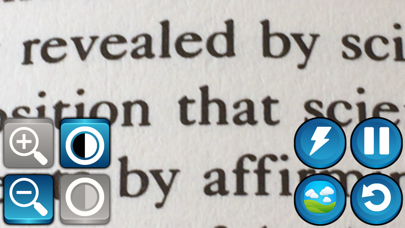
The application allows to easily control the zoom, the contrast and the color mode of the image. Three natural and six synthetical color models are supported. You can also use SuperVision in dark environments, by activating the flash of your smartphone.
If you touch the screen, a set of big size buttons appear to setup the view (from left to right):
- Zoom - A pair of buttons to increase or decrease the zoom. Maximum zoom supported is x5.
- Contrast - A pair of buttons for increase or decrease the image contrast.
- Flash - Set flash on/off for dark environments.
- Color Mode - Switch between color modes (3 natural colors and 6 synthetical colors for reading)
- Pause - A button to freeze the video
- Reset - Configuration will back to predefined values except cardboard mode and bifocal mode.
The application is fully compatible with the accessibility system of iOS (VoiceOver).
SuperVision is developped by the Mobile Vision Research Lab and Neosistec. This work is partially funded by Generalitat Valenciana and MIMECO. Thanks to the VI associations ONCE and RetiMur for their collaboration.