



AppBrain's verdict
- Last updated
- October 23, 2026
- Size
- 123.1 MB
User feedback
Ratings and reviews on the App StoreComments on SwiftShare: Fast File Sharing for iOS
We don't have enough comments to show example comments. Please check back later.
Store listing
By Gangani Gautam Rameshbhai, from the App StoreDescription by Gangani Gautam Rameshbhai Written by the developer, not by AppBrain. Click to read.
own Wi-Fi, with no internet connection, no cloud upload and no account.
SwiftShare connects two devices directly. Your files never leave the room.
WHY SWIFTSHARE
• No internet required. Transfers run device to device over local Wi-Fi, or over
a shared hotspot when there is no network at all.
• Nothing touches the cloud. No upload, no server, no copy of your files
anywhere but on the two devices.
• No account and no sign-up. Open the app and share.
• Every device, one app. iPhone, iPad all discover each other.
• Full local-network speed. Gigabytes in minutes, not the hours a round trip
through the cloud takes.
HOW IT WORKS
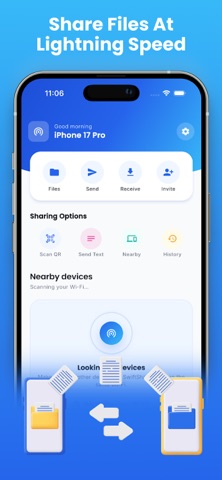
1. Open SwiftShare on both devices, on the same Wi-Fi.
2. One taps Receive. The other taps Send, then picks the device that appears.
3. Choose photos, videos, documents, music, archives — or a whole folder.
4. Watch it go.
Devices find each other automatically. On a locked-down network where discovery
is blocked, scan the pairing QR code or type the short code in by hand instead.
BUILT FOR REAL TRANSFERS
• Pause and resume. An interrupted transfer picks up from the exact byte it
stopped at, never from the beginning.
• Live progress. Current speed, time remaining, and the file moving right now.
• Nothing gets overwritten. A file whose name you already have arrives as
"photo (1).jpg" instead of replacing yours.
• Nothing arrives half-written. Files are staged as they come in and only appear
once they are complete.
• A notification when a transfer finishes, so you can put the phone down.
EVERY TRANSFER, ON THE RECORD
• History of everything you have sent and received, searchable by file name or
device, with favourites that stick around.
• Send again. Re-send any past batch to a new device in two taps.
• Insights. Total data moved, your fastest transfer, and the devices you share
with most.
THOUGHTFUL DETAILS
• Auto-receive for your own devices — off by default, so nothing lands without
asking while you are on public Wi-Fi.
• Name your device so people nearby recognise it.
• Send text and links, not just files.
• Received files stay organised in one place, ready to open or share onward.
• English, Spanish, French, Portuguese, Hindi and Arabic, with full
right-to-left layout.
SUBSCRIPTION & PRICING
• $79.99/Yearly, $9.99/Week and also with 3-day free trial
• 3-day free trial, then auto-renews weekly at the price shown before purchase
• Payment charged to your iTunes account at purchase confirmation
• Subscription auto-renews unless canceled at least 24h before the end of the current period
• Manage/cancel anytime in your iTunes account Settings
Privacy Policy: https://appspolicymanager.com/apps/swiftshare-fast-file-sharing/privacy-policy
Terms of Use: https://appspolicymanager.com/apps/swiftshare-fast-file-sharing/terms
PRIVACY
SwiftShare has no accounts and no file servers. Your files travel straight from
one device to the other across your local network. They are never uploaded,
never scanned, and never stored by us.
Both devices need to be on the same Wi-Fi network or a shared hotspot. Two
devices on mobile data cannot reach each other — that direct local connection is
exactly what makes SwiftShare private and fast.
Safety and technology
Found in the app by AppBrain- Price
- Free
- App size
- 123.1 MB
- Content rating
- Everyone
Technologies used by SwiftShare: Fast File Sharing
Releases
Updates seen on the App Store- Version
- 1.1.3
- Launched
- September 2026
No changelog data
Alternatives
Similar apps and more from Gangani Gautam RameshbhaiAlternatives to SwiftShare: Fast File Sharing


Rankings
App Store top chartsApp Store Rankings for SwiftShare: Fast File Sharing
About the app and developer
About SwiftShare: Fast File Sharing
SwiftShare: Fast File Sharing is a productivity app developed by Gangani Gautam Rameshbhai.
User Ratings
The app has no ratings yet.
App Information
SwiftShare: Fast File Sharing is freely available from the App Store. The app size is 123.11 MB. The latest version available is 1.1.3. The last update was on October 23, 2026.
Technical Requirements
The app has a content rating of Everyone. The app has been available on the App Store since September 2026.
SwiftShare: Fast File Sharing is made and published by Gangani Gautam Rameshbhai. AppBrain is an independent app data site and isn't affiliated with Gangani Gautam Rameshbhai. The app name, icon, screenshots and description belong to Gangani Gautam Rameshbhai and are shown as published on the App Store.
Developer information for Gangani Gautam Rameshbhai
Address:
Frequently asked questions about SwiftShare: Fast File Sharing
Is SwiftShare: Fast File Sharing free?
Yes. SwiftShare: Fast File Sharing is free on the App Store.
Is SwiftShare: Fast File Sharing still available?
Yes. SwiftShare: Fast File Sharing is on the App Store, and the last update we saw was on October 23, 2026.
How large is SwiftShare: Fast File Sharing?
SwiftShare: Fast File Sharing is 123.11 MB.
Is SwiftShare: Fast File Sharing suitable for children?
App Store rates the content of SwiftShare: Fast File Sharing as suitable for everyone.
Who made SwiftShare: Fast File Sharing?
SwiftShare: Fast File Sharing was developed by Gangani Gautam Rameshbhai. It is listed in the productivity category on the App Store.
What are the best alternatives to SwiftShare: Fast File Sharing?
People looking at SwiftShare: Fast File Sharing also look at these productivity apps: HAPGETA AI, PDF Reader Mate, Stowe: Voice Daily Planner, BoostSpeed Pro, Recur: Kids Classes, Handled.