






AppBrain's verdict
- Last updated
- October 17, 2026
- Size
- 6.28 MB
User feedback
Ratings and reviews on the App StoreComments on SwiftyTerminal: Terminal Shell for iOS
We don't have enough comments to show example comments. Please check back later.
Store listing
By Hemal Modi, from the App StoreDescription by Hemal Modi Written by the developer, not by AppBrain. Click to read.
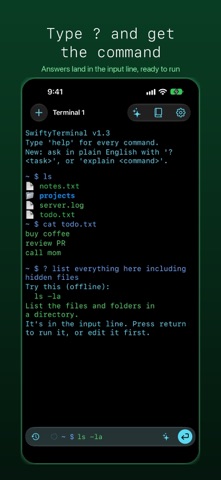
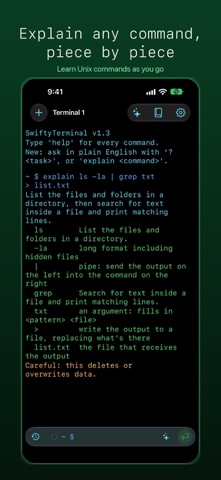
Type ? followed by a task, like "? show hidden files", and the answer lands in the input line, ready to run or edit. Type explain before any command line and it is broken down piece by piece, so you learn as you go. On devices with Apple Intelligence the copilot runs on the on-device model. Everywhere else it answers from a built-in offline guide. Nothing you type leaves your device.
COMMAND COPILOT
- Plain English to a runnable command, checked against the commands this app actually has
- Type explain before a command to decode pipes, options and redirects
- Commands that delete or overwrite data are never run for you: they wait in the input line
- Recent answers are saved so you can run them again
- A searchable reference of every built-in command, with examples
ASK FROM ANYWHERE
- Shortcuts: Explain a Terminal Command, Suggest a Terminal Command, Run in Terminal, Open Command Copilot
- Say "Explain grep in SwiftyTerminal" or "Ask SwiftyTerminal for a command"
- Every command is searchable from Spotlight
FILES AND TEXT
List, create, copy, move and delete files and folders with ls, cd, mkdir, touch, cp, mv, rm and cat. Inspect with file, wc, head and tail. Search and process text with find, grep (-i -v -n -c), sort, uniq, sed and awk, plus pipes, redirects and glob patterns.
NETWORK TOOLS
ping, nslookup, curl, netcat and port scans for hosts you own, plus SSH sessions with remote commands and file transfer.
SYSTEM AND SCRIPTING
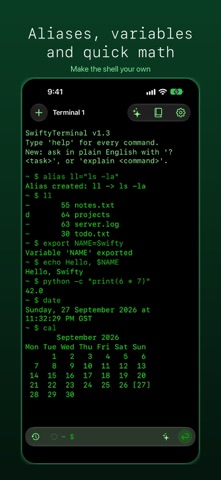
date, cal, uptime, df, uname, environment variables, aliases and history. A built-in mini Python and Lua interpreter for quick math and variables.
A FRESH LOOK
A hand-drawn design with living "thinking orb" animations, a Liquid Glass input bar, four terminal themes and adjustable text size. Reduce Motion calms every animation.
SwiftyTerminal is a simulated terminal that runs entirely inside the app sandbox. It does not download or run external code.
Who it's for: developers, students learning the command line, IT and network folks, and anyone curious about Unix commands.
Safety and technology
Found in the app by AppBrain- Price
- $0.99
- App size
- 6.28 MB
- Content rating
- Everyone
Technologies used by SwiftyTerminal: Terminal Shell
Releases
Updates seen on the App Store- Version
- 1.6
- Launched
- October 2025
No changelog data
Alternatives
Similar apps and more from Hemal ModiMore from Hemal Modi






Rankings
App Store top chartsApp Store Rankings for SwiftyTerminal: Terminal Shell
About the app and developer
About SwiftyTerminal: Terminal Shell
SwiftyTerminal: Terminal Shell is an overall app developed by Hemal Modi.
User Ratings
The app has no ratings yet.
App Information
SwiftyTerminal: Terminal Shell costs $0.99. The app size is 6.28 MB. The latest version available is 1.6. The last update was on October 17, 2026.
Technical Requirements
The app has a content rating of Everyone. The app has been available on the App Store since October 2025.
SwiftyTerminal: Terminal Shell is made and published by Hemal Modi. AppBrain is an independent app data site and isn't affiliated with Hemal Modi. The app name, icon, screenshots and description belong to Hemal Modi and are shown as published on the App Store.
Developer information for Hemal Modi
Address: