

Swipe Blur: Face & Screenshot
Swipe Blur: Face & Screenshot is made and published by YUYA SATO. AppBrain is an independent app data site and isn't affiliated with YUYA SATO. The app name, icon, screenshots and description belong to YUYA SATO and are shown as published on the App Store.
AppBrain's verdict
- Last updated
- August 17, 2026
- Size
- 2.68 MB
User feedback
Ratings and reviews on the App StoreComments on Swipe Blur: Face & Screenshot for iOS
We don't have enough comments to show example comments. Please check back later.
Store listing
By YUYA SATO, from the App Store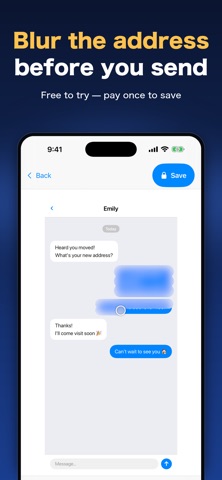



Description by YUYA SATO Written by the developer, not by AppBrain. Click to read.
You're about to post a photo of your kid, and their face is in it.
You're about to send a screenshot, and your address is sitting right there.
Swipe Blur does that one job and nothing else.
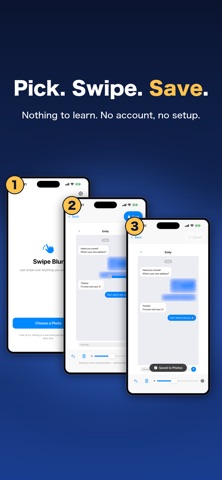
HOW IT WORKS
1. Pick a photo
2. Swipe over what you want hidden
3. Save it back to your photos
Nothing to learn. No account. No setup screens.
WHAT PEOPLE USE IT FOR
- Faces, before a photo goes on social media
- Addresses, phone numbers and names in a screenshot
- Chat threads, notifications and order history, where only a few words need to go
- The license plate on a car you're selling
- House numbers, mail and paperwork in listing photos
- The part of a document, receipt or ID card you'd rather not show
WHAT IT DOES
- Blurs exactly where your finger goes, and nowhere else
- Brush size you can change, for small text or wide areas
- Undo one stroke, or clear everything and start over
- Reaches the very edge of the photo (the space around the photo takes your finger too)
- Saves straight into your photo library
WHY A BLUR INSTEAD OF A BLACK BOX
A black rectangle announces that something was hidden. A blur lets the photo still look like a photo.
PRICING
- Free to download. Choosing a photo, swiping to blur it, and checking the result are all free.
- Only saving the edited photo to your Photos library requires a one-time in-app purchase.
- It's a one-time purchase, not a subscription. Nothing is charged after that.
- No ads. No watermark on your saved photos.
- You can confirm everything is properly hidden on your own photo before you buy.
- If you bought this app back when it was a paid app, saving stays available to you at no extra cost.
PRIVACY
- Your photos never leave your iPhone. There is no developer server.
- The network is used only to buy the in-app purchase or restore it.
- No analytics, no ad SDKs, no tracking of any kind.
- Add-only access to your photo library. It never reads, changes or deletes the photos you already have.
- No account, no sign-in, no email address.
REQUIREMENTS
- iPhone, iOS 17.0 or later
- English and Japanese, switchable inside the app
BEFORE YOU START
- You blur by hand. There is no automatic face detection.
- No mosaic or pixel tiles, no black-out boxes, no video editing.
- Very large photos may be scaled down to 4096 pixels on the long edge.
Swipe over what you want hidden. That is all this app does.
Safety and technology
Found in the app by AppBrain- Price
- Free
- App size
- 2.68 MB
- Content rating
- Everyone
Technologies used by Swipe Blur: Face & Screenshot
Releases
Updates seen on the App Store- Version
- 1.1.0
- Launched
- July 2026
No changelog data
Alternatives
Similar apps and more from YUYA SATOMore from YUYA SATO


Rankings
App Store top chartsApp Store Rankings for Swipe Blur: Face & Screenshot
About the app and developer
About Swipe Blur: Face & Screenshot
Swipe Blur: Face & Screenshot is a photo & video app developed by YUYA SATO.
What is the rating of Swipe Blur: Face & Screenshot?
Swipe Blur: Face & Screenshot has no ratings yet.
Is Swipe Blur: Face & Screenshot free?
Swipe Blur: Face & Screenshot is free. The app size is 2.68 MB. The latest version available is 1.1.0. The last update was on August 17, 2026.
What are the requirements for Swipe Blur: Face & Screenshot?
The app has a content rating of Everyone. The app has been available on the App Store since July 2026.
Developer information for YUYA SATO
Address:
Frequently asked questions about Swipe Blur: Face & Screenshot
Is Swipe Blur: Face & Screenshot free?
Yes. Swipe Blur: Face & Screenshot is free on the App Store.
Is Swipe Blur: Face & Screenshot still available?
Yes. Swipe Blur: Face & Screenshot is on the App Store, and the last update we saw was on August 17, 2026.
How large is Swipe Blur: Face & Screenshot?
Swipe Blur: Face & Screenshot is 2.68 MB.
Is Swipe Blur: Face & Screenshot suitable for children?
App Store rates the content of Swipe Blur: Face & Screenshot as suitable for everyone.
Who made Swipe Blur: Face & Screenshot?
Swipe Blur: Face & Screenshot was developed by YUYA SATO. It is listed in the photo & video category on the App Store.