
Switch Access Training: Camera
Switch Access Training: Camera is made and published by Tracy Mansfield. AppBrain is an independent app data site and isn't affiliated with Tracy Mansfield. The app name, icon, screenshots and description belong to Tracy Mansfield and are shown as published on the App Store.
AppBrain's verdict
Established- Rating on App Store
- 5.00
- 2 ratings
- Last updated
- January 11, 2022
- Size
- 14.1 MB
It doesn't have enough ratings yet to judge what users think.
User feedback
Ratings and reviews on the App StoreComments on Switch Access Training: Camera for iOS
We don't have enough comments to show example comments. Please check back later.
Store listing
By Tracy Mansfield, from the App Store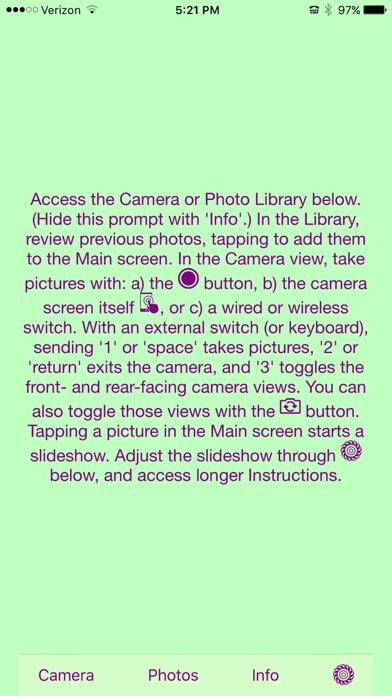


Description by Tracy Mansfield Written by the developer, not by AppBrain. Click to read.
Picture taking is a preferred activity for some people, where this app can help to familiarize a student with cause-and-effect relationships, perhaps on the way to their using switch access for an augmentative and alternative communication device (AAC); in fact, that AAC might even be provided on the same sort of device on which the switch-access training occurred. (See the app: "Switch Access Training with Music")
You access the Camera and Photo Library with the buttons on the main page. In the Camera, you can take pictures with either: a) the camera button icon, b) the camera screen itself (with the touchscreen acting as a button), or c) a wired or wireless switch.
In the Photo Library, you can review previously taken photos, tapping them to add photos to the set currently displayed on the Main screen. (There is no checkmark to indicate whether or not a picture has been selected, as I will be creating a separate app for making actual presentations.)
Tapping a photo in the Main view will start a slideshow with a default 3-second delay between photos. Adjust the slideshow through the Settings icon, where you can decide to have each tap: a) advance the album by one picture, or b) start/stop the slideshow. This is also where you can adjust the delay interval between the slides (from 1 to 5 seconds).
With an external switch (or keyboard), sending '1' or 'space' takes pictures, '2' or 'return' exits the camera, and '3' toggles the front- and rear-facing camera views. You can also toggle these two views with the camera view button.
Safety and technology
Found in the app by AppBrain- Price
- Free
- App size
- 14.1 MB
- Content rating
- Everyone
Technologies used by Switch Access Training: Camera
Releases
Updates seen on the App Store- Version
- 1.09
- Launched
- October 2016
No changelog data
Alternatives
Similar apps and more from Tracy MansfieldAlternatives to Switch Access Training: Camera






More from Tracy Mansfield


Rankings
App Store top chartsApp Store Rankings for Switch Access Training: Camera
About the app and developer
About Switch Access Training: Camera
Switch Access Training: Camera is an education app developed by Tracy Mansfield.
What is the rating of Switch Access Training: Camera?
Switch Access Training: Camera is rated 5.00 out of 5 stars, based on 2 ratings.
Is Switch Access Training: Camera free?
Switch Access Training: Camera is free. The app size is 14.11 MB. The latest version available is 1.09. The last update was on January 11, 2022.
What are the requirements for Switch Access Training: Camera?
The app has a content rating of Everyone. The app has been available on the App Store since October 2016.
Developer information for Tracy Mansfield
Address:
Frequently asked questions about Switch Access Training: Camera
Is Switch Access Training: Camera free?
Yes. Switch Access Training: Camera is free on the App Store.
Is Switch Access Training: Camera still available?
Yes. Switch Access Training: Camera is on the App Store, and the last update we saw was on January 11, 2022.
How large is Switch Access Training: Camera?
Switch Access Training: Camera is 14.11 MB.
Is Switch Access Training: Camera suitable for children?
App Store rates the content of Switch Access Training: Camera as suitable for everyone.
How do people rate Switch Access Training: Camera?
Switch Access Training: Camera scores 5.00 out of 5 stars, from 2 ratings on the App Store.
Who made Switch Access Training: Camera?
Switch Access Training: Camera was developed by Tracy Mansfield. It is listed in the education category on the App Store.
What are the best alternatives to Switch Access Training: Camera?
People looking at Switch Access Training: Camera also look at these education apps: Turn Taking, Switch Accessible Puzzles, Sensory 3DSnake, Step Scanning, Switch Kids.