

Switch Kids is made and published by Marblesoft. AppBrain is an independent app data site and isn't affiliated with Marblesoft. The app name, icon, screenshots and description belong to Marblesoft and are shown as published on the App Store.
AppBrain's verdict
- Last updated
- December 21, 2017
Rankings
App Store top chartsApp Store Rankings for Switch Kids
Competitors
Similar apps and more from MarblesoftAlternatives to Switch Kids







More from Marblesoft


Releases
Updates seen on the App Store- Version
- 3.2
- Launched
- November 2011
No changelog data
User feedback
Ratings and reviews on the App StoreComments on Switch Kids for iOS
We don't have enough comments to show example comments. Please check back later.
Technology
Found in the app by AppBrain- Price
- $4.99
- App size
- 14.0 MB
- Content rating
- Everyone
Technologies used by Switch Kids
About the app and developer
About Switch Kids
Switch Kids is an education app developed by Marblesoft.
What is the rating of Switch Kids?
Switch Kids has no ratings yet.
Is Switch Kids free?
Switch Kids costs $4.99. The app size is 14.02 MB. The latest version available is 3.2. The last update was on December 21, 2017.
What are the requirements for Switch Kids?
The app has a content rating of Everyone. The app has been available on the App Store since November 2011.
Developer information for Marblesoft
Address:
Frequently asked questions about Switch Kids
Is Switch Kids free?
No. Switch Kids costs $4.99 on the App Store.
Is Switch Kids still available?
Yes. Switch Kids is on the App Store, and the last update we saw was on December 21, 2017.
How large is Switch Kids?
Switch Kids is 14.02 MB.
Is Switch Kids suitable for children?
App Store rates the content of Switch Kids as suitable for everyone.
Who made Switch Kids?
Switch Kids was developed by Marblesoft. It is listed in the education category on the App Store.
What are the best alternatives to Switch Kids?
People looking at Switch Kids also look at these education apps: Catch The Cow, Switch Access Training: Camera, TouchMe PuzzleKlick, Step Scanning, Sensory AlphaDrop.
Store listing
By Marblesoft, from the App Store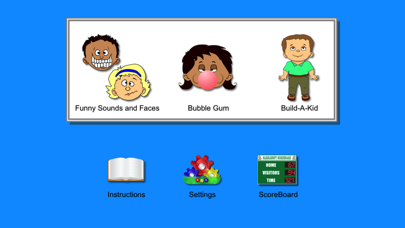
Description by Marblesoft Written by the developer, not by AppBrain. Click to read.
While the program is intended for switch users, it can also be used just by touching the screen. A finger acts like a switch. It doesn't matter where you touch, just that you touch. In the main activities, the user touches anywhere on the screen to cause the next action (the effect). A two-, three- or four-finger touch will cause a different action. You can use up to four external switches for input, to allow full use of the program to people who cannot easily touch the screen because of physical disabilities.
The numbers 1 through 4 on a Bluetooth keyboard will also control the 4 actions.
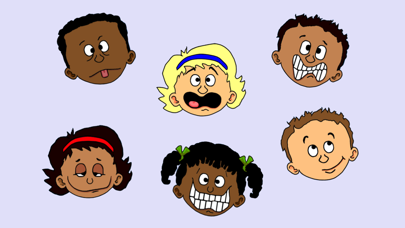
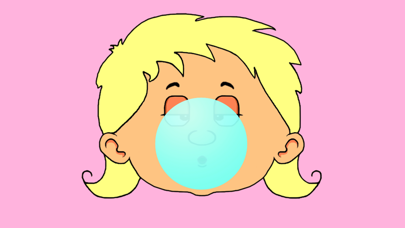
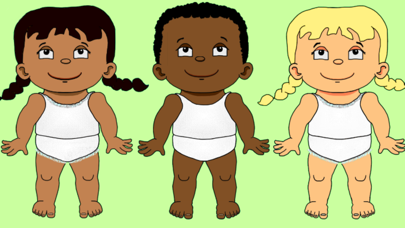
Switch Kids contains three activities, Funny Sounds and Faces, Bubble Gum and Build-A-Kid. A scoreboard tracks the child's progress.
Funny Sounds and Faces
In this activity the user presses a switch to see a funny face and hear a funny sound. Holding the switch down causes the faces to play one after another, until the switch is released. An optional second switch (or a two-finger touch) causes the face to be displayed headless. A third finger or switch squashes the face and a fourth spins it. This is a great switch training activity to teach start/stop and multiple-switch cause and effect (different causes produce different effects).
Bubble Gum
In this activity the user presses and releases his or her switch several times to blow a bubble. This is an excellent example of cause and effect with a goal, the goal being the obvious humorous conclusion. This activity also teaches multiple-switch cause and effect (different causes produce different effects). An optional second switch (or a two-finger touch) can be used to shrink the bubble. A third finger or touch changes the gum flavor, and a fourth changes the kids. From the Settings panel you can choose the flavor of bubble gum to use, and whether or not to randomly pop the bubble early.
Build-A-Kid
In this activity, a different body part or piece of clothing is added with each new switch press until the kid is complete. This is another example of cause and effect with a goal. This activity also teaches multiple-switch cause and effect (different causes produce different effects). An optional second switch (or a two-finger touch) can be used to undo the last part. A third finger or touch changes the kids, and a fourth flips them upside-down. From the Settings panel you can choose to optionally show twins or triplets, to make them identical or not, and whether to show the names on the finished kids.
Switch Kids is based on the popular desktop program of the same name by Marblesoft-Simtech.