Download Android Apps and Games
AppBrain
  • Apps
  • Apps being viewed right now Trending apps today Most popular apps All-time most downloaded apps Top rated apps
  • Intelligence ▾
    Intelligence overview → Track any Android app or your whole market
    Track & analyze
    Keyword Tracker & OptimizerTrack & improve Play rankings App Performance ReportOne-off PDF for any app StatisticsFree Android & Play market stats
    Promote your app
    Featured Apps App Links
  • Intelligence
  • Pricing
  • Dashboard
  • Sign up
  • Log in
Last updated on: 2026-06-23
App Store Apps > Productivity > Sync - File Backup and Restore
Sync - File Backup and Restore icon

Sync - File Backup and Restore

1.0.11
Miciniti Technologies
3.73
26 reviews
Free

Sync - File Backup and Restore Screenshot 1 of 5
Sync - File Backup and Restore Screenshot 2 of 5
Sync - File Backup and Restore Screenshot 3 of 5
Sync - File Backup and Restore Screenshot 4 of 5
Sync - File Backup and Restore Screenshot 5 of 5
Download from the App Store

About Sync - File Backup and Restore

Sync - File Backup and Restore is an overall app developed by Miciniti Technologies.

Download Statistics

User Ratings

Sync - File Backup and Restore is rated 3.73 out of 5 stars. The rating is based on 26 ratings.

App Information

Sync - File Backup and Restore is FREE to download. The APK download size is 18.22 MB. The latest version available is 1.0.11. The last update was on May 14, 2026.

Technical Requirements

The app has a content rating of High Maturity. The app has been available on Google Play August 2019.

Description
Sync is a personal file sync app with built-in file manager and web server. With Sync, you can sync, backup, and restore your files to/from local drives and several cloud storage drives like Amazon S3, Dropbox, Box , OneDrive, and Google Drive.

1. Drives
A drive is either a local storage unit or a cloud storage service where your files and data are stored.

Sync supports the following drives:
- Private Drive: In-app storage drive
- Public Drive: File Sharing folder accessible via Finder/iTunes
- External Drive: USB drives
- Amazon S3
- Dropbox
- Box
- Microsoft OneDrive
- Google Drive


2. Source:
A source is a local storage unit that supplies files for upload to other drives and also receives files downloaded from them.

Sync supports the following sources:
- Private Drive: In-app storage drive
- Public Drive: File Sharing folder accessible via Finder/iTunes
- External Drive: USB drives


3. Tasks:
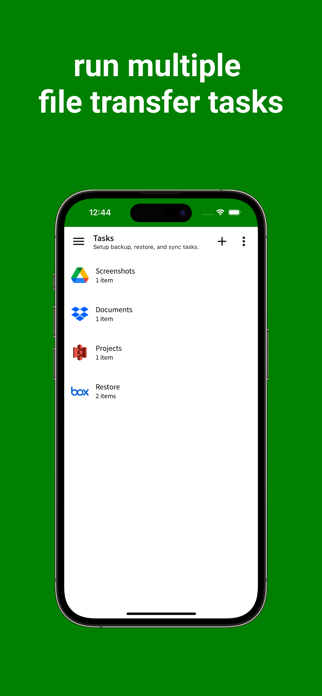
File transfers are organised into tasks. Each task consists of one or more sources and a target drive, allowing you to run sync, backup, or restore operations. You can create multiple tasks, and each task can include multiple sources.


4. File Transfer Operations
A task can perform the following operations:
- Full Sync: Compares and synchronises files between two locations. Deleted files in one location are removed from the other, while new files are copied across.
- Backup: Uploads files from local storage to a cloud storage drive.
- Restore: Downloads files from a cloud storage drive to a local drive.
- Backup Sync: Uploads only changed files from sources to the destination drive.
- Restore Sync: Downloads only changed files from a drive to the target sources.


5. File Manager
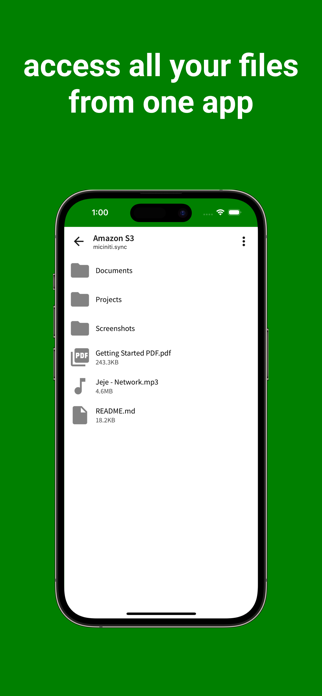
Sync includes a built-in file manager that lets you browse, upload, download, rename, and delete files and folders on your drives.


6. Web Server
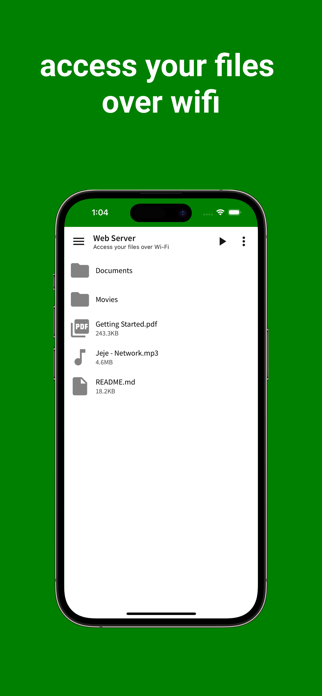
Share local files and folders over Wi-Fi. Web server features include selectable files and folders, folder listing, automatic serving of index.html, custom document root, partial content support, and auto-start on launch.


7. Pricing
Start with any drive for free (with ads).
Unlock additional drives and features—including Local Drive, Public Drive (file sharing via Finder/iTunes), External Drive (USB disks), Amazon S3, Google Drive, Dropbox, Box, OneDrive, and a built-in Web Server—through in-app purchases.

8. Terms of Use
This app uses Apple’s standard End User License Agreement (EULA), available here:
https://www.apple.com/legal/internet-services/itunes/dev/stdeula/


For additional help and guides, please visit
https://syncdrive.cloud/manual/
Show more Show less

More data about Sync - File Backup and Restore

Price Free to download
Rating 3.73 based on 26 ratings
Ranking Not ranked
Version 1.0.11
App download size 18.2 MB
Maturity High Maturity

Alternative downloads for the Sync - File Backup and Restore app

G Cloud Backup icon G Cloud Backup
Genie9 LTD
2.2
Free
73 ratings
Higher rated
FileCentral for iPhone icon FileCentral for iPhone
EuroSmartz Ltd
4.8
Free
176 ratings
Higher rated
IBackup icon IBackup
IDrive Incorporated
4.5
Free
175 ratings
SugarSync icon SugarSync
SugarSync, Inc.
3.2
Free
111 ratings
SMS & Text Message Export Pro icon SMS & Text Message Export Pro
Thanh Dang Tien
3.1
Free
383 ratings
Higher rated
PhoneCopy: Backup and transfer icon PhoneCopy: Backup and transfer
e-FRACTAL
4.7
Free
75 ratings
Higher rated
Sync2 Outlook Google & iCloud icon Sync2 Outlook Google & iCloud
Alittera Ltd Inc
4.1
Free
113 ratings
Cloud File Explorer icon Cloud File Explorer
锦文 游
3.3
Free
15 ratings

More from Miciniti Technologies

Dayly - Diary & Journal icon Dayly - Diary & Journal
Miciniti Technologies
0.0
Free
STM - Screentime Manager icon STM - Screentime Manager
Miciniti Technologies
0.0
Free

Changelog of Sync - File Backup and Restore

No changelog data

Developer information for Miciniti Technologies

Miciniti Technologies

Address:

Share Sync - File Backup and Restore

Comments on Sync - File Backup and Restore for iOS

We don't have enough comments to show example comments. Please check back later.

App Store Rankings for Sync - File Backup and Restore

This app is not ranked

Technologies used by Sync - File Backup and Restore

Top new apps Apps on sale Apps other people are watching Today's trending apps Popular Overall
G Cloud Backup icon G Cloud Backup
FileCentral for iPhone icon FileCentral for iPhone
IBackup icon IBackup
SugarSync icon SugarSync
SMS & Text Message Export Pro icon SMS & Text Message Export Pro
PhoneCopy: Backup and transfer icon PhoneCopy: Backup and transfer
Sync2 Outlook Google & iCloud icon Sync2 Outlook Google & iCloud
Cloud File Explorer icon Cloud File Explorer

Back to top
AppBrain Intelligence premium content

Subscribe now to get full and unlimited access to AppBrain Intelligence. You'll have access to:

  • App Intelligence dashboard (performance timeline, competitor comparison, country rankings, insight cards)
  • Detailed ranking data per app
  • Full timeline per developer
  • Device market shares data per country
1 Month

$75/mo
(billed every month)

SAVE 0%
Subscribe
3 Months

$65/mo
($195 billed every 3 months)

SAVE 13%
Subscribe
1 Year

$57.50/mo
($690 billed every year)

SAVE 23%
Subscribe
Each subscription will automatically renew 3 days before the expiration date for the same time period. Subscriptions can be cancelled at any time before the renewal.

AppBrain is a directory focused on discovering great apps and games. We give statistics, rankings and search options that Google Play and the App Store don't have. All trademarks are owned by their respective owners. AppBrain doesn't offer APKs or binaries, and always lets users install the official version from Google Play or the App Store.

More apps

  • Top Android apps being viewed
  • Sound meter
  • View StyleStory
  • Repocket - Earn money helper

Android Statistics

  • Android statistics
  • Google Play Developer stats
  • Trending Android Apps
  • Top popular Apps
  • Buy the best Android phone

About AppBrain

  • Contact
  • Privacy
  • Documentation
  • DMCA takedowns
  • Articles
  • Blog
  • The AppBrain advertising system
© 2010-2026 - AppBrain