

Sync Folders is made and published by VADIM ZYBIN. AppBrain is an independent app data site and isn't affiliated with VADIM ZYBIN. The app name, icon, screenshots and description belong to VADIM ZYBIN and are shown as published on the App Store.
AppBrain's verdict
Established- Rating on App Store
- 3.94
- 17 ratings
- Last updated
- January 16, 2022
It doesn't have enough ratings yet to judge what users think.
Rankings
App Store top chartsApp Store Rankings for Sync Folders
Competitors
Similar apps and more from VADIM ZYBINAlternatives to Sync Folders


More from VADIM ZYBIN







Releases
Updates seen on the App Store- Version
- 1.2
- Launched
- December 2012
No changelog data
User feedback
Ratings and reviews on the App StoreComments on Sync Folders for iOS
We don't have enough comments to show example comments. Please check back later.
Technology
Found in the app by AppBrain- Price
- Free
- App size
- 3.50 MB
- Content rating
- Everyone
Technologies used by Sync Folders
About the app and developer
About Sync Folders
Sync Folders is a business app developed by VADIM ZYBIN.
User Ratings
Sync Folders is rated 3.94 out of 5 stars. The rating is based on 17 ratings.
App Information
Sync Folders is freely available from the App Store. The app size is 3.50 MB. The latest version available is 1.2. The last update was on January 16, 2022.
Technical Requirements
The app has a content rating of Everyone. The app has been available on the App Store since December 2012.
Developer information for VADIM ZYBIN
Address:
Frequently asked questions about Sync Folders
Is Sync Folders free?
Yes. Sync Folders is free on the App Store.
Is Sync Folders still available?
Yes. Sync Folders is on the App Store, and the last update we saw was on January 16, 2022.
How large is Sync Folders?
Sync Folders is 3.50 MB.
Is Sync Folders suitable for children?
App Store rates the content of Sync Folders as suitable for everyone.
How do people rate Sync Folders?
Sync Folders scores 3.94 out of 5 stars, from 17 ratings on the App Store.
Who made Sync Folders?
Sync Folders was developed by VADIM ZYBIN. It is listed in the business category on the App Store.
What are the best alternatives to Sync Folders?
People looking at Sync Folders also look at these business apps: Möbius Sync, Sync: File Backup & Cloud Sync, Resilio Sync, DEVONthink To Go 3, FileBrowser Professional.
Store listing
By VADIM ZYBIN, from the App Store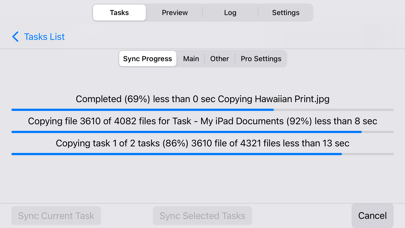




Description by VADIM ZYBIN Written by the developer, not by AppBrain. Click to read.
• Bidirectional sync, one-way sync, mirror backup (In-App Purchases, two sync modes for free).
• Powerful preview mode. Ability to change file operations before syncing.
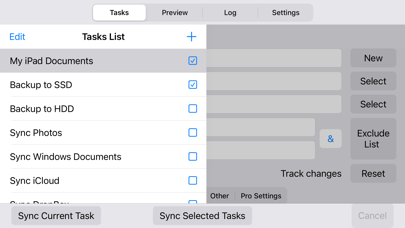
• Synchronization any number of pair folders at the same time (In-App Purchases, one pair folders for free).
• With each re-backup, the app finds and copies only new files and new file versions, thereby reducing backup time and extending the life of your storage devices.
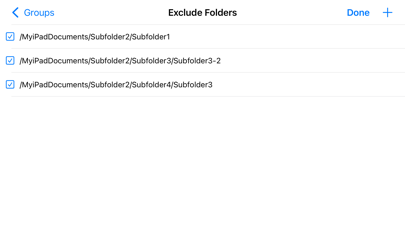
• List of excluded subfolders, files, file extensions, filter for folders and files.
Sync Folders is an easy-to-use app for beginners, has the ability to fine-tune synchronization settings for the most exacting professionals.
Do you have terabytes (TB) of data to sync? No problem! Sync Folders has been optimized to work with extremely large number of files.
Do you have questions? Please watch our helpful video tutorial on our website.
FOR BEGINNERS
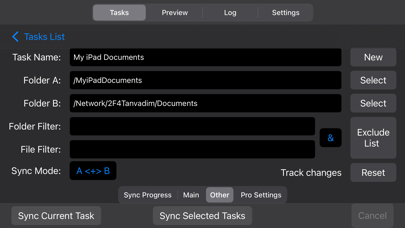
- Select 2 folders to synchronize.
- Select the synchronization mode, or use the default mode. You do not need to worry about other settings, they are set to the recommended.
- Click the "Sync current task" button and your folders will be synchronized!
FOR PROFESSIONALS
- 9 sync modes (In-App Purchases, two sync modes for free).
- 6 file comparison modes allow to synchronize files on the storage devices with different file systems.
- Synchronization of files with all attributes (timestamps, tags).
- Synchronization of subfolder attributes (timestamps, tags).
- Ability to select what package types synchronize as files, and which as folders.
- You can transform the app to the convenient file manager using powerful filters for files and folders.
- Synchronization over the network.
- Protection for unauthorized disconnect storage devices (folders) during synchronization.
- Keeping the last/all versions of files to be deleted. Using this mode, you can always restore deleted files, even if folders have synchronized several times.
- Ability to log events. You can filter events by type, task, status. Ability to export the event log to an external file.