

Tablewright: SQLite Editor
Tablewright: SQLite Editor is made and published by ROBERT BARRETT LAUNIUS. AppBrain is an independent app data site and isn't affiliated with ROBERT BARRETT LAUNIUS. The app name, icon, screenshots and description belong to ROBERT BARRETT LAUNIUS and are shown as published on the App Store.
AppBrain's verdict
- Rating on App Store
- 5.00
- 5 ratings
- Last updated
- September 19, 2026
It doesn't have enough ratings yet to judge what users think.
Rankings
App Store top chartsApp Store Rankings for Tablewright: SQLite Editor
Competitors
Similar apps and more from ROBERT BARRETT LAUNIUSAlternatives to Tablewright: SQLite Editor



More from ROBERT BARRETT LAUNIUS


Releases
Updates seen on the App Store- Version
- 1.4.1
- Launched
- February 2026
No changelog data
User feedback
Ratings and reviews on the App StoreComments on Tablewright: SQLite Editor for iOS
We don't have enough comments to show example comments. Please check back later.
Technology
Found in the app by AppBrain- Price
- Free
- App size
- 4.31 MB
- Content rating
- Everyone
Technologies used by Tablewright: SQLite Editor
About the app and developer
About Tablewright: SQLite Editor
Tablewright: SQLite Editor is an overall app developed by ROBERT BARRETT LAUNIUS.
User Ratings
Tablewright: SQLite Editor is rated 5.00 out of 5 stars. The rating is based on 5 ratings.
App Information
Tablewright: SQLite Editor is freely available from the App Store. The app size is 4.31 MB. The latest version available is 1.4.1. The last update was on September 19, 2026.
Technical Requirements
The app has a content rating of Everyone. The app has been available on the App Store since February 2026.
Developer information for ROBERT BARRETT LAUNIUS
Address:
Frequently asked questions about Tablewright: SQLite Editor
Is Tablewright: SQLite Editor free?
Yes. Tablewright: SQLite Editor is free on the App Store.
Is Tablewright: SQLite Editor still available?
Yes. Tablewright: SQLite Editor is on the App Store, and the last update we saw was on September 19, 2026.
How large is Tablewright: SQLite Editor?
Tablewright: SQLite Editor is 4.31 MB.
Is Tablewright: SQLite Editor suitable for children?
App Store rates the content of Tablewright: SQLite Editor as suitable for everyone.
How do people rate Tablewright: SQLite Editor?
Tablewright: SQLite Editor scores 5.00 out of 5 stars, from 5 ratings on the App Store.
Who made Tablewright: SQLite Editor?
Tablewright: SQLite Editor was developed by ROBERT BARRETT LAUNIUS. It is listed in the overall category on the App Store.
What are the best alternatives to Tablewright: SQLite Editor?
People looking at Tablewright: SQLite Editor also look at these overall apps: simSQL, SQL Professional Editor, DB Compass for Oracle database, SQLite database client, SQLiteFlow - SQLite Editor.
Store listing
By ROBERT BARRETT LAUNIUS, from the App Store



Description by ROBERT BARRETT LAUNIUS Written by the developer, not by AppBrain. Click to read.
Tablewright is the native database editor developers have been waiting for. Open any SQLite database, browse tables, run SQL queries, and edit data — all with a fast, fluid, offline interface.
OPEN ANY DATABASE
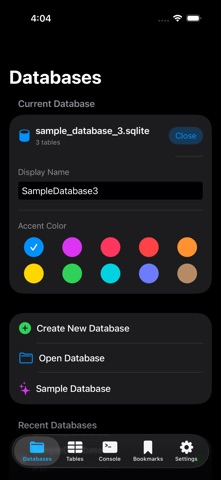
• Open .sqlite, .db, and .sqlite3 files from Files or other apps
• Recent databases for quick access
• Works with any SQLite database, no size limits
BROWSE YOUR DATA
• View all tables with row counts at a glance
• Sort, filter, and paginate through any table
• Tap rows to see complete details
• Navigate foreign key relationships instantly
INSPECT YOUR SCHEMA
• View columns, types, and constraints
• Browse indexes and foreign keys
• Copy column definitions and CREATE TABLE statements
PRO FEATURES
Unlock the full toolkit with a one-time purchase:
• Write SQL queries with syntax highlighting
• Edit data directly — insert, update, delete rows
• Edit cells inline from query results
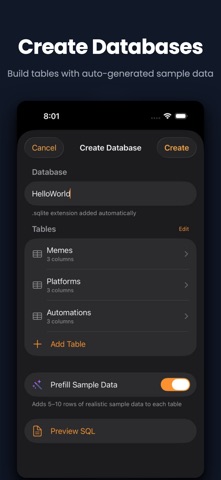
• Create and modify table schemas
• Import data from CSV and JSON
• Export results as CSV or JSON
• Save and organize your favorite queries
VIEW & MANAGE IMAGES
• View images stored in BLOB columns — JPEG and PNG detected automatically
• Upload photos from your camera or library
• Share or download images directly from any cell
BUILT FOR DEVELOPERS
• Native SwiftUI — fast and fluid on all devices
• Tablet optimized with sidebar navigation
• No account required — everything stays on your device
• No external dependencies — pure SQLite, no cloud sync
PERFECT FOR
• Mobile developers inspecting app databases
• Data analysts exploring datasets on the go
• Students learning SQL
• DBAs and engineers who work with SQLite files
One purchase. No subscription. Your database, always yours.