

Talking Speedometer
Talking Speedometer is made and published by Dmitriy Kharutskiy. AppBrain is an independent app data site and isn't affiliated with Dmitriy Kharutskiy. The app name, icon, screenshots and description belong to Dmitriy Kharutskiy and are shown as published on the App Store.
AppBrain's verdict
Established- Rating on App Store
- 5.00
- 2 ratings
- Last updated
- December 19, 2025
It doesn't have enough ratings yet to judge what users think.
Rankings
App Store top chartsApp Store Rankings for Talking Speedometer
Competitors
Similar apps and more from Dmitriy KharutskiyAlternatives to Talking Speedometer




More from Dmitriy Kharutskiy


Releases
Updates seen on the App Store- Version
- 2.5.5
- Launched
- June 2014
No changelog data
User feedback
Ratings and reviews on the App StoreComments on Talking Speedometer for iOS
We don't have enough comments to show example comments. Please check back later.
Technology
Found in the app by AppBrain- Price
- $2.99
- App size
- 26.0 MB
- Content rating
- Everyone
Technologies used by Talking Speedometer
About the app and developer
About Talking Speedometer
Talking Speedometer is a health & fitness app developed by Dmitriy Kharutskiy.
What is the rating of Talking Speedometer?
Talking Speedometer is rated 5.00 out of 5 stars, based on 2 ratings.
Is Talking Speedometer free?
Talking Speedometer costs $2.99. The app size is 26.01 MB. The latest version available is 2.5.5. The last update was on December 19, 2025.
What are the requirements for Talking Speedometer?
The app has a content rating of Everyone. The app has been available on the App Store since June 2014.
Developer information for Dmitriy Kharutskiy
Address:
Frequently asked questions about Talking Speedometer
Is Talking Speedometer free?
No. Talking Speedometer costs $2.99 on the App Store.
Is Talking Speedometer still available?
Yes. Talking Speedometer is on the App Store, and the last update we saw was on December 19, 2025.
How large is Talking Speedometer?
Talking Speedometer is 26.01 MB.
Is Talking Speedometer suitable for children?
App Store rates the content of Talking Speedometer as suitable for everyone.
How do people rate Talking Speedometer?
Talking Speedometer scores 5.00 out of 5 stars, from 2 ratings on the App Store.
Who made Talking Speedometer?
Talking Speedometer was developed by Dmitriy Kharutskiy. It is listed in the health & fitness category on the App Store.
What are the best alternatives to Talking Speedometer?
People looking at Talking Speedometer also look at these health & fitness apps: CPR Metronome, Mainspring MobileTech, Tacho, Float Control: VESC Companion, People's Pilates.
Store listing
By Dmitriy Kharutskiy, from the App Store


Description by Dmitriy Kharutskiy Written by the developer, not by AppBrain. Click to read.
1. Voice cues to notify you when you reach the selected speed. About 25* languages supported. Receive speed voice cues while listening to music.
2. Speed data filtering. Readings with the filter on are more inert than those with the filter off though. THE FILTER MUST BE ON WHEN CYCLING, JOGGING OR WALKING.
3. The G-meter. Get APPROXIMATE acceleration calculated based on your speed variation. Why use the GPS G-meter: no need to keep your iPhone in a fixed position or connect it to your vehicle’s computer system, which means speed readings can be taken discreetly, for example, during a test drive. Taking a number of readings compensates lesser accuracy. Acceleration is calculated only when the filter is off. Acceleration cannot be measured near tall buildings, in the mountains or woods.
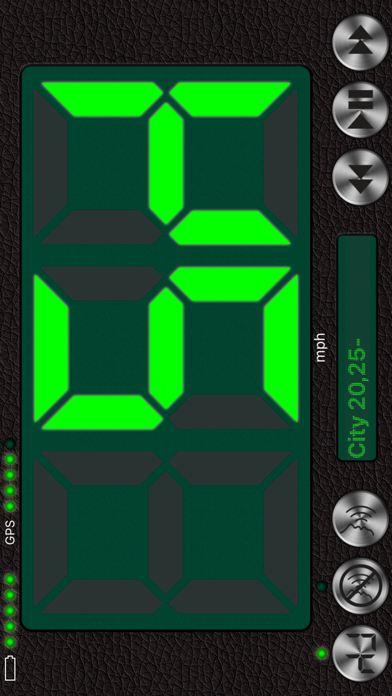
4. Large, well-lit digits
5. HUD (the speed is displayed in the windscreen reflection at night time or in cloudy weather)
6. Background mode. Continued use of GPS running in the background can dramatically decrease battery life.
7. Speed and acceleration graphs
8. Odometer
9. Altimeter
10. Time, journey duration, and current stop duration. The current stop duration will be reset after 20 seconds of motion.
11. See tracks on the map
12. Save tracks
13. Compass
14. Angle of incline (inclinometer)
15. Aircraft descent/climb angle
16. Get detailed stats for any part of your journey
17. Export your journey to a KMZ or GPX file
18. Export track statistics table to a CSV file
19. Load and show your route (journey plan) on the map together with a track. To do this, create a route, using a special online service (such as GPX Editor - https://www.gpxeditor.co.uk/map, The online GPX file editor - https://gpx.studio/, Track drawing websites - https://wiki.openstreetmap.org/wiki/Track_drawing_websites) on your desktop, and export it as a GPX (KML, CSV) file. The file name must begin with "Route". Using iTunes, transfer the file into the app (OR use the "Files" app). Following this, you will be able to select your route at the bottom of your track list. Now you can easily travel following your route line, even without loading a map.
20. Export and import files via iTunes and email
21. Waypoints (description, color selection, keywords, photos, audio records)
22. A single waypoint database with a filter option
23. Music controls
24. No annoying ads
25. Vintage design
Why use voice cues:
1. Get notified if you have gone over the speed limit.
2. Voice cues allow novice drivers to find out their current speed without taking their eyes off the road.
3. Control your speed, even when you have limited or no access to your phone's screen, for example, when you are out jogging, roller-skating, cycling or skiing.
4. Keep your speed under control when you are driving at high speeds , as taking your eyes off the road can be highly dangerous.
5. Control your speed discreetly by using headphones.
Voice cues rules:
• "50,80-" — Receive voice cues once the speed goes over or under 50 and each time it changes after hitting the 80 mark.
• "+25,-30" — Receive voice cues once the speed hits the 25 mark (when speeding up) and when it goes below 30 (while slowing down).
• "10-20" like "10,11,12,...19,20".
• "0-10-60,70-5-" — Detailed cues, such as "0,10,20,...60,70,75,80,85,90,...".
• "-10-10-40,+70-5-" — Detailed cues, such as "-10, -20, -30, -40, +70, +75, +80, +85, +90,...".
• You can use rules for sound signals (for example "55!! 60!!!"). But then the rules for pronouncing the speed will not work.
https://youtu.be/fu7nlxfjkf8
* — English, Deutsch, 日本語, Español, Français, Italiano, Русский, العربية, ไทย, Nederlands, Português, Polski, Ελληνικά, Bahasa Indonesia, Svenska, Türkçe, 한국어, Magyar, Čeština, Dansk, Suomi, Română ...