

TaskPlate is made and published by Vasuraj V Arni. AppBrain is an independent app data site and isn't affiliated with Vasuraj V Arni. The app name, icon, screenshots and description belong to Vasuraj V Arni and are shown as published on the App Store.
AppBrain's verdict
- Last updated
- September 25, 2026
Rankings
App Store top chartsApp Store Rankings for TaskPlate
Competitors
Similar apps and more from Vasuraj V ArniAlternatives to TaskPlate


Releases
Updates seen on the App Store- Version
- 1.8
- Launched
- July 2026
No changelog data
User feedback
Ratings and reviews on the App StoreComments on TaskPlate for iOS
We don't have enough comments to show example comments. Please check back later.
Technology
Found in the app by AppBrain- Price
- Free
- App size
- 1.92 MB
- Content rating
- Everyone
Technologies used by TaskPlate
About the app and developer
About TaskPlate
TaskPlate is a productivity app developed by Vasuraj V Arni.
User Ratings
The app has no ratings yet.
App Information
TaskPlate is freely available from the App Store. The app size is 1.92 MB. The latest version available is 1.8. The last update was on September 25, 2026.
Technical Requirements
The app has a content rating of Everyone. The app has been available on the App Store since July 2026.
Developer information for Vasuraj V Arni
Address:
Frequently asked questions about TaskPlate
Is TaskPlate free?
Yes. TaskPlate is free on the App Store.
Is TaskPlate still available?
Yes. TaskPlate is on the App Store, and the last update we saw was on September 25, 2026.
How large is TaskPlate?
TaskPlate is 1.92 MB.
Is TaskPlate suitable for children?
App Store rates the content of TaskPlate as suitable for everyone.
Who made TaskPlate?
TaskPlate was developed by Vasuraj V Arni. It is listed in the productivity category on the App Store.
What are the best alternatives to TaskPlate?
People looking at TaskPlate also look at these productivity apps: PearList, Munich Apartments Rent Finder, Sapience HCM, My Daily Notes, To.Do - Simple To-Do list.
Store listing
By Vasuraj V Arni, from the App Store

Description by Vasuraj V Arni Written by the developer, not by AppBrain. Click to read.
CAPTURE IT FAST
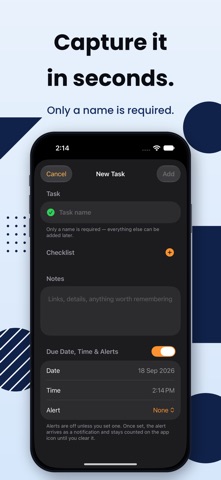
Tap + at the bottom, type, and press Return — saved, with the next blank line already waiting. Empty your head in one go, and add the details later if they matter.
BOARD YOUR WAY
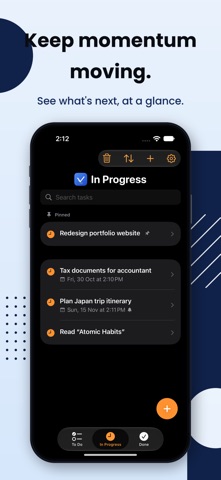
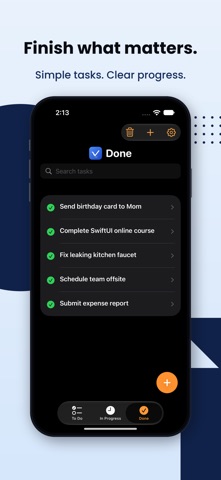
Organize every task across three simple stages — To Do, In Progress, and Done. Swipe between them or tap to switch, and move tasks forward as you make progress.
BREAK IT DOWN
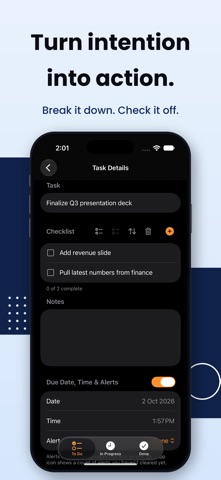
Add a checklist to any task and tick off the steps as you go. Press Return to move to the next step, check or uncheck the whole list in one tap, reorder items however you like, remove the ones you don't need, and see your progress right on the task list — "2 of 5" at a glance, without opening anything.
STAY ON TOP OF WHAT MATTERS
- Pin your most important tasks to the top of To Do or In Progress
- Drag to reorder tasks exactly how you want them
- Search instantly across task names, notes, and checklist items
- Filter any list by due date — this week, month, quarter, or year — sorted earliest first
- Select several tasks and move them to another list in one go
- Add due dates and set alerts — local reminders 5 minutes, 15 minutes, an hour, or up to a week ahead, your choice
- Tap an alert to jump straight to that task, and clear it when you're ready — it stays counted on the app icon until you do
NOTHING GETS LOST
Deleted a task by mistake? It's not gone — recover it anytime from the Deleted Tasks view before it's permanently purged. Set your own auto-cleanup schedule, or clear things out manually whenever you're ready.
MAKE IT YOURS
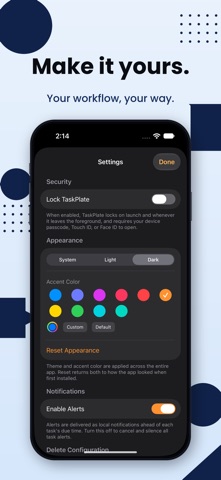
Choose Light, Dark, or System appearance, and pick your own accent color — from curated presets or a full custom color picker. In Light appearance, go further with Color Scheme: four warm, hand-picked palettes that recolor the whole app. Changed your mind? One tap puts it all back the way it started.
YOUR DATA STAYS YOURS
TaskPlate doesn't require an account, doesn't use the cloud, and doesn't collect your data. Every task lives only on your device. No sign-up, no syncing servers, no tracking — just a private, fast to-do list.
Please note: because nothing is sent to the cloud, your tasks are stored separately on each device and do not sync between your iPhone and iPad.
Works great on iPhone and iPad.