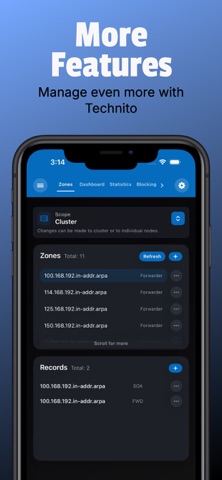
Technito is an utilities app developed by Jonathen Park.
What is the rating of Technito?
Technito is rated 5.00 out of 5 stars, based on 6 ratings.
Is Technito free?
Technito is free. The app size is 19.16 MB. The latest version available is 1.5.3. The last update was on November 12, 2026.
What are the requirements for Technito?
The app has a content rating of Everyone. The app has been available on the App Store since March 2026.
Technito is made and published by
Jonathen Park.
AppBrain is an independent app data site and isn't affiliated with Jonathen Park.
The app name, icon, screenshots and description belong to Jonathen Park and are shown as published on the App Store.
Description by Jonathen Park(from the App Store)
Manage your Technitium DNS Server from your iPhone or iPad with Technito. Whether you’re at your desk or on the go, get convenient access to the tools you need to monitor your network and manage your servers.
Review DNS activity, investigate queries, manage zones, and control blocking from one streamlined interface. Explore detailed statistics and customizable graphs, or use Easy Block to quickly block popular apps, services, and games.
MONITOR & ANALYZE • Connect to multiple Technitium DNS Server instances • View dashboard statistics, query breakdowns, and customizable traffic graphs • Analyze domains for possible service and purpose associations • See which rule or blocklist caused a domain to be blocked • View node resources, technical details, and network information • Run health checks for nodes, clusters, API access, sessions, and server versions • Browse live activity and query logs • Search and review recorded changes in Change Log
CONTROL DNS BLOCKING • Manage allowed and blocked domains • Quickly block popular apps, services, and games with Easy Block • Configure blocking settings, bypass rules, and temporary controls • Monitor blocking status and countdown timers with Live Activities and Dynamic Island • Access server statistics, graphs, and blocking controls through Home Screen widgets
MANAGE YOUR SERVERS • Browse and flush the DNS cache • Manage DNS zones and records • Run DNS lookups with DNS Client tools • Install and manage DNS apps and their configurations • Manage DHCP scopes, leases, and reservations • Manage sessions, users, groups, permissions, and API tokens • Configure LDAP and Single Sign-On settings • Create and restore backups • Access servers through the built-in SSH terminal
CONNECT & PERSONALIZE • Sign in with an API token or username and password, including supported MFA/OTP authentication • Use supported LDAP, Single Sign-On, and mutual TLS connection options • Sync saved instances, supported settings, and Change Log records through iCloud • Choose from supported app languages • Use light or dark appearance on iPhone and iPad
Each subscription will automatically renew 3 days before the expiration date for
the same time period. Subscriptions can be cancelled at any time before the renewal.