
Teleport™ is made and published by MONKEYmedia. AppBrain is an independent app data site and isn't affiliated with MONKEYmedia. The app name, icon, screenshots and description belong to MONKEYmedia and are shown as published on the App Store.
AppBrain's verdict
Established- Rating on App Store
- 2.85
- 13 ratings
- Last updated
- July 10, 2021
It doesn't have enough ratings yet to judge what users think.
Rankings
App Store top chartsApp Store Rankings for Teleport™
Competitors
Similar apps and more from MONKEYmediaAlternatives to Teleport™







More from MONKEYmedia

Releases
Updates seen on the App Store- Version
- 1.1
- Launched
- October 2017
No changelog data
User feedback
Ratings and reviews on the App StoreComments on Teleport™ for iOS
We don't have enough comments to show example comments. Please check back later.
Technology
Found in the app by AppBrain- Price
- $1.99
- App size
- 111.6 MB
- Content rating
- Everyone
Technologies used by Teleport™
About the app and developer
About Teleport™
Teleport™ is a travel app developed by MONKEYmedia.
What is the rating of Teleport™?
Teleport™ is rated 2.85 out of 5 stars, based on 13 ratings.
Is Teleport™ free?
Teleport™ costs $1.99. The app size is 111.57 MB. The latest version available is 1.1. The last update was on July 10, 2021.
What are the requirements for Teleport™?
The app has a content rating of Everyone. The app has been available on the App Store since October 2017.
Developer information for MONKEYmedia
Address:
Store listing
By MONKEYmedia, from the App Store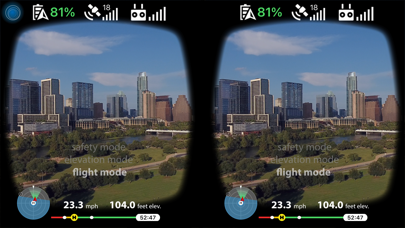

Description by MONKEYmedia Written by the developer, not by AppBrain. Click to read.
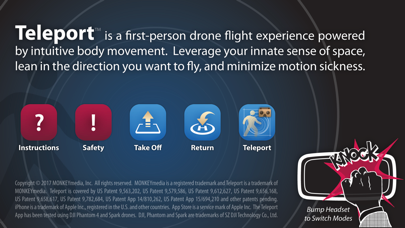
Teleportation requires a DJI drone controllable via iOS (such as a DJI Spark via WiFi or DJI Phantom 4 via USB) and an optional wearable stereoscopic 3D headset (like Google Cardboard). Connect your iPhone or iPad to the drone and run the Teleport app. Launch your drone into the air, then tap "Teleport" and mount iPhone in your headset. Knock on the headset to cycle between (1) safety mode, (2) elevation mode and (3) travel mode.
In safety mode, drone holds a stationary position in the sky, allowing you to look around from the vantage point of the drone. In elevation mode, pivot your head up/down to adjust the drone's elevation. In travel mode, lean forward to fly forward; lean back to fly backwards; lean left to fly left; and lean right to fly right. The further you lean, the faster you go. When done flying, knock on headset until in safety mode, remove headset and exit to main app screen. From there, you can manually land the drone using a physical controller or tap 'Return' to automatically return to home. Have fun and teleport safely!
Copyright © 2018 MONKEYmedia, Inc. All rights reserved. MONKEYmedia is a registered trademark, and Teleport and BodyNav are trademarks of MONKEYmedia. Teleport is covered by US Patent 9,563,202, US Patent 9,579,586, US Patent 9,612,627, US Patent 9,656,168, US Patent 9,658,617, US Patent 9,782,684, US Patent 9,791,897, US Patent App 15/694,210 and other patents pending. The Teleport App has been tested using DJI Phantom 4, Mavic Pro and Spark drones. DJI, Phantom, Mavic and Spark are trademarks of SZ DJI Technology Co., Ltd.