Teleprompt Studio by Sam is made and published by
Sam Wysock-Wright.
AppBrain is an independent app data site and isn't affiliated with Sam Wysock-Wright.
The app name, icon, screenshots and description belong to Sam Wysock-Wright and are shown as
published on the App Store.
About Teleprompt Studio by Sam
Teleprompt Studio by Sam is a productivity app developed by Sam Wysock-Wright.
User Ratings
The app has no ratings yet.
App Information
Teleprompt Studio by Sam is freely available from the App Store. The app size is 39.93 MB. The latest version available is 1.0.0. The last update was on October 15, 2026.
Technical Requirements
The app has a content rating of Everyone. The app has been available on the App Store since October 2026.
Description by Sam Wysock-Wright(from the App Store)
Speak with confidence, with your words right where you need them.
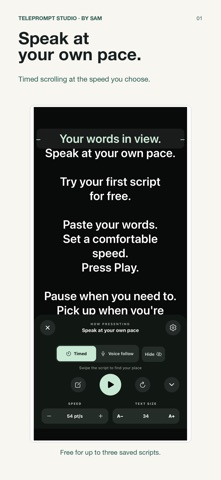
Teleprompt Studio by Sam is an iPhone teleprompter for presentations, rehearsals, speeches and talking to camera. Write or paste your script, set a comfortable reading pace, and present from your phone.
MAKE IT YOURS • Smooth timed scrolling with play, pause, restart and a starting countdown. • Adjust text size, line spacing, side padding and reading width. • Choose your background, text and active-line colors. • Reading focus and cue marks help you keep your place. • Portrait, landscape, mirror mode and right-to-left text support. • Hide the controls while presenting and bring them back when needed.
FOLLOW YOUR PACE Voice follow moves the script as you speak and pauses when you stop. Speech is processed on your iPhone and audio is not saved. Voice follow requires iOS 27 or later, a supported device and speech language, and microphone permission. A language-model download may be needed. Timed scrolling remains available on other supported iPhones.
REHEARSE AND CONTROL Set an optional rehearsal target from 30 seconds to 10 minutes and track your progress. Compatible keyboard-style Bluetooth remotes and foot pedals can control playback, page jumps and timed speed. Learn buttons in Remote controls settings. Remote support depends on the key events delivered by iOS.
YOUR SCRIPTS STAY YOURS Scripts and reader settings are saved on your device. No app account, ads or tracking. Read and edit your scripts offline; Apple purchase services and initial speech-model downloads may need a connection.
START FREE Save up to three scripts and use the full teleprompter reader. The optional, one-time Teleprompter Pro purchase unlocks unlimited saved scripts. No subscription.
This app displays scripts; it does not record video.
Each subscription will automatically renew 3 days before the expiration date for
the same time period. Subscriptions can be cancelled at any time before the renewal.