

Teleprompter: My Video Scripts
Teleprompter: My Video Scripts is made and published by Tsovinar Popova. AppBrain is an independent app data site and isn't affiliated with Tsovinar Popova. The app name, icon, screenshots and description belong to Tsovinar Popova and are shown as published on the App Store.
AppBrain's verdict
- Rating on App Store
- 4.83
- 6 ratings
- Last updated
- March 4, 2026
It doesn't have enough ratings yet to judge what users think.
Rankings
App Store top chartsApp Store Rankings for Teleprompter: My Video Scripts
Competitors
Similar apps and more from Tsovinar PopovaAlternatives to Teleprompter: My Video Scripts


More from Tsovinar Popova


Releases
Updates seen on the App Store- Version
- 1.0.4
- Launched
- December 2025
No changelog data
User feedback
Ratings and reviews on the App StoreComments on Teleprompter: My Video Scripts for iOS
We don't have enough comments to show example comments. Please check back later.
Technology
Found in the app by AppBrain- Price
- Free
- App size
- 21.2 MB
- Content rating
- Everyone
Technologies used by Teleprompter: My Video Scripts
About the app and developer
About Teleprompter: My Video Scripts
Teleprompter: My Video Scripts is a photo & video app developed by Tsovinar Popova.
User Ratings
Teleprompter: My Video Scripts is rated 4.83 out of 5 stars. The rating is based on 6 ratings.
App Information
Teleprompter: My Video Scripts is freely available from the App Store. The app size is 21.17 MB. The latest version available is 1.0.4. The last update was on March 4, 2026.
Technical Requirements
The app has a content rating of Everyone. The app has been available on the App Store since December 2025.
Developer information for Tsovinar Popova
Address:
Frequently asked questions about Teleprompter: My Video Scripts
Is Teleprompter: My Video Scripts free?
Yes. Teleprompter: My Video Scripts is free on the App Store.
Is Teleprompter: My Video Scripts still available?
Yes. Teleprompter: My Video Scripts is on the App Store, and the last update we saw was on March 4, 2026.
How large is Teleprompter: My Video Scripts?
Teleprompter: My Video Scripts is 21.17 MB.
Is Teleprompter: My Video Scripts suitable for children?
App Store rates the content of Teleprompter: My Video Scripts as suitable for everyone.
How do people rate Teleprompter: My Video Scripts?
Teleprompter: My Video Scripts scores 4.83 out of 5 stars, from 6 ratings on the App Store.
Who made Teleprompter: My Video Scripts?
Teleprompter: My Video Scripts was developed by Tsovinar Popova. It is listed in the photo & video category on the App Store.
What are the best alternatives to Teleprompter: My Video Scripts?
People looking at Teleprompter: My Video Scripts also look at these photo & video apps: Teleprompter: Script Video, Simple Sufler: Teleprompter, AI Teleprompter - Video Script, Teleprompter: Video Scripts, Floating Teleprompter for iPad.
Store listing
By Tsovinar Popova, from the App Store




Description by Tsovinar Popova Written by the developer, not by AppBrain. Click to read.
This app is designed for content creators, bloggers, educators, actors, and business professionals who demand a seamless and professional teleprompter experience.
Maintain perfect eye contact with your camera while reading your script, ensuring a natural and engaging connection with your audience every time. Import, create, and scroll your text with ease, all within a customizable floating window that adapts to your workflow.
Key Features & Capabilities
⌘ TEXT IMPORT & CREATION
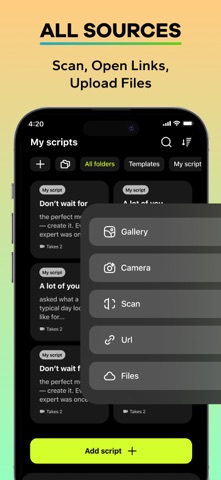
Write directly in the app or import your scripts from anywhere. We support opening text from web links, files (TXT, PDF, RTF).
⌘ SMART TEXT SCANNER
Our standout feature is the ability to scan printed text and photo directly using your device's camera or from photos in your library, instantly digitizing documents for your prompter.
⌘ ULTIMATE CUSTOMIZATION
Tailor the teleprompter to your exact needs. Adjust text size, font, and color. Modify the background for optimal contrast, set scroll speed, and fine-tune margins. Enable mirroring for use with beam-splitting glass and conveniently reposition and zoom the text overlay on your screen for the perfect framing before you start recording.
⌘ PROFESSIONAL AUDIO & VIDEO CONTROL
Improve your audio quality with built-in microphone settings. Use the audio boost, apply real-time effects like noise suppression and reverb, and monitor your voice with zero latency during recording. Capture multiple takes, save them within your project, and later select the best one for export.
⌘ SEAMLESS PRODUCTION & EXPORT
The app isn't just for prompting; it's for production, too. Export your final take in popular video formats (MOV, MP4). Perform quick trims and edits with the built-in video trimming tool. Work in both full vertical (9:16) and horizontal (16:9) screen orientations to match your platform's requirements, and choose from ready-made templates for different tasks.
⌘ INTUITIVE USER EXPERIENCE
Enjoy a clean, modern interface with full support for Light and Dark themes. Organize your work with projects that save all your settings, scripts, and recorded takes together for a streamlined workflow.
Download Teleprompter today and transform your scripted recordings into compelling, natural performances.