

Tertiary Markdown
Tertiary Markdown is made and published by Alfred Ang. AppBrain is an independent app data site and isn't affiliated with Alfred Ang. The app name, icon, screenshots and description belong to Alfred Ang and are shown as published on the App Store.
AppBrain's verdict
- Rating on App Store
- 1.00
- 1 ratings
- Last updated
- June 30, 2026
It doesn't have enough ratings yet to judge what users think.
Rankings
App Store top chartsApp Store Rankings for Tertiary Markdown
Competitors
Similar apps and more from Alfred AngAlternatives to Tertiary Markdown


More from Alfred Ang


Releases
Updates seen on the App Store- Version
- 1.0
- Launched
- June 2026
No changelog data
User feedback
Ratings and reviews on the App StoreComments on Tertiary Markdown for iOS
We don't have enough comments to show example comments. Please check back later.
Technology
Found in the app by AppBrain- Price
- Free
- App size
- 2.13 MB
- Content rating
- Everyone
Technologies used by Tertiary Markdown
About the app and developer
About Tertiary Markdown
Tertiary Markdown is a productivity app developed by Alfred Ang.
What is the rating of Tertiary Markdown?
Tertiary Markdown is rated 1.00 out of 5 stars, based on one rating ratings.
Is Tertiary Markdown free?
Tertiary Markdown is free. The app size is 2.13 MB. The latest version available is 1.0. The last update was on June 30, 2026.
What are the requirements for Tertiary Markdown?
The app has a content rating of Everyone. The app has been available on the App Store since June 2026.
Developer information for Alfred Ang
Address:
Store listing
By Alfred Ang, from the App Store
Description by Alfred Ang Written by the developer, not by AppBrain. Click to read.
KEY FEATURES
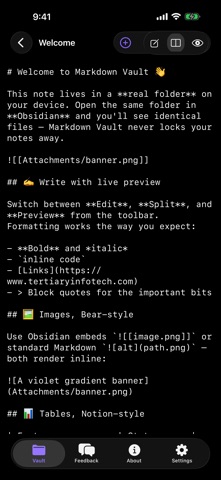
• Open any folder as a vault — fully compatible with your existing Obsidian vault. Your notes are plain Markdown files, never locked into a proprietary format.
• File & folder management — browse, create, rename, and delete notes and folders from a clean sidebar.
• Live preview editor — switch instantly between Edit, Split, and Preview. Your work autosaves as you type.
• Images, Bear-style — embed pictures with standard Markdown  or Obsidian ![[image.png]] embeds, rendered inline.
• Tables, Notion-style — GitHub-flavoured tables render as clean, bordered grids.
• Everyday Markdown — headings, bold and italic, links, checklists, bullet and numbered lists, block quotes, and code blocks.
• One app, every device — a true native experience on macOS, iPadOS, and iOS.
Your notes never leave your device. Everything is stored as simple text files on your Mac, iPad, or iPhone, so you stay in control and your library is future-proof.
Whether you keep a personal knowledge base, take meeting notes, or write long-form drafts, Tertiary Markdown gives you a distraction-free, Markdown-first workspace that travels with you.