Download Android Apps and Games
AppBrain
  • Apps
  • Apps being viewed right now Trending apps today Most popular apps All-time most downloaded apps Top rated apps iPhone and iPad apps
  • Intelligence ▾
    Intelligence overview → Track any Android app or your whole market
    Track & analyze
    Keyword Tracker & OptimizerTrack & improve Play rankings App Performance ReportOne-off PDF for any app StatisticsFree Android & Play market stats
    Promote your app
    Featured Apps App Links
  • Intelligence
  • Pricing
  • Dashboard
  • Sign up
  • Log in
Last updated on: 2026-09-21
App Store Apps > Productivity > Text Editor
Text Editor icon

Text Editor

1.0.0
John Haas
5.00
1 reviews
Free

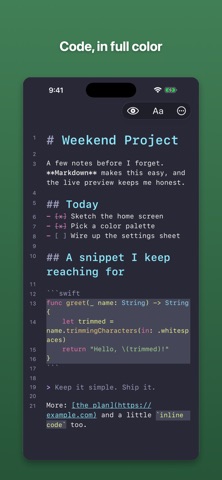
Text Editor Screenshot 1 of 4
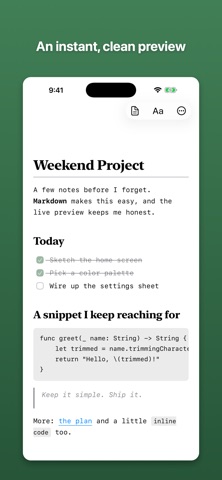
Text Editor Screenshot 2 of 4
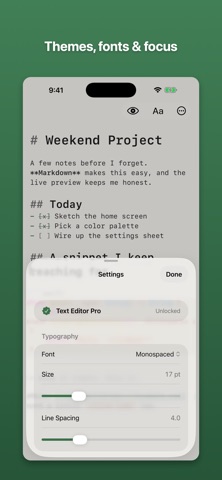
Text Editor Screenshot 3 of 4
Text Editor Screenshot 4 of 4
Download from the App Store

About Text Editor

Text Editor is a productivity app developed by John Haas.

User Ratings

Text Editor is rated 5.00 out of 5 stars. The rating is based on one rating ratings.

App Information

Text Editor is FREE to download. The download size is 1.43 MB. The latest version available is 1.0.0. The last update was on June 23, 2026.

Technical Requirements

The app has a content rating of Everyone. The app has been available on App Store June 2026.

Description
A simple, fast editor for Markdown, notes, and code. Open it and start typing. There's no account to make and nothing to set up.

Your Markdown is highlighted as you write — headings, bold, links, lists, code blocks — and when you want to see how it'll look, switch to Preview. Everything saves as a normal file in the Files app and iCloud Drive, so your writing stays yours: open it anywhere, move it, or back it up however you like.

It's free to use, with what you need for everyday writing:

• Live Markdown highlighting and a clean Preview
• Four themes: System, Light, Dark, and Sepia
• Find, a heading outline, and a live word count
• A Markdown cheat sheet for when the syntax slips your mind
• Your choice of font, size, and line spacing
• Share or export as Markdown

Text Editor Pro is a one-time purchase, no subscription:

• Syntax highlighting in code blocks for Swift, Python, JavaScript, JSON, and more
• Five more themes: Paper, Solarized Light, Solarized Dark, Nord, and Dracula
• Focus and Typewriter modes for heads-down writing
• Split View on iPad, so you can edit and preview at once
• Line numbers
• Find & Replace, with regular expressions
• Writing stats: daily goals, streaks, and an all-time word count
• Export to HTML and Rich Text

It's made for iPhone and iPad, works with a hardware keyboard, supports dark mode, and fits into iPad multitasking. There are no ads and no tracking, and the app doesn't collect anything about you.
Show more Show less

More data about Text Editor

Price Free to download
Rating 5.00 based on a single rating
Ranking Not ranked
Version 1.0.0
App download size 1.43 MB
Suitable for Everyone

Alternative downloads for the Text Editor app

Boreal Markdown Editor icon Boreal Markdown Editor
Borealbit Technology Limited
0.0
Free
Purnote icon Purnote
Sasa Mitrovic
0.0
Free
Richdown icon Richdown
Yo Suzuki
0.0
Free
Meow & Purr icon Meow & Purr
Hubert Gajewski
0.0
Free
Crab Fit App icon Crab Fit App
Benedict Woo
0.0
Free
QingMo - Markdown Editor icon QingMo - Markdown Editor
兆卓 张
0.0
Free
Raw Text Editor icon Raw Text Editor
Tan Kiet Phan
2.0
Free
1 ratings
Markdown Editor and MD Viewer icon Markdown Editor and MD Viewer
Sahana A S
0.0
Free

More from John Haas

MahWins: Mahjong Game Tracker icon MahWins: Mahjong Game Tracker
John Haas
5.0
$2.99
12 ratings

Changelog of Text Editor

No changelog data

Developer information for John Haas

John Haas

Address:

Share Text Editor

Comments on Text Editor for iOS

We don't have enough comments to show example comments. Please check back later.

App Store Rankings for Text Editor

This app is not ranked

Technologies used by Text Editor

Frequently asked questions about Text Editor

Is Text Editor free?

Yes. Text Editor is free to download from App Store.

Is Text Editor still available?

Yes. Text Editor is on App Store, and the last update we saw was on June 23, 2026.

How large is the Text Editor download?

Text Editor is 1.43 MB to download.

Is Text Editor suitable for children?

App Store rates the content of Text Editor as suitable for everyone.

How do people rate Text Editor?

Text Editor has one rating of 5.00 stars on App Store.

Who made Text Editor?

Text Editor was developed by John Haas. It is listed in the productivity category on App Store.

What are the best alternatives to Text Editor?

People looking at Text Editor also look at these productivity apps: Boreal Markdown Editor, Purnote, Richdown, Meow & Purr, Crab Fit App.

Apps on sale Popular Productivity Apps Top new apps Today's trending apps Apps other people are watching
Boreal Markdown Editor icon Boreal Markdown Editor
Purnote icon Purnote
Richdown icon Richdown
Meow & Purr icon Meow & Purr
Crab Fit App icon Crab Fit App
QingMo - Markdown Editor icon QingMo - Markdown Editor
Raw Text Editor icon Raw Text Editor
Markdown Editor and MD Viewer icon Markdown Editor and MD Viewer
Overview Reviews Alternatives Rankings Technology
AppBrain Intelligence premium content

Subscribe now to get full and unlimited access to AppBrain Intelligence. You'll have access to:

  • App Intelligence dashboard (performance timeline, competitor comparison, country rankings, insight cards)
  • Detailed ranking data per app
  • Full timeline per developer
  • Device market shares data per country
  • Unlimited keyword tracking
1 Month

$75/mo
(billed every month)

SAVE 0%
Subscribe
3 Months

$65/mo
($195 billed every 3 months)

SAVE 13%
Subscribe
1 Year

$57.50/mo
($690 billed every year)

SAVE 23%
Subscribe
Each subscription will automatically renew 3 days before the expiration date for the same time period. Subscriptions can be cancelled at any time before the renewal.

AppBrain is a directory focused on discovering great apps and games. We give statistics, rankings and search options that Google Play and the App Store don't have. All trademarks are owned by their respective owners. AppBrain doesn't offer APKs or binaries, and always lets users install the official version from Google Play or the App Store.

More apps

  • Top Android apps being viewed
  • View GG Predictions
  • indian Tuk Tuk: Mega Ramps stats
  • XPlay Browser Android App

App statistics

  • Android statistics
  • Google Play Developer stats
  • Trending Android Apps
  • Trending iOS apps
  • Top popular Apps
  • Buy the best Android phone

About AppBrain

  • Contact
  • Privacy
  • Documentation
  • DMCA takedowns
  • Articles
  • Blog
  • Android Interstitial Ads: Best practices to optimize your app's earnings
© 2010-2026 - AppBrain