

Texter: Audio & Video to Text
Texter: Audio & Video to Text is made and published by Yuichi Matsuoka. AppBrain is an independent app data site and isn't affiliated with Yuichi Matsuoka. The app name, icon, screenshots and description belong to Yuichi Matsuoka and are shown as published on the App Store.
AppBrain's verdict
EstablishedWell rated- Rating on App Store
- 4.06
- 119 ratings
- Last updated
- October 26, 2026
- Size
- 202.9 MB
Users rate it well: 4.1 stars from 119 ratings. Its best ranking is #30 in Top Grossing, Business in Japan.
User feedback
Ratings and reviews on the App StoreComments on Texter: Audio & Video to Text for iOS
We don't have enough comments to show example comments. Please check back later.
Store listing
By Yuichi Matsuoka, from the App Store



Description by Yuichi Matsuoka Written by the developer, not by AppBrain. Click to read.
Texter is an AI transcription app that turns audio, images and video into editable text with a single tap. From meeting minutes and interview notes to subtitles and SRT files, you can handle your entire workflow in one place.
Key new features
・Action items from your summary
Automatically pull out action items from meetings and lectures, then add a reminder with one tap. Due dates and assignees carry over automatically.
・Import from cloud sharing links
Paste a Google Drive, Dropbox, OneDrive or Zoom sharing link and transcribe directly, no download needed.
・Share with a public link
Share a transcript as a page anyone can view, no app install required.
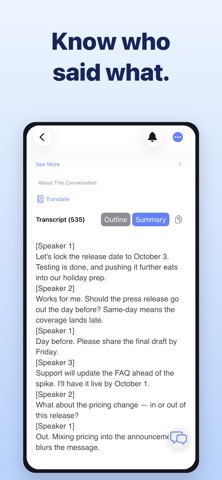
・Speaker Identification
Automatically splits multi person conversations by speaker, so it is instantly clear who said what in a meeting or interview.
・Synced subtitles on video import
Generate subtitles with timestamps when you import a video. Subtitles stay in sync as you play, which makes reviewing and editing much easier for lectures, interviews and recorded meetings.
Why people choose Texter
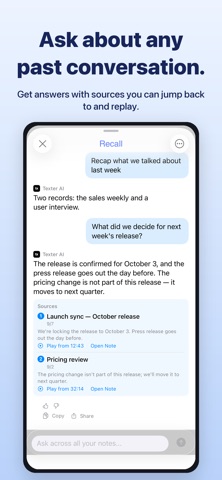
・Ask Your Note: ask AI questions about any transcript and get just the answer you need
・Picture in Picture: keep recording and transcribing in a small window while using other apps
・Speaker Identification: automatically separates multi person conversations by speaker
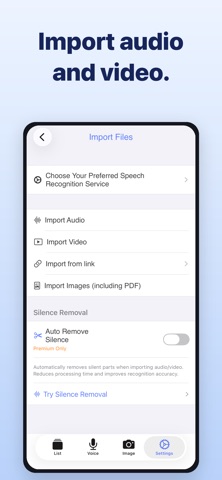
・Silence cut: automatically detects and removes silent sections from meeting recordings and lecture videos to cut transcription time
・Highly accurate transcription with the latest AI and on device technology
・Extract audio from video, auto create subtitles and edit by sentence with time jump
・Summarize and translate transcripts to turn them into clean meeting minutes (20 summary templates available)
・Real time translation using DeepL and Google, both online and offline
・Turn images, photos, PDFs and screenshots into text with multi page PDF support
・Real time transcription that can also support people with hearing difficulties
・Apple Watch recording: capture the moment without taking out your iPhone, then read the transcript later on iPhone
Use cases
・Meetings
Import recordings, review subtitles and the sentence list, then share only the important parts. When it's over, just ask your note what was decided.
・Online meetings
Turn on Picture in Picture and keep transcribing while you check documents or use other apps in the main window.
・Interviews and journalism
Speaker Identification splits the conversation automatically, and sentence based editing dramatically cuts down editing time. Easily organize interviews with Q&A templates.
・Classes and lectures
Pull out key points from lecture videos and make searchable, summarized notes. Missed something? Just ask your note.
・Creators
Convert video to text, edit subtitles and export clips for social media, all in one app.
・Export
Export transcripts as PDF or SRT subtitle files and use them directly in documents or video editing.
Texter Premium
・Unlimited use of Ask Your Note (AI Chat)
・Unlimited access to 20 summary templates
・Remove limits on real time transcription (including Picture in Picture) and image text recognition
・Increase maximum length for imported audio
・Remove ads for a smoother experience
Notes
・Some advanced features work even better on newer iOS devices and OS versions.
・Transcription and subtitle accuracy depends on recording quality, such as noise level and clarity of speech. You can always edit the text later.
We will keep improving Texter based on your feedback. Please give it a try.
Terms of Use
https://texter.work/en/terms-of-service/
Personal Information Protection Policy
https://texter.work/en/privacy-policy/
Safety and technology
Found in the app by AppBrain- Price
- Free
- App size
- 202.9 MB
- Content rating
- Everyone
Technologies used by Texter: Audio & Video to Text
Releases
Updates seen on the App Store- Version
- 2.11.67
- Launched
- October 2019
No changelog data
Alternatives
Similar apps and more from Yuichi MatsuokaAlternatives to Texter: Audio & Video to Text


More from Yuichi Matsuoka

Also available on Google Play

Rankings
App Store top charts- Highest rank
- #30
- Chart
- Top Grossing
- Business
- Country
- Japan
App Store Rankings for Texter: Audio & Video to Text
Top rankings
| Rank | Country | Category | List |
|---|---|---|---|
| 30 | Japan | Business | Top Grossing |
Ranking history in Japan
About the app and developer
About Texter: Audio & Video to Text
Texter: Audio & Video to Text is a business app developed by Yuichi Matsuoka.
User Ratings
Texter: Audio & Video to Text is rated 4.06 out of 5 stars. The rating is based on 120 ratings.
App Information
Texter: Audio & Video to Text is freely available from the App Store. The app size is 202.90 MB. The latest version available is 2.11.67. The last update was on October 26, 2026.
Technical Requirements
The app has a content rating of Everyone. The app has been available on the App Store since October 2019.
Developer information for Yuichi Matsuoka
Address:
Frequently asked questions about Texter: Audio & Video to Text
Is Texter: Audio & Video to Text free?
Yes. Texter: Audio & Video to Text is free on the App Store.
Is Texter: Audio & Video to Text still available?
Yes. Texter: Audio & Video to Text is on the App Store, and the last update we saw was on October 26, 2026.
How large is Texter: Audio & Video to Text?
Texter: Audio & Video to Text is 202.90 MB.
Is Texter: Audio & Video to Text suitable for children?
App Store rates the content of Texter: Audio & Video to Text as suitable for everyone.
How do people rate Texter: Audio & Video to Text?
Texter: Audio & Video to Text scores 4.06 out of 5 stars, from 119 ratings on the App Store.
Who made Texter: Audio & Video to Text?
Texter: Audio & Video to Text was developed by Yuichi Matsuoka. It is listed in the business category on the App Store.
What are the best alternatives to Texter: Audio & Video to Text?
People looking at Texter: Audio & Video to Text also look at these business apps: Video to Text Transcribe, Notta Transcribe Voice to Text, Eight: Business Card Manager, ココナラ|スキル販売・副業・在宅ワーク, 三井住友カード Vpassアプリ.