AppBrain
AppBrain
  • Apps
  • Apps being viewed right now Trending apps today Most popular apps All-time most installed apps Top rated apps iPhone and iPad apps
  • Intelligence ▾
    Intelligence overview → Track any Android app or your whole market
    Track & analyze
    Keyword Tracker & OptimizerTrack & improve Play rankings App Performance ReportOne-off PDF for any app StatisticsFree Android & Play market stats
    Promote your app
    Featured Apps App Links
  • Intelligence
  • Pricing
  • Dashboard
  • Sign up
  • Log in
App Store Apps > Utilities > The Image Converter
App profile & analytics · Utilities · Data updated 2026-10-18
The Image Converter icon

The Image Converter

by Float Tech, LLC · Free · Version 26.1.0
Availability On the App Store since February 2016 ↗
Rating on App Store
–
Rating
–
0 reviews
Best rank
–
not in the top lists
Last updated
April 6, 2026
26.1.0

The Image Converter is made and published by Float Tech, LLC. AppBrain is an independent app data site and isn't affiliated with Float Tech, LLC. The app name, icon, screenshots and description belong to Float Tech, LLC and are shown as published on the App Store.

About The Image Converter

The Image Converter is an utilities app developed by Float Tech, LLC.

User Ratings

The app has no ratings yet.

App Information

The Image Converter is freely available from the App Store. The app size is 26.12 MB. The latest version available is 26.1.0. The last update was on April 6, 2026.

Technical Requirements

The app has a content rating of Everyone. The app has been available on the App Store since February 2016.

Description by Float Tech, LLC (from the App Store)
Quickly convert your photos to nearly any image format!

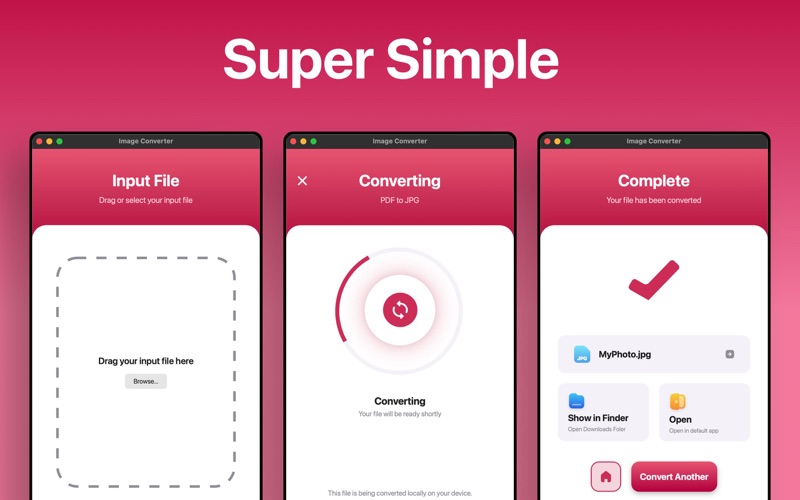
1. Select your input file
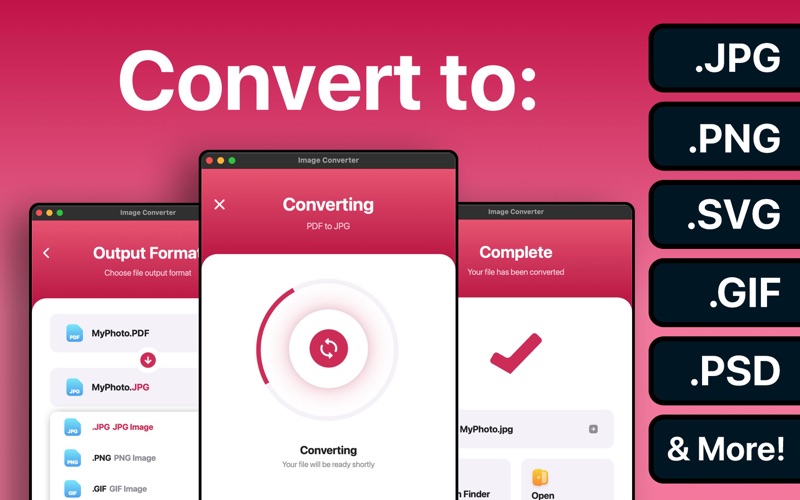
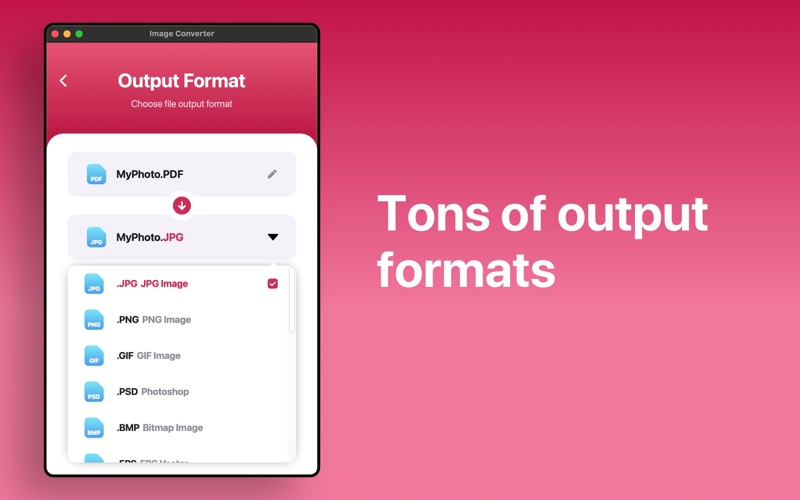
2. Choose your output format ( SVG, JPG, PNG, GIF etc. )
3. Convert! It will only take a few seconds.
4. Done! Open or share your converted image

Here are the output formats you can choose from:
JPG, PNG, GIF, PSD, BMP, EPS, SVG, EXR, ICO, TIFF, TGA, WBMP, WEBP, ODD, PSD, PS, PDF

You can convert from dozens of input formats, here are some of the most popular formats we support converting from:
JPG, PNG, HEIC, PDF, SVG, EPS, WEBP, GIF, TIF, DOCX, AI, PAGES and many more!

Save, Share or View your converted images in your favorite apps immediately.

Conversions usually take less than 15 seconds!

Conversion is done on a secure cloud server, which makes conversion easier, faster and much more battery-friendly. You must have an internet connection to use this app. Files are immediately deleted from the server after conversion. While the files are immediately deleted after conversion or cancellation, you should be aware that by using this app, you agree that your files will be sent over to internet from the app to the conversion server.

We've also recently added support for local conversions for many popular conversion types. These conversions don't require a server, and are usually done almost instantly! We are continuing to add support for more local conversions with each update.


This app includes an optional auto-renewable subscription (Premium Pass): Premium Pass beings with a free trial period, then an auto-renewable monthly subscription when trial ends. Payment will be charged to your Apple account at confirmation of purchase and will automatically renew (at the duration/price selected) unless auto-renew is turned off at least 24 hrs before the end of the current period. Account will be charged for renewal within 24-hours prior to the end of the current period. Current subscription may not be cancelled during the active subscription period; however, you can manage your subscription and/or turn off auto-renewal by visiting your Apple Account Settings after purchase. Any unused portion of the free initial period will be forfeited when you purchase a subscription.

Privacy Policy: https://float.support/the-image-converter-mac/privacy
Terms of Use: https://float.support/the-image-converter-mac/terms
Show more Show less

More data about The Image Converter

Price Free
Rating No ratings
Ranking Not ranked
Version 26.1.0
App size 26.1 MB
Suitable for Everyone

Screenshots

The Image Converter Screenshot 1 of 3
The Image Converter Screenshot 2 of 3
The Image Converter Screenshot 3 of 3
Screenshots by Float Tech, LLC, from the the App Store listing
Official page on the App Store

More from Float Tech, LLC

Interval Timer □ HIIT Timer icon Interval Timer □ HIIT Timer
Float Tech, LLC
4.8
Free
87.0K ratings
Guess the Word! Charades Game icon Guess the Word! Charades Game
Float Tech, LLC
4.7
Free
28.1K ratings
The Image Converter □ icon The Image Converter □
Float Tech, LLC
4.6
Free
16.7K ratings
The Audio Converter icon The Audio Converter
Float Tech, LLC
4.6
Free
13.6K ratings
Tabata Timer □ icon Tabata Timer □
Float Tech, LLC
4.9
Free
10.5K ratings
The Video Converter icon The Video Converter
Float Tech, LLC
4.5
Free
10.2K ratings
The Document Converter icon The Document Converter
Float Tech, LLC
4.7
Free
6.0K ratings
The Vector Converter icon The Vector Converter
Float Tech, LLC
4.6
Free
4.8K ratings

Changelog of The Image Converter

No changelog data

Developer information for Float Tech, LLC

Float Tech, LLC

Address:

Share The Image Converter

Comments on The Image Converter for iOS

We don't have enough comments to show example comments. Please check back later.

App Store Rankings for The Image Converter

This app is not ranked

Technologies used by The Image Converter

Frequently asked questions about The Image Converter

Is The Image Converter free?

Yes. The Image Converter is free on the App Store.

Is The Image Converter still available?

Yes. The Image Converter is on the App Store, and the last update we saw was on April 6, 2026.

How large is The Image Converter?

The Image Converter is 26.12 MB.

Is The Image Converter suitable for children?

App Store rates the content of The Image Converter as suitable for everyone.

Who made The Image Converter?

The Image Converter was developed by Float Tech, LLC. It is listed in the utilities category on the App Store.

Top new apps Apps other people are watching Today's trending apps Popular Utilities Apps Price drops on Google Play
More hot apps 🔥
Overview Reviews Rankings Technology
AppBrain Intelligence premium content

Subscribe now to get full and unlimited access to AppBrain Intelligence. You'll have access to:

  • App Intelligence dashboard (performance timeline, competitor comparison, country rankings, insight cards)
  • Detailed ranking data per app
  • Full timeline per developer
  • Device market shares data per country
  • Unlimited keyword tracking
1 Month

$75/mo
(billed every month)

SAVE 0%
Subscribe
3 Months

$65/mo
($195 billed every 3 months)

SAVE 13%
Subscribe
1 Year

$57.50/mo
($690 billed every year)

SAVE 23%
Subscribe
Each subscription will automatically renew 3 days before the expiration date for the same time period. Subscriptions can be cancelled at any time before the renewal.

AppBrain is an app data site, we track rankings, ratings, installs for all apps and games on Google Play and the App Store. AppBrain doesn't host app files or APKs, all install links go directly to the official store. All trademarks are owned by their respective owners. As an Amazon Associate AppBrain earns from qualifying purchases.

More apps

  • Top Android apps being viewed
  • Raccoon Notes: Notepad stats
  • myBijulee stats
  • Mighty Fu Casino Slots Games

App statistics

  • Android statistics
  • Google Play Developer stats
  • Trending Android Apps
  • Trending iOS apps
  • Top popular Apps
  • Buy the best Android phone
  • Buy & sell app businesses

About AppBrain

  • Contact
  • Privacy
  • Documentation
  • DMCA takedowns
  • Articles
  • Blog
  • Top Free Games Apps for your iPhone or iPad
© 2010-2026 - AppBrain