Download Android Apps and Games
AppBrain
  • Apps
  • Apps being viewed right now Trending apps today Most popular apps All-time most downloaded apps Top rated apps
  • Intelligence ▾
    Intelligence overview → Track any Android app or your whole market
    Track & analyze
    Keyword Tracker & OptimizerTrack & improve Play rankings App Performance ReportOne-off PDF for any app StatisticsFree Android & Play market stats
    Promote your app
    Featured Apps App Links
  • Intelligence
  • Pricing
  • Dashboard
  • Sign up
  • Log in
Last updated on: 2026-08-30
App Store Apps > Productivity > The Shift: Work Schedule
The Shift: Work Schedule icon

The Shift: Work Schedule

1.0.21
Jeeyun Lee
0.00
0 reviews
Free

The Shift: Work Schedule Screenshot 1 of 4
The Shift: Work Schedule Screenshot 2 of 4
The Shift: Work Schedule Screenshot 3 of 4
The Shift: Work Schedule Screenshot 4 of 4
Download from the App Store Android version

About The Shift: Work Schedule

The Shift: Work Schedule is an overall app developed by Jeeyun Lee.

Download Statistics

User Ratings

The app has no ratings yet.

App Information

The Shift: Work Schedule is FREE to download. The APK download size is 8.53 MB. The latest version available is 1.0.21. The last update was on August 27, 2026.

Technical Requirements

The app has a content rating of Everyone. The app has been available on Google Play 6 weeks ago.

Description
Stop logging in just to see your schedule.

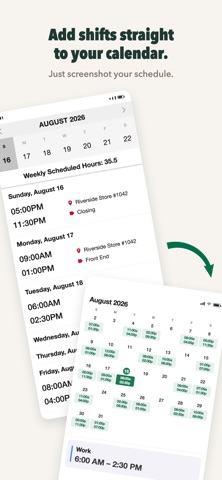
Screenshot it once. The Shift reads your schedule and pulls out the exact start and end times for each shift. Your next shift is right on your Lock Screen, and your whole schedule shows up in your calendar.

No typing. No picking dates. No entering shifts one by one. A screenshot is all it takes.

――――――――――

SOUND FAMILIAR?

It's 10 PM and you just want to know tomorrow's shift. So you unlock your phone, open your work app, wait for it to load, log in (again), find the schedule menu, scroll…

Or the app is down. The night before a 5 AM opening.

And even when it works, your shifts still live in your work app — not in your calendar, next to the rest of your life.

That's why you already screenshot your schedule. The Shift does the rest.

HOW IT WORKS

1. Screenshot your schedule from your scheduling app, or snap a photo of a posted schedule.
2. The Shift reads the dates and times for every shift.
3. Done. Your shifts are on your calendar, your Home Screen, and your Lock Screen.

The Shift doesn't just find the dates — it captures each shift's exact times. That's the whole point.

WHAT YOU GET

- Your work schedule, added to your calendar from one screenshot — no manual entry, ever
- Lock Screen widgets — your next shift and a live countdown, without unlocking your phone
- Home Screen widgets — today, this week, or the next two weeks at a glance
- Weekly hour totals — know your hours before payroll does
- Days off clearly shown — plan your life, not just your work
- Works offline — no Wi-Fi, no problem

"AM I EVEN ALLOWED TO USE THIS?"

Fair question. Here's what The Shift does — and doesn't do:

- The Shift never connects to your employer's systems. It only reads a schedule screenshot you provide.
- No account. No sign-up. No email.
- Your schedule stays on your device. It isn't uploaded, shared, or sold.
- Delete the app, and your local schedule data goes with it.

Your schedule is yours. We built The Shift so it stays that way.

BUILT BY A SHIFT WORKER

The Shift was built by a barista who was tired of checking the work app just to see a schedule. Word spread among baristas, and The Shift reached 1,000+ downloads in its first month, mostly through coworkers sharing it. Now it works for shift workers everywhere: baristas, servers, nurses, retail and warehouse teams, grocery crews — anyone whose week never looks the same twice.

If your schedule doesn't import correctly, let us know in the app — we usually add support within 24 hours.

SCREENSHOT YOUR NEXT SCHEDULE

Download The Shift, take one screenshot, and see your whole week — on your Lock Screen, Home Screen, and calendar. You'll never log in just to check a shift again.
Show more Show less

More data about The Shift: Work Schedule

Price Free to download
Rating No ratings
Ranking Not ranked
Version 1.0.21
App download size 8.53 MB
Suitable for Everyone

Alternative downloads for the The Shift: Work Schedule app

Weekvu - Weekly Planner icon Weekvu - Weekly Planner
song kim
0.0
Free
GIORNO Diary icon GIORNO Diary
Chihiro Omata
0.0
Free
Mitsu: AI Life Coach icon Mitsu: AI Life Coach
C2 Insights
0.0
Free
아토믹투두: 할 일, 루틴, 리마인더 icon 아토믹투두: 할 일, 루틴, 리마인더
Hwarang Lee
0.0
Free
한본냥과 보람찬 하루 - 타임스탬프, 뽀모도로 타이머 icon 한본냥과 보람찬 하루 - 타임스탬프, 뽀모도로 타이머
Dongin Won
0.0
Free
Higher rated
Reminder Templates icon Reminder Templates
Chakkaradeep Chandran
3.0
Free
2 ratings
Higher rated
Dooo - Habit Tracker icon Dooo - Habit Tracker
Lovely Duck, LLC
4.5
Free
2 ratings
DABONDA Viewer icon DABONDA Viewer
ARASOFT.Co.,Ltd
0.0
Free

More from Jeeyun Lee

Syncly: Alarms across cities icon Syncly: Alarms across cities
Jeeyun Lee
0.0
Free

Changelog of The Shift: Work Schedule

No changelog data

Developer information for Jeeyun Lee

Jeeyun Lee

Address:

Share The Shift: Work Schedule

Comments on The Shift: Work Schedule for iOS

We don't have enough comments to show example comments. Please check back later.

App Store Rankings for The Shift: Work Schedule

This app is not ranked

Technologies used by The Shift: Work Schedule

Weekvu - Weekly Planner icon Weekvu - Weekly Planner
GIORNO Diary icon GIORNO Diary
Mitsu: AI Life Coach icon Mitsu: AI Life Coach
아토믹투두: 할 일, 루틴, 리마인더 icon 아토믹투두: 할 일, 루틴, 리마인더
한본냥과 보람찬 하루 - 타임스탬프, 뽀모도로 타이머 icon 한본냥과 보람찬 하루 - 타임스탬프, 뽀모도로 타이머
Reminder Templates icon Reminder Templates
Dooo - Habit Tracker icon Dooo - Habit Tracker
DABONDA Viewer icon DABONDA Viewer

Back to top
AppBrain Intelligence premium content

Subscribe now to get full and unlimited access to AppBrain Intelligence. You'll have access to:

  • App Intelligence dashboard (performance timeline, competitor comparison, country rankings, insight cards)
  • Detailed ranking data per app
  • Full timeline per developer
  • Device market shares data per country
  • Unlimited keyword tracking
1 Month

$75/mo
(billed every month)

SAVE 0%
Subscribe
3 Months

$65/mo
($195 billed every 3 months)

SAVE 13%
Subscribe
1 Year

$57.50/mo
($690 billed every year)

SAVE 23%
Subscribe
Each subscription will automatically renew 3 days before the expiration date for the same time period. Subscriptions can be cancelled at any time before the renewal.

AppBrain is a directory focused on discovering great apps and games. We give statistics, rankings and search options that Google Play and the App Store don't have. All trademarks are owned by their respective owners. AppBrain doesn't offer APKs or binaries, and always lets users install the official version from Google Play or the App Store.

More apps

  • Top Android apps being viewed
  • Firehouse Subs stats
  • Ayat - Al Quran stats
  • Critical Action:Gun Strike Ops

Android Statistics

  • Android statistics
  • Google Play Developer stats
  • Trending Android Apps
  • Top popular Apps
  • Buy the best Android phone

About AppBrain

  • Contact
  • Privacy
  • Documentation
  • DMCA takedowns
  • Articles
  • Blog
  • Free App-Ads.Txt Validation
© 2010-2026 - AppBrain