

Time Lapse Clip
Time Lapse Clip is made and published by Heng Jia Liang. AppBrain is an independent app data site and isn't affiliated with Heng Jia Liang. The app name, icon, screenshots and description belong to Heng Jia Liang and are shown as published on the App Store.
AppBrain's verdict
- Rating on App Store
- 5.00
- 1 ratings
- Last updated
- October 5, 2025
- Size
- 1.75 MB
It doesn't have enough ratings yet to judge what users think.
User feedback
Ratings and reviews on the App StoreComments on Time Lapse Clip for iOS
We don't have enough comments to show example comments. Please check back later.
Store listing
By Heng Jia Liang, from the App Store




Description by Heng Jia Liang Written by the developer, not by AppBrain. Click to read.
Features:
• Outputs the highest video quality supported by your device
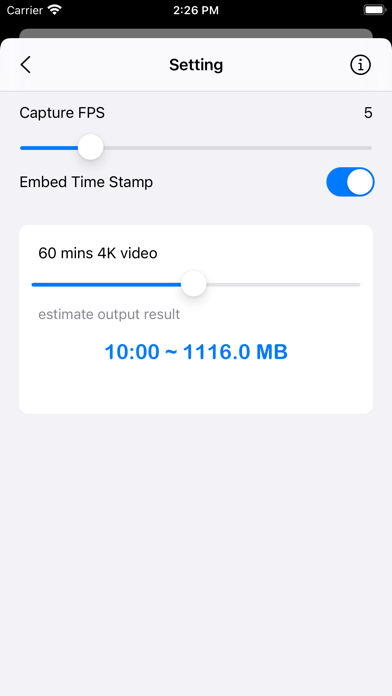
• Adjustable frame rate: 2 to 20 frames per second
• Records sound as well
• Video quality options: 4K (best for viewing), Full HD 1080p, or HD 720p
• Easy Start/Stop recording
• Dim screen during recording to save battery
• Option to embed date and time in the video (time-stamped video)
• Supports dual-lens and triple-lens devices
• Pinch to zoom, pinch out for ultra-wide-angle lens
• Calculates estimated file size and video duration to help with planning
• Saves recordings directly to the camera roll
• Supports both landscape and portrait modes
• Small app size
• Simple UI and easy to use
How it works:
Unlike classic time-lapse apps that take still photos at intervals (every few seconds or minutes), Time Lapse Clip records video at a preset frame rate and converts it into a 30fps clip. The result is a smooth time-lapse video.
Examples:
• Record at 15fps for 1 minute → results in a 30-second time-lapse
• Record at 10fps for 1 minute → results in a 20-second time-lapse
Benefits:
Recording long videos can quickly fill up storage and cause recordings to stop. This method saves both space and time compared to capturing long videos and speeding them up later.
Usage ideas:
- Record your road trips
- Capture party moments
- Film flowers blooming
- Record beautiful landscapes
- Record drives as proof in case of accidents
Tips:
• Dim the screen during recording to save battery
• Pinch out to use the ultra-wide lens and capture more of the surroundings
Best for capturing changes over 1–2 hours, e.g. flower blooming, sunset, sunrise, insect activity, etc.
Thanks for your support! Visit nitrio.com for more apps for your iOS devices.
Safety and technology
Found in the app by AppBrain- Price
- $3.99
- App size
- 1.75 MB
- Content rating
- Everyone
Technologies used by Time Lapse Clip
Releases
Updates seen on the App Store- Version
- 1.1
- Launched
- August 2022
No changelog data
Alternatives
Similar apps and more from Heng Jia LiangMore from Heng Jia Liang





Rankings
App Store top chartsApp Store Rankings for Time Lapse Clip
About the app and developer
About Time Lapse Clip
Time Lapse Clip is a photo & video app developed by Heng Jia Liang.
What is the rating of Time Lapse Clip?
Time Lapse Clip is rated 5.00 out of 5 stars, based on one rating ratings.
Is Time Lapse Clip free?
Time Lapse Clip costs $3.99. The app size is 1.75 MB. The latest version available is 1.1. The last update was on October 5, 2025.
What are the requirements for Time Lapse Clip?
The app has a content rating of Everyone. The app has been available on the App Store since August 2022.
Developer information for Heng Jia Liang
Address:
Frequently asked questions about Time Lapse Clip
Is Time Lapse Clip free?
No. Time Lapse Clip costs $3.99 on the App Store.
Is Time Lapse Clip still available?
Yes. Time Lapse Clip is on the App Store, and the last update we saw was on October 5, 2025.
How large is Time Lapse Clip?
Time Lapse Clip is 1.75 MB.
Is Time Lapse Clip suitable for children?
App Store rates the content of Time Lapse Clip as suitable for everyone.
How do people rate Time Lapse Clip?
Time Lapse Clip has one rating of 5.00 stars on the App Store.
Who made Time Lapse Clip?
Time Lapse Clip was developed by Heng Jia Liang. It is listed in the photo & video category on the App Store.