

Time_Tools is made and published by HTLab. AppBrain is an independent app data site and isn't affiliated with HTLab. The app name, icon, screenshots and description belong to HTLab and are shown as published on the App Store.
AppBrain's verdict
- Last updated
- September 19, 2026
Rankings
App Store top chartsApp Store Rankings for Time_Tools
This app is not ranked
Competitors
Similar apps and more from HTLabAlternatives to Time_Tools




More from HTLab


Releases
Updates seen on the App Store- Version
- 2.6
- Launched
- January 2022
No changelog data
User feedback
Ratings and reviews on the App StoreComments on Time_Tools for iOS
We don't have enough comments to show example comments. Please check back later.
Technology
Found in the app by AppBrain- Price
- $1.99
- App size
- 2.24 MB
- Content rating
- Everyone
Technologies used by Time_Tools
About the app and developer
About Time_Tools
Time_Tools is an utilities app developed by HTLab.
User Ratings
The app has no ratings yet.
App Information
Time_Tools costs $1.99. The app size is 2.24 MB. The latest version available is 2.6. The last update was on September 19, 2026.
Technical Requirements
The app has a content rating of Everyone. The app has been available on the App Store since January 2022.
Developer information for HTLab
Address:
Store listing
By HTLab, from the App Store


Screenshots by HTLab, from the the App Store listing
Description by HTLab Written by the developer, not by AppBrain. Click to read.
This is a 4-mode app suitable for time management calculations: time calculation function, stopwatch function, backward count timer function, and clock display function.
Calculations and measurements in seconds are possible (measurements in milliseconds are not supported)
You can use the time calculation function, stopwatch function, and backward count timer function on Apple Watch alone.
detail of function
・Time calculation function [CALCULATOR]: Hour: minute: second addition and subtraction function
・Stopwatch function [STOP WATCH]: Stopwatch function in seconds
You can not only start from 0 seconds but also set the start time in advance.
・Countdown timer function [COUNTDOWN]: Countdown timer function from a preset time
When it reaches 0 seconds, no alarm is generated and it continues to move in the negative direction.
(The press time will be displayed during broadcasts, etc.)
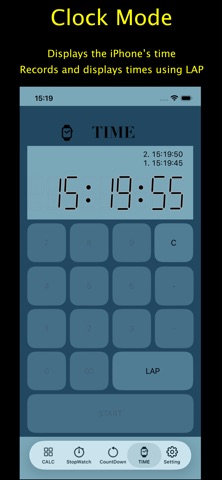
・Clock display function [TIME]: Displays the iPhone clock time digitally.
Calculations and measurements in seconds are possible (measurements in milliseconds are not supported)
You can use the time calculation function, stopwatch function, and backward count timer function on Apple Watch alone.
detail of function
・Time calculation function [CALCULATOR]: Hour: minute: second addition and subtraction function
・Stopwatch function [STOP WATCH]: Stopwatch function in seconds
You can not only start from 0 seconds but also set the start time in advance.
・Countdown timer function [COUNTDOWN]: Countdown timer function from a preset time
When it reaches 0 seconds, no alarm is generated and it continues to move in the negative direction.
(The press time will be displayed during broadcasts, etc.)
・Clock display function [TIME]: Displays the iPhone clock time digitally.