



AppBrain's verdict
EstablishedLoved by users- Rating on App Store
- 4.53
- 1,763 ratings
- Last updated
- November 5, 2026
- Size
- 23.2 MB
Users love it: 4.5 stars from 1,763 ratings.
User feedback
Ratings and reviews on the App StoreComments on Time Tracker by eBillity for iOS
We don't have enough comments to show example comments. Please check back later.
Store listing
By Boston Billing Solutions, LLC, from the App StoreDescription by Boston Billing Solutions, LLC Written by the developer, not by AppBrain. Click to read.
Save Time | Increase Profitability
Keep track of time from any device, anywhere with Time Tracker by eBillity. Our time tracking software is securely connected to the cloud and runs automatic backups, so if you lose your internet connection you can manually sync your time entry to your account once your device is back online.
Unique Time Tracking
Just like you, your business is unique so when we designed Time Tracker we decided to be unique too which is why we created options based on why you need to track time – is it for payroll or billing?
Time Tracker for Payroll
Time cards are the default setting for Time Tracker and the ideal way to capture your team's time for payroll. Time cards allow employees to clock in and out of shifts, take breaks, switch between projects and receive overtime alerts.
With time cards the admin or manager can easily: and be notified when their break is coming to an end.
Monitor employee hours to estimate costs within each pay cycle
Set thresholds to automatically calculate overtime and double time
Set time rounding (up or down); for example, if an employee clocks in at 08:55 am the time entry can round up and be recorded as 09:00 am.
Receive automatic notifications of a rate increase to overtime/double time
Time Tracker for Billing
Timers are ideal for invoicing clients and they’re the default setting for our Time Tracker +Billing account. With timers you can easily capture every second worked in just one click – run multiple timers, switch between clients, projects and activities.
Mark time entries as billable or non-billable
Enter your hourly billing rate or add a flat fee
Flag the time entry as standard or overtime
Option to add the time entry to an invoice
Included in every account:
Geolocation tracking
View a detailed map of where your employees were when they logged time to avoid billing disputes and verify locations (displays location after the entry is saved/not real-time tracking).
Time entry approvals
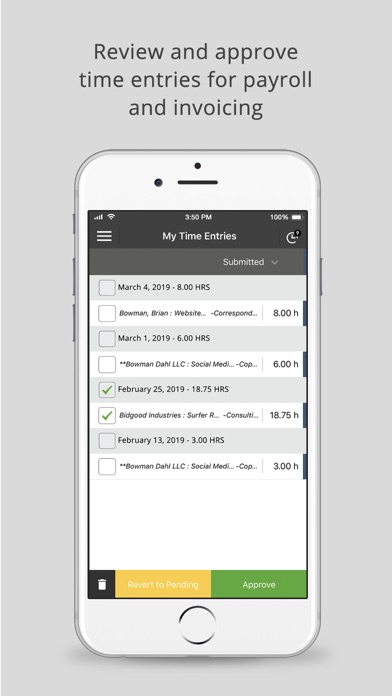
Submitted time entries can be edited, rejected or approved by an admin. Approved time entries automatically sync with your accounting and payroll software (if enabled).
For larger teams, you can assign your managers or supervisors (for example) as an admin so they can review and approve their own team’s time entries.
Time Tracker +Billing also offers expense tracking and client billing!
Manage expenses
Track expenses with your mobile device; take a photo of your receipt and upload it to Time Tracker. Expenses can be reviewed, marked as billable and easily added to client invoices (optional).
Client Billing
Turn time and expenses into branded client invoices, allow your clients to pay invoices instantly when you connect your account with Stripe payment gateway.
Invoice Management
View your list of invoices to see what percentage is paid and email client invoices from any device.
Additional Desktop Access
For additional features login to your account via your desktop:
To invite additional people to your account so you can track time as a team
Seamless integration with payroll, expense and accounting software such as Xero, Sage, Intuit’s QuickBooks, ADP, Gusto, Reckon, Concur and MYOB
To access powerful, real-time reports in multiple formats (PDF, CSV, online, HTML)
Detailed time logs to protect you against labor disputes and audits
Configurations for DCAA/DOL compliance
Access to our developer open API
Support is always free
At eBillity we’re here to help you every step of the what which is why we offer free unlimited phone, email, and live chat support to all of our customers.
Have a question? We’re always happy to help!
Toll Free: (800) 851-0992
International: +1 (732) 253-4200
Australia: (02) 8317 1139
Mon-Thurs: 9:00 am - 6:00 pm, EST / Friday: 9:00 am - 4:30 pm, EST
Safety and technology
Found in the app by AppBrain- Price
- Free
- App size
- 23.2 MB
- Content rating
- Everyone
Technologies used by Time Tracker by eBillity
Releases
Updates seen on the App Store- Version
- 3.7.8
- Launched
- October 2011
No changelog data
Alternatives
Similar apps and more from Boston Billing Solutions, LLCAlternatives to Time Tracker by eBillity




More from Boston Billing Solutions, LLC



Rankings
App Store top chartsApp Store Rankings for Time Tracker by eBillity
About the app and developer
About Time Tracker by eBillity
Time Tracker by eBillity is a business app developed by Boston Billing Solutions, LLC.
User Ratings
Time Tracker by eBillity is rated 4.53 out of 5 stars. The rating is based on 1.8 thousand ratings.
App Information
Time Tracker by eBillity is freely available from the App Store. The app size is 23.23 MB. The latest version available is 3.7.8. The last update was on November 5, 2026.
Technical Requirements
The app has a content rating of Everyone. The app has been available on the App Store since October 2011.
Time Tracker by eBillity is made and published by Boston Billing Solutions, LLC. AppBrain is an independent app data site and isn't affiliated with Boston Billing Solutions, LLC. The app name, icon, screenshots and description belong to Boston Billing Solutions, LLC and are shown as published on the App Store.
Developer information for Boston Billing Solutions, LLC
Address:
Frequently asked questions about Time Tracker by eBillity
Is Time Tracker by eBillity free?
Yes. Time Tracker by eBillity is free on the App Store.
Is Time Tracker by eBillity still available?
Yes. Time Tracker by eBillity is on the App Store, and the last update we saw was on November 5, 2026.
How large is Time Tracker by eBillity?
Time Tracker by eBillity is 23.23 MB.
Is Time Tracker by eBillity suitable for children?
App Store rates the content of Time Tracker by eBillity as suitable for everyone.
How do people rate Time Tracker by eBillity?
Time Tracker by eBillity scores 4.53 out of 5 stars, from 1,763 ratings on the App Store.
Who made Time Tracker by eBillity?
Time Tracker by eBillity was developed by Boston Billing Solutions, LLC. It is listed in the business category on the App Store.
What are the best alternatives to Time Tracker by eBillity?
People looking at Time Tracker by eBillity also look at these business apps: Timesheet IO - Time Tracker, Workstorm, Intuit Field Service Mgnt, Timecard GPS, OfficeTime Work & Time Tracker.