



AppBrain's verdict
- Last updated
- October 1, 2026
- Size
- 13.2 MB
User feedback
Ratings and reviews on the App StoreComments on Timeflow - Time Widgets for iOS
We don't have enough comments to show example comments. Please check back later.
Store listing
By CHANWOO KOO, from the App StoreDescription by CHANWOO KOO Written by the developer, not by AppBrain. Click to read.
■ Plan sleep on a clock dial
Drag bedtime and wake-up time around the dial. Move the colored arc to shift the whole window without changing its length. “If I sleep now” shows the time until you wake up, minus the time you expect to take to fall asleep.
■ Estimated earnings by day, month and year
Enter hourly, monthly or annual pay, then choose your workdays and hours. View gross or estimated net earnings, and browse estimates for previous days and months. Amounts are in Korean won; net estimates use South Korean rules.
■ See how much time has passed
Track the year, month, week or day with dots, blocks, bars or rings. Start the week on Sunday or Monday and show a full day, morning or afternoon. The daily time card moves from time until leaving home to returning home and bedtime. Subtract time for meals, chores and other plans to see your free time after getting home.
■ Count down or count days since a date
See days until a trip or event, or days since a birthday, adoption or anniversary. Include today in a countdown or count the starting date as day one. For a deadline, choose available days and hours to count remaining work sessions.
■ Clocks, text and photos
Choose an analog or digital clock with Minimal, Classic or Rounded styling. Add a web link to a text card, or make a card just for a photo. Countdown, elapsed-day, clock and text cards also support background photos, with adjustable framing for each size and a darkness control.
■ From a card to your Home Screen
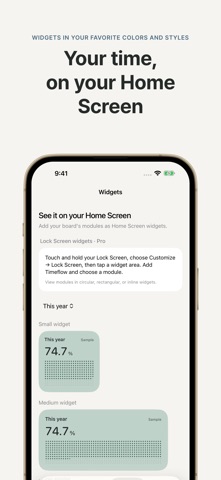
Set the content, then choose a design while viewing the preview. Small, medium and large widgets are supported, with extra large widgets on iPad. A widget opens its module; a text widget with a link opens the web address you set.
■ Lock Screen widgets and Live Activities
With Pro, see compact Lock Screen widgets for 12 module types, excluding photo modules. With Pro, start or stop a Live Activity from each module’s detail screen and see it in Dynamic Island on supported iPhones. Each session stays active for up to eight hours; iOS may end it sooner. Remaining-time displays count down automatically; other values refresh when you open the app or edit the module.
■ Free and Pro
Create up to three personal modules for free. Example modules do not count toward this limit. A one-time Timeflow Pro purchase removes ads and unlocks unlimited modules, Lock Screen widgets and Live Activities. The purchase screen shows the current price.
Calculation and data notes
• Module settings and selected photos are stored on your device and shared with the widget. No login or developer-operated cloud sync is required. Apple handles purchases and restores. Free use may include ads; see the privacy policy for usage, diagnostics, purchase and advertising data.
• Earnings history is recalculated from your current pay and schedule. It is an estimate, not a timesheet or a record of payments received.
• Net pay estimates use 2026 South Korean employment tax and social insurance rules. They may differ from actual withholding or year-end tax results. Assumptions and sources are available in the app.
• Sleep calculations are for planning. Timeflow does not set alarms or measure sleep.
• iOS controls Home Screen widget refresh times. Clock widgets are not guaranteed to update every second.
Available in Korean, English, Japanese and Simplified Chinese on iPhone with iOS 18 or later and iPad with iPadOS 18 or later.
Safety and technology
Found in the app by AppBrain- Price
- Free
- App size
- 13.2 MB
- Content rating
- Everyone
Technologies used by Timeflow - Time Widgets
Releases
Updates seen on the App Store- Version
- 1.1.0
- Launched
- September 2026
No changelog data
Alternatives
Similar apps and more from CHANWOO KOOAlternatives to Timeflow - Time Widgets





Rankings
App Store top chartsApp Store Rankings for Timeflow - Time Widgets
About the app and developer
About Timeflow - Time Widgets
Timeflow - Time Widgets is an utilities app developed by CHANWOO KOO.
User Ratings
The app has no ratings yet.
App Information
Timeflow - Time Widgets is freely available from the App Store. The app size is 13.15 MB. The latest version available is 1.1.0. The last update was on October 1, 2026.
Technical Requirements
The app has a content rating of Everyone. The app has been available on the App Store since September 2026.
Timeflow - Time Widgets is made and published by CHANWOO KOO. AppBrain is an independent app data site and isn't affiliated with CHANWOO KOO. The app name, icon, screenshots and description belong to CHANWOO KOO and are shown as published on the App Store.
Developer information for CHANWOO KOO
Address:
Frequently asked questions about Timeflow - Time Widgets
Is Timeflow - Time Widgets free?
Yes. Timeflow - Time Widgets is free on the App Store.
Is Timeflow - Time Widgets still available?
Yes. Timeflow - Time Widgets is on the App Store, and the last update we saw was on October 1, 2026.
How large is Timeflow - Time Widgets?
Timeflow - Time Widgets is 13.15 MB.
Is Timeflow - Time Widgets suitable for children?
App Store rates the content of Timeflow - Time Widgets as suitable for everyone.
Who made Timeflow - Time Widgets?
Timeflow - Time Widgets was developed by CHANWOO KOO. It is listed in the utilities category on the App Store.
What are the best alternatives to Timeflow - Time Widgets?
People looking at Timeflow - Time Widgets also look at these utilities apps: NiceClock Analog, Bible Verse:Pray & KJV bible, MyType, Digital Clock: Big LED, Reach: Countdown to Connect.