

TimerFit: Interval Timer
TimerFit: Interval Timer is made and published by KWANG ROK KIM. AppBrain is an independent app data site and isn't affiliated with KWANG ROK KIM. The app name, icon, screenshots and description belong to KWANG ROK KIM and are shown as published on the App Store.
AppBrain's verdict
- Last updated
- September 28, 2026
- Size
- 12.1 MB
User feedback
Ratings and reviews on the App StoreComments on TimerFit: Interval Timer for iOS
We don't have enough comments to show example comments. Please check back later.
Store listing
By KWANG ROK KIM, from the App Store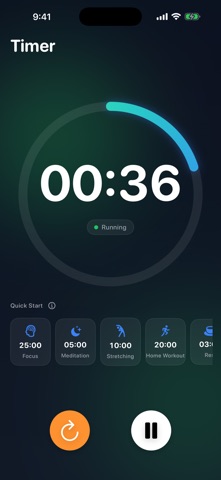


Description by KWANG ROK KIM Written by the developer, not by AppBrain. Click to read.
■ Two timers, one app
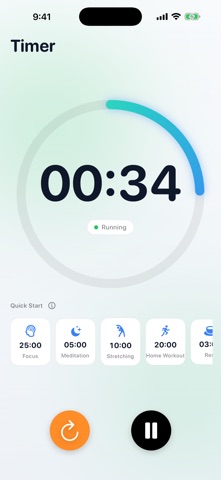
• Simple Timer — set the time and go. A big, clear progress ring shows time at a glance, and your go-to durations are one tap away under "Recent."
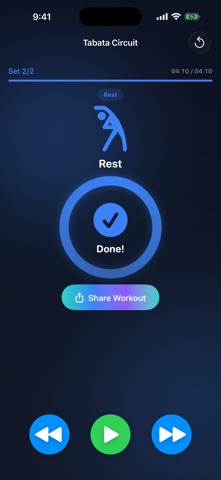
• Interval Circuit Timer — prepare → work → rest → next round, all handled automatically. Hands-free flow from start to finish.
■ A different move each round — follow along
Burpees, mountain climbers, jumping jacks, squats… each work interval shows the movement and a short form cue, big and clear. No more "what's next?" — just move.
■ Ready-to-go presets
• Tabata (20s work / 10s rest)
• HIIT (40s work / 20s rest)
• EMOM Burpees
Tap and start. Perfect for beginners.
■ Build your own routine
Set work/rest durations and rounds your way. Add your own exercises with a custom icon, name, and form cue. Your routines are saved for next time.
■ Signals you won't miss
Sound and haptics on every interval change, plus a 3-2-1 countdown before each one ends. Stay on track without staring at the screen.
■ A glance at your Lock Screen
• Lock your phone — the current interval and time left stay on the Lock Screen and Dynamic Island.
• Tap a Home Screen widget to start your go-to routine instantly.
■ Right on your wrist with Apple Watch
• Start from the watch alone — no phone needed. Presets and the routines you build on iPhone sync straight over.
• Drop your wrist and let the screen sleep; the timer keeps running.
• A tap on the wrist at every interval change, so you never lose the flow.
■ Stay motivated with history
Completed workouts stack up in the History tab — see your total count, total time, and this week's activity at a glance.
■ Clean by design
• Dark mode by default, easy on the eyes (Light mode too)
• No ads · No account
• Keeps the screen awake during workouts
• iPhone, iPad & Apple Watch · English/Korean
Home workouts, CrossFit, core, stretching — or just a 3-minute timer. For every moment that needs one.
Start light. Start now.
Safety and technology
Found in the app by AppBrain- Price
- Free
- App size
- 12.1 MB
- Content rating
- Everyone
Technologies used by TimerFit: Interval Timer
Releases
Updates seen on the App Store- Version
- 1.8.0
- Launched
- July 2026
No changelog data
Alternatives
Similar apps and more from KWANG ROK KIMAlternatives to TimerFit: Interval Timer


More from KWANG ROK KIM


Rankings
App Store top chartsApp Store Rankings for TimerFit: Interval Timer
About the app and developer
About TimerFit: Interval Timer
TimerFit: Interval Timer is a health & fitness app developed by KWANG ROK KIM.
User Ratings
The app has no ratings yet.
App Information
TimerFit: Interval Timer is freely available from the App Store. The app size is 12.10 MB. The latest version available is 1.8.0. The last update was on September 28, 2026.
Technical Requirements
The app has a content rating of Everyone. The app has been available on the App Store since July 2026.
Developer information for KWANG ROK KIM
Address: