Download Android Apps and Games
AppBrain
  • Apps
  • Apps being viewed right now Trending apps today Most popular apps All-time most downloaded apps Top rated apps
  • Intelligence ▾
    Intelligence overview → Track any Android app or your whole market
    Track & analyze
    Keyword Tracker & OptimizerTrack & improve Play rankings App Performance ReportOne-off PDF for any app StatisticsFree Android & Play market stats
    Promote your app
    Featured Apps App Links
  • Intelligence
  • Pricing
  • Dashboard
  • Sign up
  • Log in
Last updated on: 2026-06-26
App Store Apps > Productivity > TimeTick
TimeTick icon

TimeTick

1.1.6
Ian Longshaw
0.00
0 reviews
Free

Not recently updated — last update was on 2023-11-11. This app may no longer be actively maintained.
TimeTick Screenshot 1 of 10
TimeTick Screenshot 2 of 10
TimeTick Screenshot 3 of 10
TimeTick Screenshot 4 of 10
TimeTick Screenshot 5 of 10
TimeTick Screenshot 6 of 10
TimeTick Screenshot 7 of 10
TimeTick Screenshot 8 of 10
TimeTick Screenshot 9 of 10
TimeTick Screenshot 10 of 10
Download from the App Store

About TimeTick

TimeTick is an overall app developed by Ian Longshaw.

How many times has TimeTick been downloaded?

What is the rating of TimeTick?

TimeTick has no ratings yet.

Is TimeTick free?

TimeTick is free to download. The APK download size is 10.35 MB. The latest version available is 1.1.6. The last update was on November 11, 2023.

What are the requirements for TimeTick?

The app has a content rating of Everyone. The app has been available on Google Play May 2021.

Description
Welcome to TimeTick - a time-based checklist!

Use it as a daily to-do list, an aid to schedule meal preparation tasks, a tool to keep agendas on track, a means to monitor time during practice exams, or a simple timed log of completed items. 

The free version of the app is fully functional for a single Template but requires a small one-time in-app purchase to enable multiple Templates.

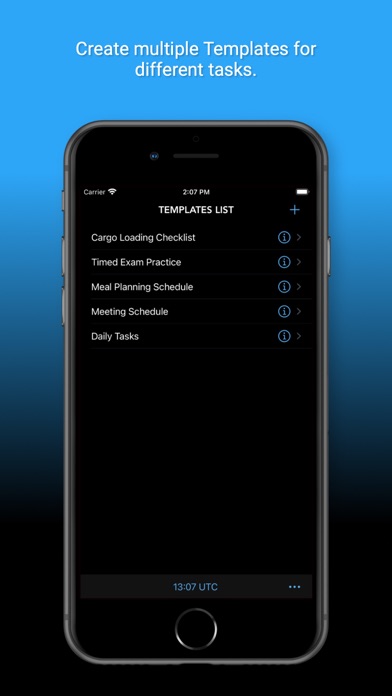
Start by defining a Template and use this Template as the blueprint for one or more Tick Sheets. For example, set up a Template once and use that Template to create daily Tick Sheets for repetitive tasks. Alternatively, create an outline meal planning Template and use this as the starting point for a Tick Sheet for scheduling the preparation of different meals.

Templates can be set up to track tasks relative to a reference time or cascading from a reference time. For example, in a meal planning situation, the reference time would show the planned dinner time and the target times for each task would all be relative to this reference time. An exam practice schedule, on the other hand, would use a cascading time with the total exam time split between the questions in proportion to their allocated marks. In the Tick Sheet for the first example, the Time Bank shows a countdown to the reference time, and in the second example, it indicates whether you have time in hand or are behind schedule. The Time Bank function allows for +/- six hours of ‘banked time’.

On completion each item row is ‘ticked off’ by entering a completion time. Times can be entered manually, or by using a time entry button or swipe gesture, both of which use the app clock. Each item line also supports individual notes for additional information.

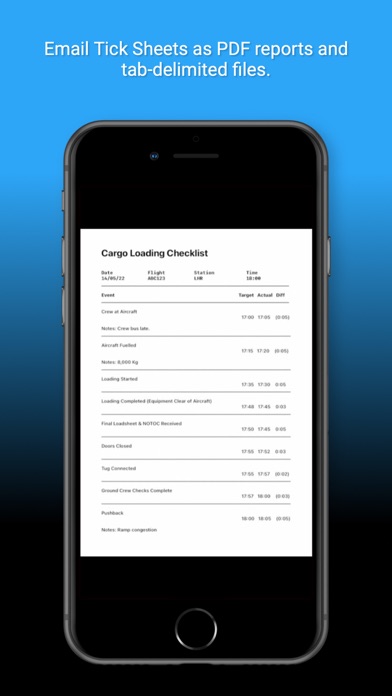
Completed Tick Sheets may be emailed as a PDF and a tab-delimited file.

The app has an extensive notification system. Each item row can be assigned a combination of colour, background notification and foreground audible alert. When the target time for a row is reached any notifications for that row are triggered:

* A colour notification will change the colour of the toolbar from the default grey to the assigned colour - it will remain this colour until changed by a further target time trigger.
* A sound notification will result in an audible chime if the app is active.
* A background notification and associated sound will be triggered if the app is not active.

Both the sound and background notifications for an entire Tick Sheet can be overridden by selecting these options 'on' or 'off' in the Tick Sheet preferences - 'on' is the default option. All the notification features may be set up in the Template Editor and inherited by the associated Tick Sheets or set up and amended directly in individual Tick Sheets.

The app includes a clock that can be toggled between three time zones. (UTC, device system time and local time)

TimeTick is set up to be easy to use. All views support dragging and dropping item rows to new positions. Where appropriate target times will be recalculated to reflect the new row position. Rows may be deleted in all views by swiping left on a row. In Tick Sheets, times can be entered by swiping right on a row.

To help get you started the app comes with freely editable sample Template that is populated with the typical tasks performed by flight crew when loading a freight aircraft (also a great use for TimeTick!)

The app was developed to work well on the small screen of an iPhone but scales effectively to the larger iPad screens. This version does not allow synchronisation between devices.
Show more Show less

More data about TimeTick

Price Free to download
Rating No ratings
Ranking Not ranked
Version 1.1.6
App download size 10.4 MB
Suitable for Everyone

Alternative downloads for the TimeTick app

Dalo Task Manager icon Dalo Task Manager
Nishco Ltd
4.8
Free
13 ratings
ZhaoXi - Simplify your time icon ZhaoXi - Simplify your time
Beijing Yinshi Technology Co., Ltd.
4.5
Free
12 ratings
Timesense - Interval tracker icon Timesense - Interval tracker
Stanton Software, LLC
4.0
Free
5 ratings
Tasker: Pomodoro Timer & Focus icon Tasker: Pomodoro Timer & Focus
Waldemar Fiedorowicz
0.0
Free
Advanced Search Smart Options icon Advanced Search Smart Options
manabu ueda
4.2
Free
30 ratings
Listisy icon Listisy
ICI Solutions
3.7
Free
3 ratings
MinimaList Pro. icon MinimaList Pro.
Davetech Co., Ltd.
4.5
$49.99
48 ratings
My Password Book icon My Password Book
Proson Technologies
5.0
$0.99
3 ratings

More from Ian Longshaw

PilotCalc icon PilotCalc
Ian Longshaw
4.9
Free
10 ratings

Changelog of TimeTick

No changelog data

Developer information for Ian Longshaw

Ian Longshaw

Address:

Share TimeTick

Comments on TimeTick for iOS

We don't have enough comments to show example comments. Please check back later.

App Store Rankings for TimeTick

This app is not ranked

Technologies used by TimeTick

Dalo Task Manager icon Dalo Task Manager
ZhaoXi - Simplify your time icon ZhaoXi - Simplify your time
Timesense - Interval tracker icon Timesense - Interval tracker
Tasker: Pomodoro Timer & Focus icon Tasker: Pomodoro Timer & Focus
Advanced Search Smart Options icon Advanced Search Smart Options
Listisy icon Listisy
MinimaList Pro. icon MinimaList Pro.
My Password Book icon My Password Book

Back to top
AppBrain Intelligence premium content

Subscribe now to get full and unlimited access to AppBrain Intelligence. You'll have access to:

  • App Intelligence dashboard (performance timeline, competitor comparison, country rankings, insight cards)
  • Detailed ranking data per app
  • Full timeline per developer
  • Device market shares data per country
1 Month

$75/mo
(billed every month)

SAVE 0%
Subscribe
3 Months

$65/mo
($195 billed every 3 months)

SAVE 13%
Subscribe
1 Year

$57.50/mo
($690 billed every year)

SAVE 23%
Subscribe
Each subscription will automatically renew 3 days before the expiration date for the same time period. Subscriptions can be cancelled at any time before the renewal.

AppBrain is a directory focused on discovering great apps and games. We give statistics, rankings and search options that Google Play and the App Store don't have. All trademarks are owned by their respective owners. AppBrain doesn't offer APKs or binaries, and always lets users install the official version from Google Play or the App Store.

More apps

  • Top Android apps being viewed
  • RepairBuddy - AI Fix
  • Luck Tester stats
  • Terry Services

Android Statistics

  • Android statistics
  • Google Play Developer stats
  • Trending Android Apps
  • Top popular Apps
  • Buy the best Android phone

About AppBrain

  • Contact
  • Privacy
  • Documentation
  • DMCA takedowns
  • Articles
  • Blog
  • Android Interstitial Ads: Best practices to optimize your app's earnings
© 2010-2026 - AppBrain