

Timetodo - Visual Due Dates
Timetodo - Visual Due Dates is made and published by Mishima Design. AppBrain is an independent app data site and isn't affiliated with Mishima Design. The app name, icon, screenshots and description belong to Mishima Design and are shown as published on the App Store.
AppBrain's verdict
- Last updated
- September 2, 2026
Rankings
App Store top chartsApp Store Rankings for Timetodo - Visual Due Dates
Competitors
Similar apps and more from Mishima DesignAlternatives to Timetodo - Visual Due Dates






More from Mishima Design


Releases
Updates seen on the App Store- Version
- 3.8.4
- Launched
- November 2010
No changelog data
User feedback
Ratings and reviews on the App StoreComments on Timetodo - Visual Due Dates for iOS
We don't have enough comments to show example comments. Please check back later.
Technology
Found in the app by AppBrain- Price
- Free
- App size
- 8.16 MB
- Content rating
- Everyone
Technologies used by Timetodo - Visual Due Dates
About the app and developer
About Timetodo - Visual Due Dates
Timetodo - Visual Due Dates is a productivity app developed by Mishima Design.
User Ratings
The app has no ratings yet.
App Information
Timetodo - Visual Due Dates is freely available from the App Store. The app size is 8.16 MB. The latest version available is 3.8.4. The last update was on September 2, 2026.
Technical Requirements
The app has a content rating of Everyone. The app has been available on the App Store since November 2010.
Developer information for Mishima Design
Address:
Store listing
By Mishima Design, from the App Store


Description by Mishima Design Written by the developer, not by AppBrain. Click to read.
Timetodo is a color-coded task manager that helps you see what needs attention today and what can wait.
Use colors and alerts to stay on top of tasks without keeping everything in your head.
◆ See due dates clearly
・Tasks with closer due dates appear higher in the list, making it easy to find what to do next.
・Colors change as due dates approach, helping urgent tasks stand out.
◆ Stay on track with alerts
・Choose exactly when you want to be notified.
・Tasks with active alerts use a lighter background, keeping your focus on what matters now.
・Hide tasks with alerts temporarily to keep your list focused.
◆ Flexible tools for your workflow
・Flexible repeat schedules for routines and recurring tasks.
・Groups for organizing work, personal tasks, shopping, and more.
・Pull down to quickly add today's tasks.
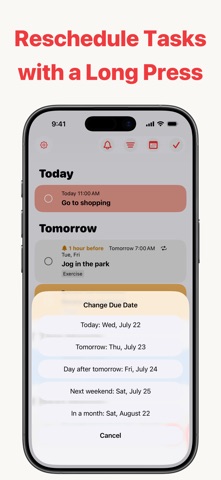
・Long-press a task to quickly reschedule it.
・Subtasks for breaking larger tasks into manageable steps.
・Widgets for checking tasks from the Home Screen.
・Dark Mode for comfortable viewing.
◆ Timetodo Membership
Unlock additional features for larger and more detailed task lists.
・Unlimited subtasks.
・Unlimited snooze settings for repeating alerts.
・Unlimited calendar browsing beyond the current month.
・Unlimited search length for finding tasks quickly.
● Price
"Monthly Membership" $2.99/month (auto-renewing subscription)
● Restore on a new iPhone
Sign in with the Apple Account used for the original purchase, then tap "Restore Purchases" on the Membership screen. You can restore your membership at no additional charge.
● Manage or cancel your subscription
On your iPhone, open Settings, tap your name, tap "Subscriptions," then select Timetodo. You can view or cancel your subscription there.
● Auto-renewal
Your subscription renews automatically unless canceled at least 24 hours before the end of the current billing period.
Your Apple Account will be charged within 24 hours before the end of the current billing period.
● Important
・Subscriptions must be canceled through your Apple Account settings.
・Cancellation takes effect at the end of the current billing period.
・Payment will be charged to your Apple Account.
■ Terms of Use & Privacy Policy
https://apps.mishimadesign.com/timetodo/legal.html#terms-en