Tiny Docs is an overall app developed by James Dassoulas.
How many times has Tiny Docs been downloaded?
What is the rating of Tiny Docs?
Tiny Docs has no ratings yet.
Is Tiny Docs free?
Tiny Docs is free to download. The APK download size is 16.12 MB. The latest version available is 1.1. The last update was on April 20, 2026.
What are the requirements for Tiny Docs?
The app has a content rating of Everyone. The app has been available on Google Play April 2026.
Description
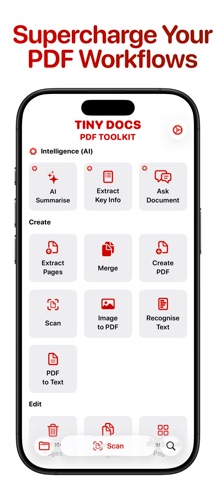
Tiny Docs is the best PDF toolkit in your pocket.
INTELLIGENCE (AI)
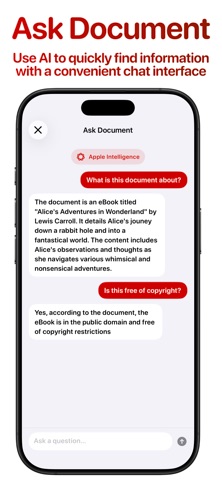
• Summarise — Summarise a PDF with AI • Extract Key Info — Pull out dates, names, and key facts from a document using AI • Ask Document — Ask questions about a PDF and get answers powered by AI
CREATE
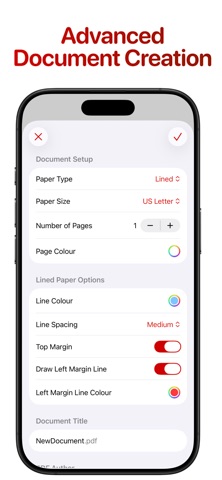
• Scan — Scan a document with your camera and save it as a PDF instantly. • Image to PDF — Convert one or more photos into a single PDF document. • Create PDF — Build a PDF from scratch by adding blank pages. Plain | Lined | Isometric | Graph • Merge — Combine multiple PDFs into one seamless document. • Extract Pages — Pull specific pages out of a PDF and save them as a new file, or as individual files. • Recognise Text (OCR) — Extract searchable text from a scanned PDF using optical character recognition. • PDF to Text — Export the text content of a PDF as a plain .txt file.
EDIT
• Watermark — Add images or text as watermarks to your documents. • Page Numbers — Add custom page numbers to a PDF. • Delete Pages — Remove unwanted pages from a PDF. • Duplicate Pages — Copy pages within a PDF. • Rearrange Pages — Drag and drop to reorder the pages of a PDF. • Rotate Pages — Rotate one or more pages to the correct orientation. • Reverse Pages — Flip the entire page order of a PDF in one tap. • Compress — Reduce the file size of a PDF while preserving quality. • Flatten — Burn annotations and form fields permanently into the PDF. • Edit Metadata — Edit the title, author, and subject of a PDF document. • Add Blank Pages — Insert blank pages anywhere in a PDF. • Resize Pages — Scale pages to a different standard paper size.
SECURITY
• Sign Document — Add your signature or initials to a PDF as a moveable annotation. • Lock Document — Password-protect a PDF to restrict access. • Remove Password — Remove an existing password from a PDF.
IMAGE
• PDF to Image — Export PDF pages as high-quality image files.
Each subscription will automatically renew 3 days before the expiration date for
the same time period. Subscriptions can be cancelled at any time before the renewal.