ToBlock: Time Block Planner is a productivity app developed by Livia Krauss.
What is the rating of ToBlock: Time Block Planner?
ToBlock: Time Block Planner has no ratings yet.
Is ToBlock: Time Block Planner free?
ToBlock: Time Block Planner is free. The app size is 18.00 MB. The latest version available is 1.3.0. The last update was on September 17, 2026.
What are the requirements for ToBlock: Time Block Planner?
The app has a content rating of Everyone. The app has been available on the App Store since March 2026.
Description by Livia Krauss(from the App Store)
Your tasks and your calendar on one timeline. You plan your day — no algorithm does it for you.
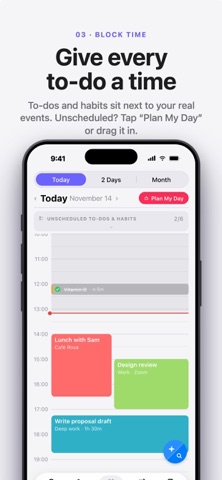
Most apps keep to-dos and events apart. You end up with a long list and no idea when any of it actually happens. ToBlock gives every task a time, a duration, and a fixed place in your day. No AI rebuilding your calendar overnight: you drag the blocks where they belong, and that's where they stay.
ONE TIMELINE FOR EVERYTHING Every task with a time and duration appears alongside your Apple Calendar events. Overdue items carry forward. Drag to reschedule. Tap to adjust.
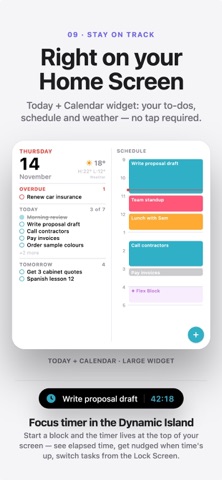
YOUR DAY, WITHOUT OPENING AN APP Put ToBlock on your Home Screen and see today's tasks, tomorrow's plan, and your timeline at a glance. Choose from to-do, calendar, dashboard, and progress-ring widgets.
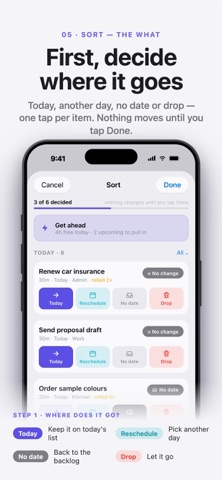
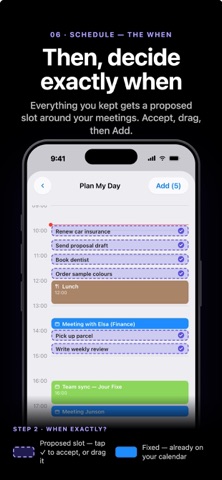
PLAN TOMORROW IN TWO MINUTES Open Plan Tomorrow and your overdue and unscheduled tasks are already waiting. Drop the ones that matter into open slots and wake up with the day decided.
NEVER DOUBLE-BOOK YOURSELF Drag a task onto a busy slot and ToBlock warns you, then moves it to your next free window with one tap.
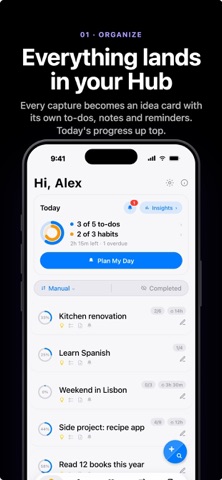
ORGANIZE THE WAY YOU THINK Tasks inside projects. Sub-tasks inside tasks. Notes on anything worth keeping. Build the structure that fits your head, then collapse it to focus. Save any hierarchy as a reusable template.
CAPTURE NOW, SORT LATER Get an idea, task, or note out of your head before you decide what it is. Share it from Safari or any other app, or just ask Siri. It all lands in one Inbox, ready for when you want to sort.
FOLLOW UP WITHOUT REMEMBERING TO Mark a task as Waiting and give it a follow-up date. It comes back on its own, at the right time.
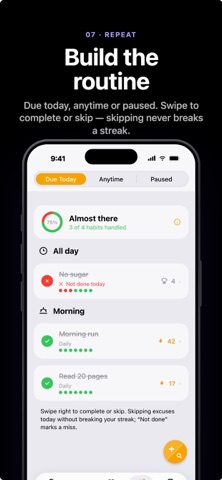
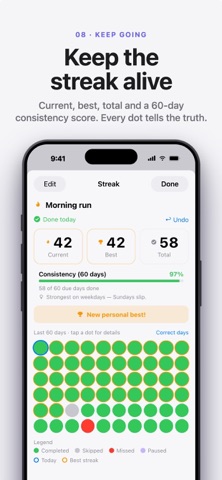
HABITS THAT ACTUALLY STICK Turn any recurring task into a tracked habit with streaks on a visual grid and a nudge when you beat your record. Rotation mode cycles through routines — ideal for workouts, meal plans, and study schedules.
TIME ANY TASK WITHOUT WATCHING THE CLOCK Start a timer on any task and let Live Activity and Dynamic Island keep it in view. End the day with a summary of where your hours actually went.
ALSO INSIDE Siri Shortcuts and Action Button · share from any app · reminders by time or location · Stealth mode for a quieter, distraction-free look · iCloud sync across your Apple devices · no ads, no tracking, ever.
TOBLOCK PRO Start with a 14-day free trial — full access, no commitment. After that, ToBlock Pro is $0.99/month or $9.99/year. Subscriptions renew automatically unless canceled at least 24 hours before the current period ends. Manage or cancel anytime in Settings > Apple ID > Subscriptions.
Privacy Policy: https://www.toblock.app/privacy Terms of Use: https://www.apple.com/legal/internet-services/itunes/dev/stdeula/
Each subscription will automatically renew 3 days before the expiration date for
the same time period. Subscriptions can be cancelled at any time before the renewal.